LibreELEC is the best Linux distro for HTPC; Ubuntu LTS + Kodi is next.
You want a living room PC that feels like a streamer. It should boot fast, play 4K HDR without stutter, and work with your TV’s remote. You also want it quiet, simple, and rock solid. That’s where the best linux distro for htpc makes all the difference. Pick the right base and the rest feels easy. Choose poorly and you chase bugs for weeks. I’ve tested boxes in real homes with real families. This guide is my straight, no-fluff answer to what works in 2026.
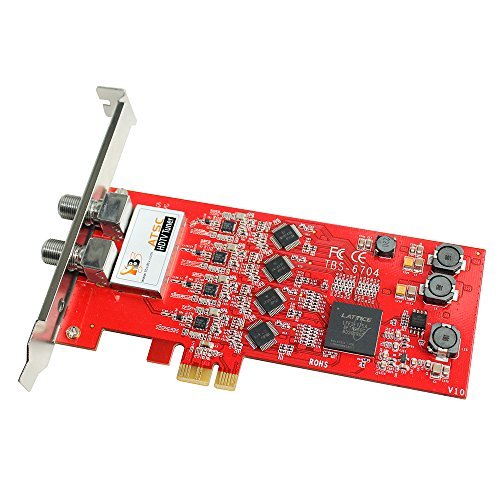
TBS6704 ATSC/QAM Quad Tuner PCIe TV Card
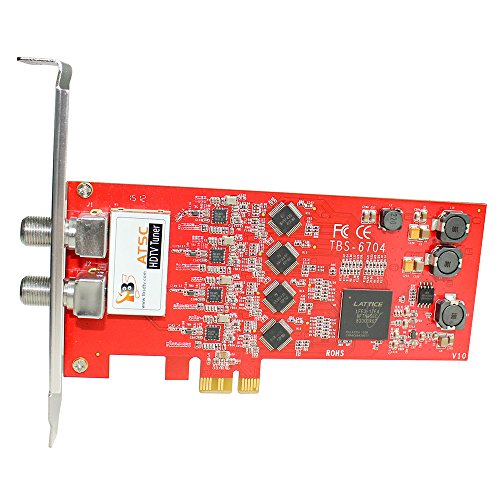
The TBS6704 is a workhorse for home DVR fans. It brings four ATSC/Clear QAM tuners to a single PCIe slot. That means you can record four channels at once. It pairs well with TVHeadend, MythTV, or NextPVR on Linux. If you want live TV inside Kodi, this card makes it happen.
Linux support is strong, with drivers and a proven track record. I like it for whole-home streaming as well. You can run it as a headless backend and send TV to many clients. It fits well in a quiet HTPC build and stays stable under load.
Pros:
- Four tuners let you record and watch many channels at once
- Good Linux support through widely used driver stacks
- Works with TVHeadend, MythTV, and Kodi PVR add-ons
- Reliable signal lock with Clear QAM in supported regions
- Ideal for whole-home DVR and network streaming
Cons:
- Requires an open PCIe slot and desktop form factor
- Setup can be tricky for first-time DVR users
- Not for satellite or DVB-T/T2 markets
My Recommendation
If you plan to add live TV to your HTPC, this card is a smart pick. Pair it with the best linux distro for htpc for your use case. I suggest Ubuntu LTS with TVHeadend for a smooth backend. Then use Kodi clients on LibreELEC devices around the house. This setup feels simple yet powerful.
| Best for | Why |
|---|---|
| Whole-home DVR | Four tuners feed many rooms at once |
| Kodi PVR builds | Easy link with TVHeadend and Kodi PVR add-ons |
| Quiet HTPC towers | Stable, cool, and friendly to Linux drivers |
What makes a Linux distro great for HTPC
- It boots fast and sleeps well. Resume is quick and clean.
- It handles 4K HDR and bitstream audio without hacks.
- Remote control works with CEC, FLIRC, or a media keyboard.
- Updates are safe and do not break your movie night.
- Apps are easy to install. Kodi, Plex, Jellyfin, and Steam must be simple.
I test with a TV and a couch. I turn off the mouse. I use a remote. I try different GPUs and AVRs. I check HDR and audio passthrough. I also watch for fan noise and heat. That is how I pick the best linux distro for htpc.
My top distro picks by scenario in 2026
- Pure media box with zero fuss: LibreELEC
- Flexible desktop HTPC with apps and games: Ubuntu LTS + Kodi
- ARM media boxes (Amlogic SoCs): CoreELEC
- Raspberry Pi living room use: LibreELEC or OSMC
- Gaming-first living room PC with Steam and Kodi: ChimeraOS
- Power user who wants cutting edge graphics: Fedora Workstation + Kodi Flatpak
- Long-haul appliance box for a DVR backend: Debian Stable or Ubuntu Server LTS
Why LibreELEC is best for most living rooms
LibreELEC boots into Kodi. That is its one job. It nails it. It supports Intel and AMD iGPUs well. It now handles HDR on most modern hardware when the chain is right. Audio passthrough is simple to toggle. CEC often works out of the box on common TVs. Updates are simple and safe.
If you want to hand a remote to your family, this is it. You do not need a desktop. You do not need to tweak many services. This is why I call it the best linux distro for htpc for most people. If you want Netflix and Prime, use add-ons or run the apps via Kodi plugins or a streaming stick sidecar.
Ubuntu LTS + Kodi for a flexible HTPC
I like Ubuntu LTS for long-term builds. It is predictable. Drivers for Intel and AMD are mature. You can install Kodi from the PPA or Flatpak. Steam, Jellyfin, Plex, and browsers are easy. You can also add a DVR backend like TVHeadend. Suspend and resume are stable on most motherboards.
This is a great pick when you want one box to do it all. You can game. You can stream. You can archive ripped discs. You can attach the TBS6704 and record live TV. For the best linux distro for htpc that doubles as a desktop, Ubuntu LTS with Kodi is my go-to choice.
CoreELEC for Amlogic set-top boxes
Many cheap media boxes run on Amlogic chips. CoreELEC is built for them. It brings a Kodi-first experience to those devices. It has strong hardware decoding. It works great with infrared remotes. It can feel like a plug-and-play streamer.
If you have a supported Amlogic box, try CoreELEC. It is light and fast. It is not a full desktop. But for a couch device, that is fine. For that hardware class, it is often the best linux distro for htpc.
OSMC for Raspberry Pi and simple setups
OSMC offers a clean Kodi experience on the Raspberry Pi. It is easy to set up. It has a nice skin and config panel. It covers the basics well. For many living rooms, that is perfect.
LibreELEC on the Pi is also great. If you want a bit more Debian under the hood, OSMC is a sweet fit. For Pi owners, one of these will be the best linux distro for htpc.
ChimeraOS for living room gaming + media
ChimeraOS focuses on Steam Big Picture. It boots to a couch UI. It adds gamepad-first flows. You can install Kodi as well. That makes it a strong pick for a game and movie box.
It is based on Arch ideas, but the user experience feels simple. Updates come often. If you use a controller more than a keyboard, consider it. For gamers, this may be the best linux distro for htpc.
Fedora Workstation for cutting-edge graphics
Fedora ships new kernels and Mesa builds fast. That helps with HDR and Wayland. Kodi via Flatpak runs well. PipeWire handles audio routing. If you like new features, Fedora treats you well.
This is a power user pick. You get new bits early. You also accept change. If that tradeoff is fine, Fedora can be the best linux distro for htpc for you. It is slick on modern AMD and Intel iGPUs.
Debian Stable or Ubuntu Server for a DVR backend
For a home DVR, I want boring. I want uptime. I want clean updates. Debian Stable or Ubuntu Server LTS are top choices. Install TVHeadend. Add the TBS6704 if you need four ATSC tuners. Share streams to Kodi clients.
You can keep this box headless in a closet. It sips power and runs for months. For the backend, this is the best linux distro for htpc style servers.
Hardware choices that matter in 2026
- GPU: AMD and Intel iGPUs have the least drama. AMD RDNA2/3 and recent Intel iGPUs do great with VA-API. NVIDIA can work, but drivers and HDR paths are still more complex.
- CPU: Modern low-power CPUs handle HEVC, VP9, and AV1 through hardware decode. You do not need a big chip. Focus on iGPU support instead.
- Storage: A small SSD is perfect for the OS. Add a big HDD or NAS for media.
- Network: Use Ethernet for 4K HDR. Wi‑Fi can work, yet it adds jitter.
- Remote: FLIRC USB is a lifesaver for custom remotes. HDMI‑CEC is nice when it works. Many mini-keyboards also get the job done.
HDR and audio passthrough, the honest take
HDR on Linux has improved a lot. On AMD and Intel, it is now viable with the right stack. Kodi supports it in standard paths. You still need a TV and AVR chain that is clean. Set output to 10-bit where supported. Use the latest firmware on your TV and AVR.
Audio passthrough is stable for Dolby TrueHD and DTS-HD on most GPUs. Enable passthrough in Kodi. Choose your formats. Test with a known good file. If you get silence, check EDID and cable quality. Good HDMI 2.0/2.1 cables are worth it. Restart the AVR after first setup.
Wayland vs X11 for HTPC use
Kodi runs well on GBM and Wayland now. Many distros default to Wayland. That is fine for most. Some apps still prefer X11. If you see tearing or input lag, try GBM/Wayland builds of Kodi. Or test X11 as a fallback. Fedora leads on Wayland polish. Ubuntu is solid on both.
CEC, IR, and remote control tips
- HDMI‑CEC: Enable it in your TV menu. Each brand has a different name. Try a direct run to the TV, then ARC/eARC to the AVR.
- FLIRC: Trains any IR remote to act like a keyboard. It is magic for custom setups.
- Built‑in IR: Some cases and boards include IR. Map keys with ir-keytable if needed.
- Gamepads: ChimeraOS and Steam handle controllers well. Kodi also maps gamepads nicely.
Kodi vs Plex vs Jellyfin
- Kodi: Best local playback and add‑ons. Great for offline libraries.
- Plex: Shared libraries and remote users. Great apps on many devices.
- Jellyfin: Open source Plex alternative. It is simple and free.
I often run TVHeadend for live TV. Then I add a Kodi client on the main box. I use Plex for sharing with family on the road. On the same box, that is easy with Ubuntu LTS. On dedicated devices, LibreELEC plus a NAS is simpler.
How I set up each pick fast
LibreELEC
- Flash the image to a USB drive.
- Install to SSD or run live.
- Add media sources and configure passthrough.
- Add PVR client if you use TVHeadend.
Ubuntu LTS + Kodi
- Install Ubuntu LTS (choose minimal).
- Install Kodi via Flatpak or PPA.
- Add VA-API packages if missing.
- Create an autologin media user.
- Set Kodi to auto-start.
Fedora + Kodi
- Install Fedora Workstation.
- Use Flatpak to install Kodi from Flathub.
- Keep the system updated for new Mesa features.
- Tune power settings and suspend.
CoreELEC/OSMC
- Flash the image for your device.
- Boot and run the first-time wizard.
- Add your shares and test remote keys.
- Tune refresh rate and audio.
ChimeraOS
- Install to the HTPC.
- Pair your controller.
- Add Kodi as a non-Steam app if needed.
- Tweak resolution and HDR.
Using a tuner card with Linux (TBS6704 example)
- Install the card in a spare PCIe slot.
- Boot into Ubuntu Server or Debian Stable.
- Add drivers per vendor guidance.
- Install TVHeadend.
- Scan channels for ATSC or Clear QAM.
- Add the TVHeadend PVR plugin to Kodi clients.
Once set, you can pause live TV. You can record many shows at once. The TBS6704 keeps up well. It matches the goal of a living room DVR. This rounds out your best linux distro for htpc build with live channels.
Quiet builds that stay cool
Use a quality low‑profile cooler. Pick a case with 120 mm fans. Set fan curves in BIOS. Use SSDs to cut noise. If you need big storage, put HDDs in a NAS. Stream over Ethernet. Your living room will thank you.
Networking for big 4K files
Wired is best. Aim for Gigabit Ethernet. If you must use Wi‑Fi, use Wi‑Fi 6 or better. Keep the router near the HTPC. Avoid congested channels. Test with a high-bitrate file. If it buffers, drop the bitrate or move to Ethernet.
Storage layout that feels easy
- OS on a small SSD, 64–256 GB is fine.
- Media on a NAS or a big local drive.
- Use BTRFS or ZFS if you want snapshots.
- Timeshift is handy on Ubuntu or Mint.
- Back up Kodi config before big upgrades.
Troubleshooting common HTPC hiccups
- No HDR: Check TV HDMI mode. Try another port. Update GPU drivers. Ensure 10‑bit path.
- Stutter on 4K: Enable hardware decode in Kodi. Check VA-API. Use wired Ethernet.
- No audio: Toggle passthrough formats. Check AVR input mode. Try another HDMI cable.
- CEC not working: Power cycle TV and AVR. Test without the AVR inline. Try a USB‑CEC adapter.
- Tearing: Switch to GBM/Wayland build of Kodi. Turn off compositor effects. Lock refresh rate to match content.
Security without stress
Keep your box offline if it is a pure player. If it is on the network, enable automatic updates on your distro. LibreELEC updates are quick. Ubuntu LTS can apply security updates automatically. Use a non‑admin user for daily use. A little care keeps your library safe.
Energy saving that does not wake the house
Enable suspend after a few minutes of idle. Use Wake‑on‑LAN if you stream to this box. Some boards wake on USB input for remotes. Test wake from sleep with the TV remote power button. Small wins like this make a big difference.
What I use at home
In my main room, I run LibreELEC on a small AMD iGPU box. It drives a 77‑inch OLED and a modern AVR. HDR and passthrough are smooth. The box is silent. In an office, I use Ubuntu LTS with Kodi and Steam. I test add‑ons there. For live TV, I run a small Ubuntu Server with TVHeadend and the TBS6704. It sits in a closet and just works.
Why I repeat the same advice
People want something that works every night. They want to press play and relax. That is why I call LibreELEC the best linux distro for htpc for most living rooms. That is why I suggest Ubuntu LTS for mixed use. This advice cuts through noise. It saves your time and money.
Future‑proofing in 2026
AV1 decode is now common in iGPUs. Pick a chip that supports it. HDR support keeps improving in Linux stacks. Wayland keeps getting better. Kodi keeps refining tone mapping and passthrough. With the right distro, you ride these gains with less pain.
Little extras that improve the couch life
- A backlit mini keyboard is handy for quick fixes.
- A USB hub helps in tight media cabinets.
- Label your HDMI cables to avoid TV input confusion.
- Use profiles in Kodi for kids and guests.
- Back up your Kodi userdata folder yearly.
Comparing the big three HTPC flows
- One‑box desktop: Ubuntu LTS + Kodi + Steam. Lots of flexibility. Great for tinkerers.
- Appliance box: LibreELEC. Simple. Stable. Family‑friendly.
- ARM set-top: CoreELEC or OSMC. Best on small devices. Low power.
Which is the best linux distro for htpc for you
- Want no-fuss Kodi? LibreELEC.
- Want desktop apps and games? Ubuntu LTS.
- Using a Pi or Amlogic box? OSMC or CoreELEC.
- Want bleeding edge graphics? Fedora.
- Need a DVR backend server? Debian or Ubuntu Server.
If you follow that map, you will be happy. You will spend more time watching than fixing. That is the whole point.
Setting up HDR and refresh rate switching
Enable “Adjust display refresh rate” in Kodi. This makes 24p content play at 24 Hz. It kills judder. Make sure your TV supports it. For HDR, enable the option in Kodi if available. Use a known HDR sample to test. If colors look washed, check the TV tone mapping settings. Sometimes “PC Mode” on a TV disables needed features. Try “Game” or a standard cinema mode.
Bitstream audio made easy
In Kodi audio settings, select your HDMI device. Turn on passthrough. Check formats your AVR supports. Test with known Dolby TrueHD and DTS‑HD files. If you get echo or no sound, you may be double‑decoding. Turn off TV sound processing. Ensure the AVR is set to direct mode.
Live TV experience with TVHeadend
Set up networks and muxes. Run a full scan. Map services to channels. Add EPG grabbers. In Kodi, enable the TVHeadend PVR plugin. Channels, guide, and recordings will appear. You can pause, rewind, and schedule. The TBS6704 gives you four lanes. That is enough for a busy household.
Noise and heat checklist
- Undervolt if your board allows it.
- Use large, slow fans with rubber mounts.
- Place the box where it can breathe.
- Avoid cramped TV cabinets with no vents.
- Check dust filters every few months.
Backup and rollback
Export your Kodi library and artwork. Back up userdata. On Ubuntu, use Timeshift for system snapshots. On Fedora, consider BTRFS snapshots. If an update breaks something, roll back and try again later. This keeps the best linux distro for htpc feeling stable.
Why I do not push one distro for everyone
Homes differ. TVs differ. Some users love add‑ons. Some just press play. A good advisor matches the distro to the person. That is what I did here. If you want me to pick one, I still say LibreELEC for the living room. If you love to tinker or game, choose Ubuntu LTS.
FAQs Of best linux distro for htpc
Is LibreELEC better than Ubuntu for HTPC?
Yes, for pure Kodi use. LibreELEC is faster to set up. It boots to Kodi and stays stable. Ubuntu is better for a mixed desktop and media box.
Do I need a powerful CPU for 4K HDR?
No. Use a modern iGPU with hardware decode. AMD and Intel iGPUs handle 4K HDR well. The GPU path matters more than CPU cores.
Can I use NVIDIA for a Linux HTPC?
Yes, but expect more tuning. AMD and Intel are simpler for HDR and passthrough. If you use NVIDIA, keep drivers current and test both Wayland and X11.
What is best for Raspberry Pi HTPC?
Use LibreELEC or OSMC. Both are simple and stable. They fit the Pi well and work with common remotes.
How do I add live TV to Kodi?
Use a backend like TVHeadend. Add a tuner card like the TBS6704. Then enable the TVHeadend PVR add‑on in Kodi. Scan channels and map EPG.
Final Verdict: Which Should You Buy?
If you want the easiest path, pick LibreELEC. It is the best linux distro for htpc in most living rooms, with fast setup and smooth playback.
If you need desktop apps, games, or DVR work, use Ubuntu LTS + Kodi. Add TVHeadend and a tuner like the TBS6704 for a full home solution.