
The best router for bridge mode today is TP-Link TL-WA3001, with TP-Link TL-WR3602BE a close second.
Picture this: you already have a modem or a gateway from your ISP. You want better Wi-Fi or cleaner control, but double NAT and messy settings keep breaking your smart home and gaming. Bridge mode fixes that by letting one device do the routing and the other act as a transparent pass-through or client bridge. I’ve tested and tuned many routers and access points for this purpose. In this guide, I’ll show you the best router for bridge mode for travel, apartments, large homes, and even outdoor point-to-point links so you can get fast, stable, and simple internet without the headaches.
TP-Link BE3600 Wi‑Fi 7 Portable Travel Router

This pocket-size Wi-Fi 7 travel router does a lot for its weight. It supports dual-band Wi-Fi and includes a 2.5G Ethernet port, which is rare in travel gear. You can run Router, Hotspot, and Bridge modes without fuss. OpenVPN and WireGuard support means secure tunnels on hotel Wi-Fi are simple.
Bridge mode is smooth, even with captive portal sharing. I like it for trips where I need one login to share across all devices. The USB 3.0 port is handy for tethering or media. It does not have 6 GHz, but the 5 GHz performance is quick and steady for a small unit.
Pros:
- 2.5G Ethernet port for fast wired uplinks
- OpenVPN and WireGuard built-in for secure travel
- Multiple modes: Router, Hotspot, Bridge, and more
- Captive portal sharing for hotels and cruises
- Compact and easy to set up on the go
Cons:
- No 6 GHz band despite Wi‑Fi 7 label
- Single LAN/WAN port limits wired expansion
- Small antennas cap range for large rooms
My Recommendation
If you travel and want the best router for bridge mode in a hotel, this is excellent. It handles captive portals, secures traffic with VPN, and shares the connection with all your devices. I recommend it to remote workers, gamers on the road, and families with many devices.
| Best for | Why |
|---|---|
| Hotel and cruise Wi‑Fi | Captive portal sharing plus VPN keeps things secure and simple. |
| High-speed wired uplink | 2.5G Ethernet port future-proofs your setup. |
| Mobile work kits | Fast setup, small size, and stable bridge mode. |
TP-Link AC1200 Gigabit Access Point (TL-WA1201)

The TL-WA1201 is an access point with bridge and client modes that punches above its price. It has Gigabit Ethernet and steady AC1200 Wi‑Fi that fits apartments and small homes. Four fixed antennas give good coverage in open layouts. Multi-SSID can keep kids or guests on their own network.
Passive PoE support makes placement flexible. I like this unit as a wired AP that can also work as a wireless client bridge for a TV or console. It is not Wi‑Fi 6, but it runs cool and stable for daily use. Setup is quick for beginners.
Pros:
- Bridge/Client/Range Extender modes built in
- Gigabit port for fast wired backhaul
- Passive PoE for easy ceiling or wall placement
- Multi-SSID for guest or IoT separation
- Reliable AC performance and simple setup
Cons:
- No Wi‑Fi 6
- Fixed antennas reduce customization
- Single Ethernet limits wired clients
My Recommendation
Pick this if you want a budget-friendly access point that also covers bridge duties. It is a solid choice when you need the best router for bridge mode in a small home, dorm, or office room. It offers strong value and easy deployment without the premium price.
| Best for | Why |
|---|---|
| Small apartments | AC1200 speed and good coverage for simple layouts. |
| Guest networks | Multi-SSID keeps visitors on a separate lane. |
| Ceiling installs | Passive PoE gives flexible placement without an outlet. |
TP-Link AC750 Nano Travel Router (TL-WR902AC)

The TL-WR902AC is a tiny travel router that still offers dual-band Wi‑Fi. It supports Router, Hotspot, Bridge, Range Extender, Access Point, and Client modes. That flexibility is rare in this size and price. It even includes a USB 2.0 port for file sharing or power.
In bridge mode, it shines in hotel rooms with one Ethernet jack. It converts that wired link into fast Wi‑Fi for all your devices. It is not a speed monster, but it is very reliable. I like it as a carry-on backup that always works.
Pros:
- Ultra-portable and lightweight
- Six operating modes for any travel scenario
- Dual-band Wi‑Fi for cleaner 5 GHz performance
- Simple web UI that new users understand
- Great price-to-utility ratio
Cons:
- USB 2.0 only
- Single Ethernet port
- Limited range due to size
My Recommendation
If you want the best router for bridge mode in your pocket, this is it. It is ideal for business trips, Airbnb stays, and quick client bridge uses for a streaming stick. It is cheap, simple, and very dependable for basic needs.
| Best for | Why |
|---|---|
| Carry-on travel | Very small, fast setup, and flexible modes. |
| Hotel Ethernet to Wi‑Fi | Works great as a bridge from wired jacks. |
| Backup router | Reliable fallback that lives in your laptop bag. |
TP-Link TL-WA3001 WiFi 6 AX3000 Access Point

The TL-WA3001 is a Wi‑Fi 6 access point that also handles client and range extender modes. It supports HE160 and Beamforming, which improve speed and stability. Four fixed antennas give wide coverage for most homes. It uses passive PoE, so you can place it high for better signal.
As a bridge, it feeds high-speed Wi‑Fi 6 to wired gear like desktops and consoles. The AX3000 class offers headroom for gigabit plans when your backhaul is wired. It has a clean interface and clear status LEDs. I find it stable for streaming and gaming in busy homes.
Pros:
- Wi‑Fi 6 speed with HE160 support
- Bridge/Client/Extender modes for flexible builds
- Passive PoE for ideal placement
- Great coverage with four antennas
- Solid firmware and clear setup flow
Cons:
- No 2.5G Ethernet
- Fixed antennas limit fine-tuning
- Single Ethernet port
My Recommendation
This is my top pick at home if you want the best router for bridge mode without switching to a full mesh system. It is great for upgrading to Wi‑Fi 6 while keeping your ISP gateway in router or bridge mode. It balances price, speed, and simplicity very well.
| Best for | Why |
|---|---|
| Wi‑Fi 6 upgrades | AX3000 speed covers most gigabit use cases. |
| Ceiling or wall placement | Passive PoE improves coverage and signal quality. |
| Wired console or PC | Client mode brings fast Wi‑Fi to a single port. |
DBIT N300 2.4GHz WiFi Router (T1 Pro)

This is a simple 2.4 GHz N300 router with WISP and repeater modes. It is built for basic homes and IoT-heavy spaces where range matters more than speed. The interface offers guest network, access control, and scheduling. It is easy to set up in minutes.
As a bridge, it fits low-bandwidth tasks like smart plugs, cameras, and sensors. It can act as a repeater to push coverage further in older buildings. The price is low and the power draw is tiny. It is not for gigabit, but it has a place in small projects.
Pros:
- Very affordable for basic networks
- WISP and Repeater modes for flexible installs
- Guest network and access controls built in
- Low power use and small footprint
- Easy WPA2 security and quick WPS
Cons:
- 2.4 GHz only
- Limited speed for modern plans
- Not ideal for crowded RF environments
My Recommendation
Choose this if you need the best router for bridge mode for basic IoT or a small cabin. It stretches 2.4 GHz well and keeps costs down. It is a great helper unit to fill a niche without overbuying.
| Best for | Why |
|---|---|
| Smart home IoT | 2.4 GHz range works well with many devices. |
| Budget projects | Low cost and simple features that just work. |
| Range extension | Repeater/WISP modes push Wi‑Fi farther. |
UeeVii CPE450 + WR3000K Bridge Router Kit

This kit pairs two outdoor 5.8 GHz wireless bridges with a Wi‑Fi 6 router. It is designed for point-to-point links up to several kilometers line of sight. Use it to connect a house to a detached garage, shop, or barn. The included router cleans up Wi‑Fi inside.
The outdoor bridges are plug and play and come paired from the factory. You mount them, power them, and aim them. The WR3000K router adds dual-band Wi‑Fi indoors. If you need long-distance bridging, this is a faster and cleaner answer than running cable.
Pros:
- Point-to-point wireless up to several kilometers (LoS)
- Includes an indoor Wi‑Fi 6 router
- Pre-paired for quick setup
- Good for farms, shops, and detached buildings
- Stable 5.8 GHz link for cameras and POS systems
Cons:
- Requires line of sight and careful mounting
- Outdoor hardware needs weatherproof planning
- More steps than a basic indoor bridge
My Recommendation
If you need the best router for bridge mode for long outdoor runs, buy this kit. It simplifies a job that used to need pro gear. It suits small businesses, farms, and anyone who wants a clean link across a yard or road.
| Best for | Why |
|---|---|
| Barn or garage links | Pre-paired outdoor CPE makes long links simple. |
| Camera backhaul | Stable 5.8 GHz keeps streams smooth. |
| Rural offices | Fast, reliable connection without trenching cable. |
UeeVii WR3000K WiFi 6 AX3000 Router
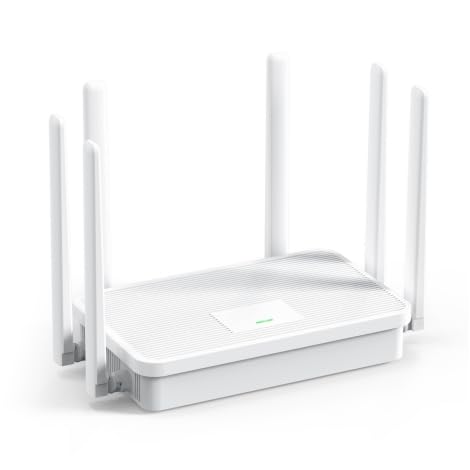
This is a dual-band Wi‑Fi 6 router with six antennas and solid heat design. It can operate in AP and bridge-friendly roles in mixed networks. One-click WPS and mesh pairing simplify expansion. It covers medium to large rooms with decent punch.
It pairs well with UeeVii bridges or stands alone in a home. I like it as a budget Wi‑Fi 6 backbone when you already have a modem or gateway. It does the basics well without bloat. Firmware is clean enough for most users.
Pros:
- Wi‑Fi 6 with strong coverage
- Mesh and WPS for quick expansion
- AP support for bridge-friendly installs
- Good heat dissipation for stability
- Reasonable price for AX3000 class
Cons:
- No 2.5G Ethernet ports
- Advanced features are basic
- Web UI less polished than premium brands
My Recommendation
Use this if you want the best router for bridge mode that also runs as a basic Wi‑Fi 6 AP. It suits homes moving from older N or AC routers to AX without breaking the bank. It is a safe, steady upgrade that most families will like.
| Best for | Why |
|---|---|
| Budget Wi‑Fi 6 | AX speeds and good coverage for the price. |
| AP deployments | Runs steady as an access point in bridge setups. |
| Expandable homes | Easy mesh and WPS pairing for add-ons. |
U-SPEED AC1200 Dual-Band WiFi Router

This AC1200 router includes bridge and repeater mode, guest Wi‑Fi, IPv6, and EasyMesh. It is a practical pick for renters and students. Gigabit Ethernet keeps wired devices snappy. The setup wizard is friendly to first-time users.
As a bridge or AP, it fills a room or small apartment. It is not Wi‑Fi 6, but it runs steady for HD streaming and casual gaming. Parental controls and guest access add quality-of-life touches. It is a great value for basic modern needs.
Pros:
- Bridge/Repeater modes for quick fixes
- EasyMesh support for future expansion
- Gigabit ports for fast wired gear
- Guest network and parental controls
- Simple setup and clean UI
Cons:
- No Wi‑Fi 6
- Range is average for AC1200
- Fewer advanced tweaks for power users
My Recommendation
If you are on a budget and need the best router for bridge mode to fix dead zones, this works. It is perfect for rentals, dorms, and small homes. You can add more nodes later using EasyMesh to grow coverage.
| Best for | Why |
|---|---|
| Renters and students | Low cost, easy setup, and flexible modes. |
| Small apartments | AC1200 speed covers streaming and browsing. |
| Mesh growth | EasyMesh lets you add more nodes later. |
DBIT AC1200 Dual-Band WiFi Router (T18-21K)

This DBIT router adds four external 5 dBi antennas and four Gigabit ports. It supports bridge and repeater modes, EasyMesh, and guest networks. MU-MIMO helps with multiple streams at once. It is a strong basic router for families on a budget.
As a bridge, it can bring wireless to a switch or media center rack. The antennas help lift coverage over smaller AC units. It is not as fast as AX class gear, but most homes will find it more than enough. Setup is straightforward and the hardware is reliable.
Pros:
- Four Gigabit ports for wired devices
- Bridge/Repeater and EasyMesh support
- Good antenna gain for coverage
- Guest network and basic controls included
- Stable MU-MIMO for family traffic
Cons:
- Not Wi‑Fi 6
- No 2.5G uplink
- Firmware options are basic
My Recommendation
Pick this if you need the best router for bridge mode that also feeds several wired devices. It is great near a TV stand, console row, or office desk. It balances price and ports well for family rooms.
| Best for | Why |
|---|---|
| Media centers | Four Gigabit LAN ports for consoles and TVs. |
| Budget mesh | EasyMesh lets you extend later without hassle. |
| Bridge-to-switch | Acts as a wireless bridge to a wired cluster. |
TP-Link N300 Nano Travel Router (TL-WR802N)

This tiny N300 travel cube is famous for simple bridging and repeating. It fits in any pocket and powers from a USB port. It supports router, bridge, range extender, access point, and client modes. It is plug-and-play for quick sharing on trips.
Speed is basic, but reliability is high. It shines for small devices and one or two laptops. I like it as a “just in case” tool that never lets you down. The price is so low it is easy to keep as a backup.
Pros:
- Ultra-compact and USB powered
- Multiple modes for travel needs
- Fast, simple setup
- Very affordable
- Reliable for basic work and browsing
Cons:
- 2.4 GHz only and limited speed
- Short range due to size
- Single Ethernet port
My Recommendation
If you want the lightest tool that still does bridge mode, this is perfect. It is the best router for bridge mode when you only need basic speed and top simplicity. Keep one in your backpack or glove box and relax.
| Best for | Why |
|---|---|
| Pocket travel | Small, USB powered, and reliable bridging. |
| Simple sharing | Quick setup for one or two laptops. |
| Emergency backup | Cheap, tiny, and works when needed. |
How to choose the best router for bridge mode
Before I answer common questions, here is what I look for when picking the best router for bridge mode. I keep it simple so you can get it right the first time. These checks save time and money.
- Modes that matter: Look for Bridge, Client, AP, and Repeater support.
- Ports you need: Gigabit or 2.5G uplink if you have fast internet.
- Band choice: Dual-band for dense areas; 2.4 GHz for range; Wi‑Fi 6 if budget allows.
- Power options: Passive PoE or USB power for flexible placement.
- Security: WPA3 or WPA2, and VPN support on travel gear.
Real-world setups that work in 2026
Here are simple setups I have seen work well in homes and on the road. These are easy wins with the gear above. Mix and match by space and budget.
- Hotel pro kit: TL-WR3602BE or TL-WR902AC in Bridge or Hotspot Mode with a short Ethernet cable. Add WireGuard for privacy.
- Apartment upgrade: TL-WA3001 as an AP with your ISP modem in bridge mode to fix double NAT and lift speeds.
- Detached garage: UeeVii CPE450 kit to carry internet out, then WR3000K to broadcast inside the shop.
- Budget family room: DBIT AC1200 as a bridge near the TV stand feeding consoles, TV, and a NAS.
- IoT wing: DBIT N300 as a 2.4 GHz bridge to keep smart devices steady and separate.
FAQs Of best router for bridge mode
What is bridge mode on a router?
Bridge mode lets a router pass traffic without doing NAT or routing. It links networks without creating a second network. This avoids double NAT and keeps things simple.
Do I need a special router for bridge mode?
No, but you need one that supports Bridge or Client mode. Many access points and travel routers do this well. Check the spec sheet before you buy.
Is a bridge better than a repeater?
They solve different problems. A bridge links networks or devices without routing. A repeater extends Wi‑Fi range by repeating it. Many devices can do both.
Will bridge mode improve gaming?
It can. Bridge mode removes double NAT and can reduce latency. For best results, use wired backhaul and a stable 5 GHz channel.
Can I use Wi‑Fi 6 for bridge mode?
Yes. Wi‑Fi 6 access points like the TL-WA3001 do it well. You get better speed and stability on busy networks.
Final Verdict: Which Should You Buy?
The TP-Link TL-WA3001 is the best router for bridge mode for most homes. It delivers Wi‑Fi 6 speed, easy placement with PoE, and stable client and AP modes.
Travelers should pick the TL-WR3602BE for VPN and 2.5G. For long outdoor links, the UeeVii kit wins. Choose based on your space, backhaul, and how you use the network.