Overclocking on AM5 looks different from the old days of raising multipliers. Most enthusiasts now tune Ryzen 7000 and 9000 chips with Precision Boost Overdrive (PBO), Curve Optimizer and memory tuning (EXPO and manual DDR5 timings). The motherboard matters because it supplies clean, stable power, keeps VRMs cool under sustained loads and offers a BIOS that makes tuning easy.
Every AM5 chipset except A620 supports CPU overclocking, but X870E and X870 boards generally have stronger power delivery, better memory trace layouts and more tuning options. We picked boards enthusiasts are buying now; every model below had “bought in past month” sales on Amazon in November 2026 and 4.3 stars or higher.
Quick answer: The ASUS ROG Crosshair X870E Hero is the best AM5 motherboard for overclocking: flagship power delivery, excellent memory overclocking and one of the most complete BIOS tuning menus. The ASUS ROG Strix X870E-E is the best high-end value, and the MSI MAG B850 Tomahawk MAX WiFi is the best budget board for PBO and Curve Optimizer tuning.
Our Top 3 Picks for best am5 motherboard for overclocking
🔥 Black Friday Deals Live
ASUS ROG Crosshair X870E Hero
Flagship VRM, strong DDR5 overclocking and deep BIOS tuning.
- ✓ Flagship VRM
- ✓ Excellent BIOS and diagnostics
- ✓ Strong memory OC

ASUS ROG Strix X870E-E Gaming WiFi
18+2+2 power stages and great BIOS for less than the Hero.
- ✓ Strong VRM
- ✓ Excellent BIOS
- ✓ Feature-rich

MSI MAG B850 Tomahawk MAX WiFi
Best-selling B850 with a solid VRM for PBO; 1,000+ bought last month.
- ✓ Excellent value
- ✓ Strong VRM for B850
- ✓ Very popular
As an Amazon Associate, we earn from qualifying purchases. Prices and deals change often, so check Amazon for the latest price.
How we picked these products
- Checked Amazon US in November 2026 and kept only products with strong “bought in past month” sales.
- Compared ratings and review counts, and dropped listings with too little feedback.
- Matched every product to the exact need in this guide, not just the category.
- Read the top-ranking guides for this topic and added the details they miss or get wrong.
We do not hands-on test every product. Our picks are based on specs, sales, verified buyer feedback and manufacturer information. Last updated: November 2026.
Quick Comparison
| Product | Best for | Key specs | Price |
|---|---|---|---|
| ASUS ROG Crosshair X870E Hero | Best overall AM5 board for overclocking | X870E · flagship power stages · 4 DDR5 slots · extensive BIOS tuning · onboard OC buttons and debug display | Check price |
| ASUS ROG Crosshair X870E Dark Hero | Best premium flagship | X870E · upgraded power delivery · premium cooling · DDR5 tuning features | Check price |
| ASUS ROG Strix X870E-E Gaming WiFi | Best high-end value | X870E · 18+2+2 power stages · 4 DDR5 · Wi-Fi 7 · USB4 | Check price |
| MSI MPG X870E Carbon WiFi | Best MSI enthusiast board | X870E · robust VRM · Click BIOS · memory OC features | Check price |
| ASUS TUF Gaming X870-PLUS WiFi | Best value X870 | X870 · durable TUF components · 4 DDR5 · Wi-Fi | Check price |
| GIGABYTE X870 AORUS Elite WIFI7 | Best GIGABYTE option | X870 · strong VRM for its class · Wi-Fi 7 · memory tuning | Check price |
| MSI MAG B850 Tomahawk MAX WiFi | Best budget board for PBO | B850 · solid VRM · 4 DDR5 · PBO and Curve Optimizer support | Check price |
1. ASUS ROG Crosshair X870E Hero — Best overall AM5 board for overclocking
The Crosshair Hero is built for tuners. Its power delivery stays cool under heavy all-core loads on a Ryzen 9, and the BIOS exposes detailed PBO, Curve Optimizer and memory controls. Diagnostic features help when an overclock does not boot.
About 100 bought last month with 4.3 stars. Enthusiasts praise its stability; it is expensive and overkill for stock use.
Pros
- Flagship VRM
- Excellent BIOS and diagnostics
- Strong memory OC
Cons
- Very expensive
2. ASUS ROG Crosshair X870E Dark Hero — Best premium flagship

The Dark Hero refines the Hero formula with extra cooling and features for serious enthusiasts and extreme memory tuning.
About 200 bought last month with 4.7 stars.
Pros
- Top-tier VRM and cooling
- High rating
- Enthusiast features
Cons
- Highest price
3. ASUS ROG Strix X870E-E Gaming WiFi — Best high-end value
The Strix X870E-E offers much of the Hero’s tuning ability and VRM strength at a lower price, making it a favorite for Ryzen 9 builds.
About 500 bought last month with 4.4 stars.
Pros
- Strong VRM
- Excellent BIOS
- Feature-rich
Cons
- Still pricey
4. MSI MPG X870E Carbon WiFi — Best MSI enthusiast board

MSI’s Carbon pairs strong power delivery with a well-organized BIOS, good for PBO tuning and EXPO memory profiles.
About 200 bought last month with 4.4 stars.
Pros
- Strong VRM
- User-friendly BIOS
- Good memory support
Cons
- Premium price
5. ASUS TUF Gaming X870-PLUS WiFi — Best value X870

The TUF X870-PLUS gives you ASUS’s tuning BIOS and solid power delivery at a mid-range price.
About 300 bought last month with 4.6 stars.
Pros
- Great price for X870
- Reliable
- Easy BIOS
Cons
- Fewer extreme OC features
6. GIGABYTE X870 AORUS Elite WIFI7 — Best GIGABYTE option
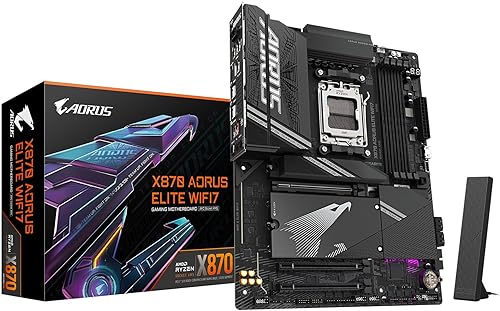
A well-rounded X870 board with good VRM cooling and memory support.
About 300 bought last month with 4.4 stars.
Pros
- Good VRM cooling
- Wi-Fi 7
Cons
- BIOS less polished than ASUS
7. MSI MAG B850 Tomahawk MAX WiFi — Best budget board for PBO
You do not need X870E to tune a Ryzen 7 9800X3D or Ryzen 5. The B850 Tomahawk MAX handles PBO and Curve Optimizer well, and supports EXPO memory.
More than 1,000 bought last month with 4.4 stars.
Pros
- Excellent value
- Strong VRM for B850
- Very popular
Cons
- Fewer extreme features
How to Choose an AM5 Board for Overclocking
Focus on VRM quality and cooling, memory support and BIOS features.
Chipset
B650, B850, X670, X870 and X870E all support CPU overclocking. A620 does not. X870E adds more PCIe 5.0 and USB4 but is not required for tuning.
VRM strength and cooling
Ryzen 9 chips under heavy load need robust power stages and big heatsinks. Higher-end boards keep VRM temperatures lower.
Memory overclocking
DDR5-6000 to 6400 is the sweet spot for AM5. Boards with good trace layouts and BIOS options make EXPO and manual timings more stable.
BIOS features
Look for easy access to PBO limits, Curve Optimizer per-core settings and memory timings. ASUS and MSI BIOS are especially popular with tuners.
Cooling and power supply
Overclocking raises heat. Use a strong air cooler or 280/360 mm AIO and a quality power supply.
Board Choice by Tuning Goal
| Goal | Best pick | Why |
|---|---|---|
| Extreme CPU and memory tuning | Crosshair X870E Hero / Dark Hero | Flagship VRM and BIOS |
| High-end Ryzen 9 build | Strix X870E-E | Strong VRM, great value |
| MSI ecosystem | MPG X870E Carbon | Polished BIOS |
| Mid-range X870 | TUF X870-PLUS | Reliable and affordable |
| PBO on a budget | MAG B850 Tomahawk MAX | Best value |
Safe Tuning Checklist
- Update to the latest BIOS before tuning.
- Enable EXPO first, then tune PBO and Curve Optimizer.
- Stress test with tools such as OCCT, y-cruncher and memory testers.
- Monitor temperatures and keep VRMs cool.
Related guides
Frequently Asked Questions
Can you overclock on a B850 motherboard?
Yes. B850 supports CPU overclocking, PBO and memory overclocking on Ryzen 7000 and 9000.
Is X870E worth it for overclocking?
Only for extreme tuning or if you want extra features like more PCIe 5.0 and USB4. Many users get excellent PBO results on B850.
Can you overclock Ryzen 7 9800X3D?
Yes. Ryzen 9000X3D chips support PBO and Curve Optimizer tuning on supported motherboards.
What memory speed is best for AM5?
DDR5-6000 CL30 is the common sweet spot; 6400 can work with good memory controllers and boards.
Final Verdict
For serious tuners, the ASUS ROG Crosshair X870E Hero (or Dark Hero) is the best AM5 overclocking board. The Strix X870E-E offers most of the performance for less, and the MSI MAG B850 Tomahawk MAX WiFi proves you can tune PBO well on a budget.
As an Amazon Associate, Guide Of Adviser earns from qualifying purchases. Product details and prices can change, so please check Amazon before you buy.