
A local AI PC lives or dies by its graphics card, but the motherboard decides how far you can take it. It controls how many GPUs you can install and at what speed, how much system RAM you can fit for models that spill out of VRAM, and how many fast NVMe drives you can use for model files that are often tens of gigabytes each.
We focused on AM5 boards, because AMD’s Ryzen 7000 and 9000 platform is what most buyers are choosing right now. Every board below showed “bought in past month” sales on Amazon in November 2026 and holds a 4.3-star rating or higher.
Quick answer: The ASUS ROG Strix X870E-E Gaming WiFi is the best all-round motherboard for local AI: PCIe 5.0 graphics slots that can split x8/x8 for a second GPU, strong power delivery for 16-core Ryzen chips and plenty of M.2 slots. On a budget, the MSI MAG B850 Tomahawk MAX WiFi is the best-selling value pick for a single-GPU AI build.
Our Top 3 Picks for best motherboard for local ai
🔥 Black Friday Deals Live
ASUS ROG Strix X870E-E Gaming WiFi
X870E with dual PCIe 5.0 slots (x8/x8), strong VRM and many M.2 slots.
- ✓ Dual-GPU capable (x8/x8)
- ✓ Excellent VRM
- ✓ Lots of fast storage

MSI MAG B850 Tomahawk MAX WiFi
Best-selling AM5 board here (1,000+ last month) with solid VRM and Wi-Fi 7.
- ✓ Great value
- ✓ Strong VRM for a B850
- ✓ Four RAM slots

ASUS ROG Crosshair X870E Hero
Crosshair Hero splits PCIe 5.0 lanes x8/x8 and has excellent power delivery.
- ✓ Dual GPU at PCIe 5.0 x8/x8
- ✓ Flagship power delivery
- ✓ Huge connectivity
As an Amazon Associate, we earn from qualifying purchases. Prices and deals change often, so check Amazon for the latest price.
How we picked these products
- Checked Amazon US in November 2026 and kept only products with strong “bought in past month” sales.
- Compared ratings and review counts, and dropped listings with too little feedback.
- Matched every product to the exact need in this guide, not just the category.
- Read the top-ranking guides for this topic and added the details they miss or get wrong.
We do not hands-on test every product. Our picks are based on specs, sales, verified buyer feedback and manufacturer information. Last updated: November 2026.
Quick Comparison
| Product | Best for | Key specs | Price |
|---|---|---|---|
| ASUS ROG Strix X870E-E Gaming WiFi | Best overall motherboard for local AI | AM5 · X870E · 18+2+2 power stages · two PCIe 5.0 x16 slots (x16 or x8/x8) · 4 DDR5 slots · multiple M.2 incl. PCIe 5.0 · Wi-Fi 7 · USB4 | Check price |
| MSI MAG B850 Tomahawk MAX WiFi | Best value for a single-GPU AI build | AM5 · B850 · PCIe 5.0 x16 graphics slot · 4 DDR5 slots · PCIe 5.0 M.2 · Wi-Fi 7 · 5G LAN | Check price |
| ASUS ROG Crosshair X870E Hero | Best for two GPUs and heavy workloads | AM5 · X870E · flagship power delivery · two PCIe 5.0 x16 slots (x8/x8) · many M.2 · dual USB4 | Check price |
| MSI MAG X870E Tomahawk WiFi | Best mid-price X870E | AM5 · X870E · PCIe 5.0 x16 · 4 DDR5 · several M.2 incl. PCIe 5.0 · USB4 · Wi-Fi 7 | Check price |
| GIGABYTE B850 AORUS Elite WIFI7 | Best budget AM5 board with Wi-Fi 7 | AM5 · B850 · PCIe 5.0 x16 · 4 DDR5 · PCIe 5.0 M.2 · Wi-Fi 7 | Check price |
| ASUS ROG Strix B850-A Gaming WiFi | Best for a clean, quiet build | AM5 · B850 · 14+2+2 power stages · PCIe 5.0 x16 · 4 DDR5 · Wi-Fi 7 | Check price |
| MSI MPG X870E Carbon WiFi | Best premium alternative | AM5 · X870E · robust VRM · multiple PCIe 5.0 slots · many M.2 · USB4 · 5G LAN | Check price |
1. ASUS ROG Strix X870E-E Gaming WiFi — Best overall motherboard for local AI
The Strix X870E-E gives you a clear upgrade path: run one GPU at full PCIe 5.0 x16 today, and add a second card later with an x8/x8 split. Power delivery comfortably handles a Ryzen 9 9950X under long, heavy loads, and the four DIMM slots support large DDR5 kits for CPU offloading.
About 500 bought last month with 4.4 stars. Owners like the BIOS and build quality; using some M.2 slots can share lanes with the graphics slots, so check the manual before planning a dual-GPU setup.
Pros
- Dual-GPU capable (x8/x8)
- Excellent VRM
- Lots of fast storage
- USB4 and Wi-Fi 7
Cons
- Expensive
- Lane sharing with some M.2 slots
2. MSI MAG B850 Tomahawk MAX WiFi — Best value for a single-GPU AI build
Most local AI builds use one powerful GPU. For that, the B850 Tomahawk MAX offers everything you need: a PCIe 5.0 x16 slot, four DDR5 slots for up to 192GB of RAM (with supported kits) and good cooling for its power stages.
The best-selling board in our search, with over 1,000 bought last month and a 4.4-star rating. Buyers like the value and stable memory support.
Pros
- Great value
- Strong VRM for a B850
- Four RAM slots
- Fast networking
Cons
- Second x16-size slot is not CPU-connected
- Not ideal for two GPUs
3. ASUS ROG Crosshair X870E Hero — Best for two GPUs and heavy workloads
The Crosshair Hero is built for enthusiasts. Its top-tier VRM, x8/x8 PCIe 5.0 support and extensive storage options make it a strong base for a dual-GPU AI workstation.
About 100 bought last month with 4.3 stars. Owners praise stability and features; it is one of the most expensive AM5 boards.
Pros
- Dual GPU at PCIe 5.0 x8/x8
- Flagship power delivery
- Huge connectivity
Cons
- Very expensive
- Overkill for one GPU
4. MSI MAG X870E Tomahawk WiFi — Best mid-price X870E
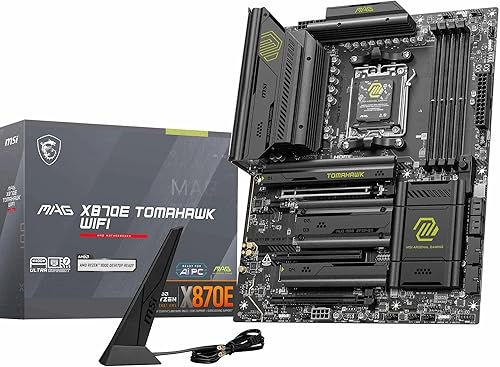
The X870E Tomahawk adds USB4 and extra high-speed connectivity over the B850 version at a moderate price. It is a good choice for a single-GPU AI PC that also needs fast external storage.
About 300 bought last month with 4.3 stars.
Pros
- USB4 included
- Good price for X870E
- Strong cooling
Cons
- Check lane split before adding a second GPU
5. GIGABYTE B850 AORUS Elite WIFI7 — Best budget AM5 board with Wi-Fi 7

A solid lower-cost base for a Ryzen 7 or Ryzen 9 AI build. It offers PCIe 5.0 for the GPU and the main NVMe drive, plus four RAM slots.
About 500 bought last month with 4.4 stars.
Pros
- Low price
- PCIe 5.0 GPU and SSD
- Easy BIOS
Cons
- Fewer M.2 slots than X870E boards
6. ASUS ROG Strix B850-A Gaming WiFi — Best for a clean, quiet build

The Strix B850-A combines good power delivery with ASUS’s easy-to-use BIOS and a white-silver look. It suits a single-GPU AI PC in a showcase case.
About 500 bought last month with 4.5 stars.
Pros
- Good VRM
- Polished BIOS
- Attractive design
Cons
- Single CPU-connected GPU slot
7. MSI MPG X870E Carbon WiFi — Best premium alternative

The Carbon is MSI’s high-end gaming board with strong storage and connectivity. It is a good alternative to the Strix X870E-E for workstation-style AI builds.
About 200 bought last month with 4.4 stars. Check the manual for how PCIe lanes are shared if you plan to add a second GPU.
Pros
- High-end features
- Excellent cooling
- Lots of storage
Cons
- Expensive
- Lane sharing to plan around
How to Choose a Motherboard for Local AI
For AI work, focus on PCIe layout, RAM capacity and storage before gaming features.
PCIe slots and lanes
Your main GPU should run in a CPU-connected PCIe x16 slot. If you might add a second GPU, choose a board that splits CPU lanes x8/x8 across two slots; secondary slots wired to the chipset run at x4 or less and are slower for multi-GPU AI.
Space between slots
Modern GPUs are often three slots thick. Make sure there is enough physical spacing for two cards, or plan on a riser cable and a larger case.
RAM capacity
When a model does not fit in VRAM, tools like llama.cpp can offload layers to system RAM. Four DIMM slots let you install 96GB, 128GB or more. Large four-stick kits usually run at lower speeds than two-stick kits.
Storage
Model files are large. Look for at least two or three M.2 slots, ideally one PCIe 5.0, so you can keep many models on fast storage.
Power delivery and cooling
Long AI jobs keep the CPU busy for hours. A strong VRM with good heatsinks keeps a Ryzen 9 stable and quiet.
Board Choice by Build Type
| Build | Recommended board | Why |
|---|---|---|
| One mid-range GPU (e.g. RTX 5060 Ti 16GB) | MSI MAG B850 Tomahawk MAX WiFi | Everything you need at a low price |
| One high-end GPU (RTX 5070 Ti / 5090) | MSI MAG X870E Tomahawk WiFi | PCIe 5.0, USB4, strong VRM |
| Planning a second GPU later | ASUS ROG Strix X870E-E | x8/x8 PCIe 5.0 split |
| Dual-GPU workstation now | ASUS ROG Crosshair X870E Hero | Flagship power and lane layout |
Pair It With
- A Ryzen 7 9700X or Ryzen 9 9950X for fast prompt processing and CPU offload.
- 64GB to 128GB of DDR5 RAM.
- A 2TB or larger NVMe SSD for model files.
- A quality 850W to 1200W power supply, depending on your GPUs.
Related guides
Frequently Asked Questions
Does the motherboard affect AI performance?
Indirectly. It decides PCIe speed for your GPUs, how much RAM you can fit and how fast your storage is. The GPU still does most of the work.
Do I need X870E for local AI?
Not for a single GPU. A good B850 board works well. Choose X870E if you want two GPUs with an x8/x8 split, USB4 or more fast storage.
How much RAM should a local AI PC have?
32GB is the minimum, 64GB is comfortable, and 128GB helps if you offload large models to the CPU.
Can I use two different GPUs for AI?
Many tools can split a model across two GPUs, even of different sizes, but matching cards are simpler. Make sure your board, case and power supply can handle both.
Final Verdict
For an AI PC with room to grow, the ASUS ROG Strix X870E-E Gaming WiFi is the best balance of PCIe layout, power and storage. If you only plan to use one GPU, the MSI MAG B850 Tomahawk MAX WiFi gives you most of what matters for much less.
For a serious dual-GPU workstation, step up to the ASUS ROG Crosshair X870E Hero.
As an Amazon Associate, Guide Of Adviser earns from qualifying purchases. Product details and prices can change, so please check Amazon before you buy.