You do not need an expensive gaming rig to enjoy great PC games. Many of the most loved games ever made run well on older laptops, office PCs and integrated graphics. The trick is choosing games built with simple graphics or efficient engines, and setting them up for performance.
This guide lists 20 of the best games for a weak PC, sorted by genre, including several free-to-play options. Many lists stop at game names, so we also add settings tips that boost frame rates and a few inexpensive upgrades, picked by last-month Amazon sales, that can make an old PC feel much faster.
Quick answer: Great low-spec games: Stardew Valley, Terraria, Minecraft, Hollow Knight, Celeste, Undertale, Slay the Spire, Balatro, Vampire Survivors, Portal 2, League of Legends, Dota 2, Rocket League and Among Us. Cheap upgrades that help most: an SSD like the Crucial BX500, more RAM such as Crucial 16GB DDR4, and a laptop cooling pad like the Kootek (5K+ bought last month).
Our Top 3 Picks for best games for weak pc
🔥 Black Friday Deals Live
Crucial BX500 1TB SATA SSD
SATA SSD speeds up old PCs, 33,000+ reviews.
- ✓ Huge speed boost over HDD
- ✓ Fits most PCs
- ✓ Affordable
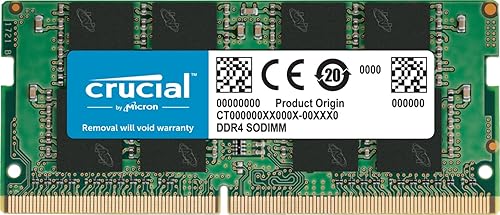
Crucial 16GB DDR4-3200 Laptop RAM (SODIMM)
16GB DDR4 laptop RAM, 17,000+ reviews.
- ✓ Big help on 4-8GB systems
- ✓ Trusted brand
- ✓ Easy install in many laptops
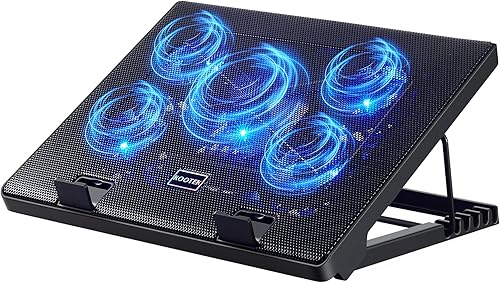
Kootek Laptop Cooling Pad with 5 Quiet Fans
Cooling pad, 5K+ bought last month.
- ✓ Helps reduce heat
- ✓ Raises screen height
- ✓ Very popular
As an Amazon Associate, we earn from qualifying purchases. Prices and deals change often, so check Amazon for the latest price.
How we picked these products
- Checked Amazon US in November 2026 and kept only products with strong “bought in past month” sales.
- Compared ratings and review counts, and dropped listings with too little feedback.
- Matched every product to the exact need in this guide, not just the category.
- Read the top-ranking guides for this topic and added the details they miss or get wrong.
We do not hands-on test every product. Our picks are based on specs, sales, verified buyer feedback and manufacturer information. Last updated: November 2026.
Cheap Upgrades for Low-End Gaming PCs Compared
| Product | Best for | Type | Price |
|---|---|---|---|
| Crucial BX500 1TB SATA SSD | Best upgrade for old PCs | 2.5 in SATA SSD | Check price |
| Crucial 16GB DDR4-3200 Laptop RAM (SODIMM) | Best RAM upgrade | 16GB DDR4 SODIMM | Check price |
| Kootek Laptop Cooling Pad with 5 Quiet Fans | Best for laptops | Cooling pad, 12-17 in | Check price |
| havit HV-F2056 Laptop Cooling Pad | Budget cooling pad alternative | Cooling pad, 15.6-17 in | Check price |
| Logitech G305 LIGHTSPEED Wireless Gaming Mouse | Best budget gaming mouse | Wireless, HERO sensor | Check price |
1. Crucial BX500 1TB SATA SSD — Best upgrade for old PCs
If your PC still boots from a hard drive, an SSD is the single biggest upgrade: faster boot times, quicker game loading and fewer stutters while assets load. The BX500 fits most laptops and desktops with a 2.5-inch bay.
It has 33,500+ reviews, a 4.7-star rating and 300+ purchases last month.
Pros
- Huge speed boost over HDD
- Fits most PCs
- Affordable
Cons
- SATA speed, not NVMe
- Needs cloning or fresh install
2. Crucial 16GB DDR4-3200 Laptop RAM (SODIMM) — Best RAM upgrade
Many older laptops ship with 4GB or 8GB of RAM, which is tight for modern Windows plus games. Adding a compatible 16GB stick can reduce stutter and let you keep a browser or Discord open.
It has 17,200+ reviews, a 4.8-star rating and 500+ purchases last month, and it is an Amazon’s Choice pick.
Pros
- Big help on 4-8GB systems
- Trusted brand
- Easy install in many laptops
Cons
- Check compatibility first
- Not all laptops are upgradeable
3. Kootek Laptop Cooling Pad with 5 Quiet Fans — Best for laptops
Laptops often slow down when they get hot (thermal throttling). A cooling pad raises the laptop for airflow and adds fans, which can help keep performance more stable during long sessions.
It has 15,200+ reviews, a 4.4-star rating and 5K+ purchases last month, and it is an Amazon’s Choice pick.
Pros
- Helps reduce heat
- Raises screen height
- Very popular
Cons
- Results vary by laptop
- Adds fan noise
4. havit HV-F2056 Laptop Cooling Pad — Budget cooling pad alternative

A slim, popular alternative cooling pad with three fans and a metal mesh top for larger laptops.
It has 45,600+ reviews, a 4.4-star rating and 3K+ purchases last month.
Pros
- Huge user base
- Metal mesh surface
- Good for 15-17 in laptops
Cons
- Less height adjustment
- Uses a USB port
5. Logitech G305 LIGHTSPEED Wireless Gaming Mouse — Best budget gaming mouse
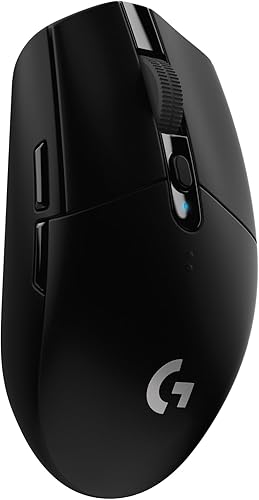
A good mouse makes any game feel better, especially on a laptop touchpad setup. The G305 is light, accurate and runs a long time on one AA battery.
It has 40,700+ reviews, a 4.6-star rating and 10K+ purchases last month, and it is an Amazon’s Choice pick.
Pros
- Excellent sensor
- Long battery life
- Very affordable
Cons
- Uses AA battery
- Small for very large hands
20 Best Games for a Weak PC and How to Run Them Better
Pick lightweight games, lower settings smartly, and fix the biggest bottleneck first.
Cozy and creative
Stardew Valley, Terraria and Minecraft are huge, replayable games that run on modest hardware. Minecraft benefits from lowering render distance on weak PCs.
Platformers and action
Hollow Knight, Celeste, Dead Cells and Cuphead offer tight, polished action with 2D art that is easy on hardware.
Story and puzzle
Undertale, Portal 2, Inside and Return of the Obra Dinn deliver memorable stories and puzzles without needing modern GPUs.
Roguelikes and card games
Slay the Spire, Balatro and Vampire Survivors are addictive, run on almost anything and are perfect for short sessions.
Free-to-play multiplayer
League of Legends, Dota 2, Rocket League and Among Us are popular free or low-cost multiplayer games that support low settings. Check each game’s minimum requirements on its official page or Steam before downloading.
Settings that boost fps
Lower resolution scale or resolution first, then shadows, effects and view distance. Turn off motion blur and V-Sync if you see input lag, close background apps, and use your laptop’s high-performance power mode while plugged in.
Update drivers
Install the latest graphics drivers from Intel, AMD or NVIDIA. Integrated graphics drivers often improve game compatibility and performance.
20 Low-Spec Games at a Glance
| Game | Genre | Price model |
|---|---|---|
| Stardew Valley | Farming / life sim | Paid |
| Terraria | Sandbox adventure | Paid |
| Minecraft | Sandbox | Paid |
| Hollow Knight | Metroidvania | Paid |
| Celeste | Platformer | Paid |
| Dead Cells | Action roguelite | Paid |
| Cuphead | Run and gun | Paid |
| Undertale | RPG | Paid |
| Portal 2 | Puzzle | Paid |
| Inside | Puzzle platformer | Paid |
| Return of the Obra Dinn | Mystery | Paid |
| Slay the Spire | Deckbuilder | Paid |
| Balatro | Card roguelike | Paid |
| Vampire Survivors | Action roguelite | Paid |
| League of Legends | MOBA | Free |
| Dota 2 | MOBA | Free |
| Rocket League | Sports / cars | Free |
| Among Us | Party | Paid |
| Counter-Strike 2 | Shooter (moderate specs) | Free |
| Fortnite (Performance mode) | Battle royale | Free |
Requirements change with updates; check official minimum specs before you buy or download.
Find Your Bottleneck First
- Slow boot and long loads: upgrade to an SSD.
- Stutters with a browser open: add RAM.
- Fast at first, then slower: heat throttling; clean vents and use a cooling pad.
- Low fps all the time: lower resolution and graphics settings, or choose lighter games.
Related guides
Frequently Asked Questions
What games can I play on a low-end PC?
Stardew Valley, Terraria, Minecraft, Hollow Knight, Slay the Spire and many indie games run well on low-end PCs.
Can integrated graphics run games?
Yes, many indie and older games run well on integrated graphics at lower settings.
What is the best cheap upgrade for gaming?
An SSD if you still use a hard drive, then more RAM if you have 8GB or less.
Does a cooling pad improve fps?
It can help if your laptop is throttling from heat, but results vary.
Is 8GB of RAM enough for gaming?
It works for many light games, but 16GB is more comfortable for modern Windows and multitasking.
Are free-to-play games good on weak PCs?
Many are, like League of Legends and Dota 2, because they are built to run on a wide range of hardware.
Final Verdict
Start with Stardew Valley, Terraria, Hollow Knight and Slay the Spire, then try free multiplayer games like League of Legends or Rocket League. If your PC still feels slow, an SSD like the Crucial BX500 and more RAM are the best value upgrades.
As an Amazon Associate, Guide Of Adviser earns from qualifying purchases. Product details and prices can change, so please check Amazon before you buy.