The PlayStation 2 has one of the best game libraries ever made, and PCSX2, the free and open-source PS2 emulator, lets you play many of those games on a Windows, macOS or Linux PC. On a modern computer you can often run them at higher resolutions than the original console, with save states and widescreen patches for some titles.
Most “best PS2 games for PCSX2” lists only name games. They skip how to set up PCSX2 legally, which controller to use, and what to do when a game has problems. This guide gives you 15 great PS2 games to emulate, a quick PCSX2 setup checklist, and the accessories that make PS2 emulation feel like the real thing.
Quick answer: Top PS2 games to emulate on PC include Shadow of the Colossus, God of War II, Metal Gear Solid 3, Kingdom Hearts II, Final Fantasy X, Okami, Persona 4 and Burnout 3. Use PCSX2 with a BIOS dumped from your own PS2. Best controller: Xbox Wireless Controller (10K+ bought last month). Best for PlayStation feel: DualSense. To use your original discs, add a USB DVD drive like the Amicool external drive.
Our Top 3 Picks for best ps2 games to emulate on pc
🔥 Black Friday Deals Live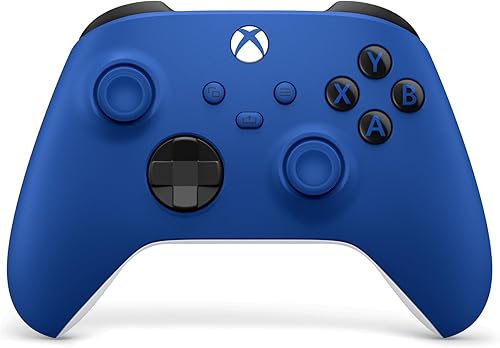
Xbox Wireless Controller
Plug and play on Windows, 10K+ bought monthly.
- ✓ Plug and play on Windows
- ✓ Comfortable for long sessions
- ✓ Easy PCSX2 mapping

PlayStation DualSense Wireless Controller
DualSense, 52,000+ reviews.
- ✓ PlayStation button layout
- ✓ Comfortable grip
- ✓ Rechargeable

Amicool External DVD Drive, USB 3.0 / USB-C
USB DVD drive, 26,000+ reviews.
- ✓ Reads PS2 CDs and DVDs
- ✓ USB-A and USB-C
- ✓ No drivers needed
As an Amazon Associate, we earn from qualifying purchases. Prices and deals change often, so check Amazon for the latest price.
How we picked these products
- Checked Amazon US in November 2026 and kept only products with strong “bought in past month” sales.
- Compared ratings and review counts, and dropped listings with too little feedback.
- Matched every product to the exact need in this guide, not just the category.
- Read the top-ranking guides for this topic and added the details they miss or get wrong.
We do not hands-on test every product. Our picks are based on specs, sales, verified buyer feedback and manufacturer information. Last updated: November 2026.
Best Gear for PS2 Emulation on PC
| Product | Best for | Use | Price |
|---|---|---|---|
| Xbox Wireless Controller | Best controller for most PCs | Wireless/USB, works with PCSX2 | Check price |
| PlayStation DualSense Wireless Controller | Best PlayStation feel | Bluetooth/USB-C | Check price |
| 8BitDo Ultimate 2C Wireless Controller for PC | Best budget controller | 2.4G wireless, PC | Check price |
| Xahpower PS2 to USB Adapter for PS1/PS2 Controllers | Use your original DualShock 2 | PS2 controller to USB | Check price |
| Amicool External DVD Drive, USB 3.0 / USB-C | Use your own PS2 discs | External CD/DVD drive | Check price |
1. Xbox Wireless Controller — Best controller for most PCs
Windows supports the Xbox controller out of the box, and PCSX2 can map it automatically. The button layout matches PS2 games well once mapped, and it connects by Bluetooth, USB-C or the Xbox Wireless Adapter.
It has 2,000+ reviews on this listing, a 4.7-star rating and 10K+ purchases last month, and it is an Amazon’s Choice pick.
Pros
- Plug and play on Windows
- Comfortable for long sessions
- Easy PCSX2 mapping
Cons
- Face buttons use Xbox labels
- Pressure-sensitive buttons not supported
2. PlayStation DualSense Wireless Controller — Best PlayStation feel
If you want the same button symbols as the PS2, the DualSense is the most natural choice. PCSX2 supports PlayStation controllers through its SDL input, and Steam can also handle the mapping.
It has 52,000+ reviews, a 4.7-star rating and 20K+ purchases last month.
Pros
- PlayStation button layout
- Comfortable grip
- Rechargeable
Cons
- Some setups need Steam or SDL settings
- Higher price than third-party pads
3. 8BitDo Ultimate 2C Wireless Controller for PC — Best budget controller
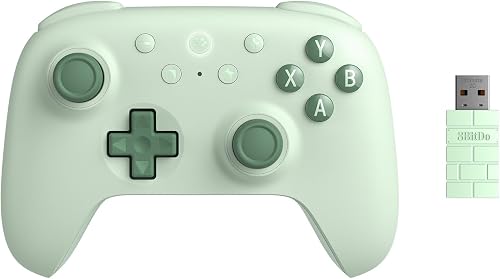
8BitDo makes controllers for retro gaming fans. The Ultimate 2C is an affordable wireless pad with a 2.4G dongle and Hall effect sticks.
It has 8,200+ reviews, a 4.4-star rating and 3K+ purchases last month.
Pros
- Low price
- Low-latency 2.4G dongle
- Good build quality
Cons
- Xbox-style layout
- No Bluetooth on this model
4. Xahpower PS2 to USB Adapter for PS1/PS2 Controllers — Use your original DualShock 2

Still have an original DualShock 2? This adapter lets you plug it into your PC so you get the exact PS2 feel in PCSX2.
It has 1,000+ reviews, a 4.0-star rating and 200+ purchases last month.
Pros
- Original controller feel
- Cheap
- Plug and play
Cons
- Quality varies between units
- Needs manual mapping
5. Amicool External DVD Drive, USB 3.0 / USB-C — Use your own PS2 discs
PS2 games came on CD and DVD. With an external drive you can play your own discs directly in PCSX2 or make a personal backup image, which is the legal way to get your games onto your PC.
It has 26,400+ reviews, a 4.2-star rating and 10K+ purchases last month.
Pros
- Reads PS2 CDs and DVDs
- USB-A and USB-C
- No drivers needed
Cons
- Some discs may need cleaning
- Slower than a desktop drive
15 Best PS2 Games to Emulate on PC and How to Set Up PCSX2
Pick your games, set up PCSX2 the right way, then add a good controller.
1. Shadow of the Colossus
A haunting adventure built around climbing and defeating 16 giant colossi. Higher internal resolution in PCSX2 makes its huge landscapes look far better than on an old TV.
2. God of War II
Kratos at his most epic, with huge set pieces and fast combat. It is one of the most popular PCSX2 showcases.
3. Metal Gear Solid 3: Snake Eater
A jungle stealth classic with survival mechanics and a great story. Save states help with its toughest boss fights.
4. Kingdom Hearts II and 5. Final Fantasy X
Two of Square Enix’s biggest PS2 RPGs. Both are long, so PCSX2 save states and fast-forward for grinding are a real bonus.
6. Okami and 7. Persona 4
Okami’s painted art style looks gorgeous upscaled, and Persona 4 mixes dungeon crawling with a high-school life sim. Both are among the most loved PS2 games.
8 to 15: More must-plays
Burnout 3: Takedown, Resident Evil 4, Silent Hill 2, Jak II, Sly 2: Band of Thieves, Gran Turismo 4, Dragon Ball Z: Budokai Tenkaichi 3 and Tekken 5 round out our list. Check the PCSX2 compatibility list for each game, because some titles need specific settings or patches.
PCSX2 setup checklist
Download PCSX2 only from the official pcsx2.net website. You also need a PS2 BIOS, which you should dump from your own PS2 console using the tools described in PCSX2’s documentation. Then add your game images (or point PCSX2 to your disc drive), choose a renderer (Vulkan or Direct3D 12 on most modern PCs), and set internal resolution to 2x or 3x to start.
Is PS2 emulation legal?
The PCSX2 emulator itself is legal. Downloading a PS2 BIOS or games you do not own is not legal in many countries. The safe approach is to dump the BIOS from your own console and make images of discs you own.
PC requirements
PCSX2 runs best on a CPU with strong single-core performance and a graphics card that supports Vulkan or Direct3D 12. Most gaming PCs and many modern laptops can run popular PS2 games well; very demanding titles may need lower resolution on weaker integrated graphics.
Fixing common problems
If a game stutters, lower the internal resolution first. If graphics look broken, switch renderers or check the game’s page on the PCSX2 wiki for recommended settings. Keep PCSX2 updated, since new versions often fix game-specific issues.
All 15 Games at a Glance
| Game | Genre | Why it is great on PCSX2 |
|---|---|---|
| Shadow of the Colossus | Action adventure | Huge landscapes benefit from higher resolution |
| God of War II | Action | Big set pieces, fast combat |
| Metal Gear Solid 3: Snake Eater | Stealth | Save states help with tough bosses |
| Kingdom Hearts II | Action RPG | Long RPG; fast-forward helps grinding |
| Final Fantasy X | Turn-based RPG | Classic story, easy to save anywhere |
| Okami | Action adventure | Painted art style looks stunning upscaled |
| Persona 4 | RPG / life sim | Long game; save states save time |
| Burnout 3: Takedown | Racing | Fast arcade racing with a controller |
| Resident Evil 4 | Survival action | A true PS2 classic |
| Silent Hill 2 | Survival horror | Atmosphere still holds up |
| Jak II | Platformer | Open-world platforming |
| Sly 2: Band of Thieves | Stealth platformer | Fun for all ages |
| Gran Turismo 4 | Racing sim | Huge car list; demanding on some PCs |
| Dragon Ball Z: Budokai Tenkaichi 3 | Fighting | Fan-favorite roster |
| Tekken 5 | Fighting | Great for local versus play |
Emulation quality depends on your PC and PCSX2 version. Check each game’s entry on the official PCSX2 compatibility list before you start.
Recommended PCSX2 Settings to Start With
| Setting | Start with | Why |
|---|---|---|
| Renderer | Vulkan or Direct3D 12 | Best performance on most modern GPUs |
| Internal resolution | 2x or 3x native | Sharper image without heavy load |
| Texture filtering | Default | Keep defaults until a game needs a change |
| Widescreen patches | On, if available for the game | Removes stretched image on 16:9 screens |
| Controller | Automatic mapping | Then fine-tune buttons per game if needed |
Laptop Tips
On laptops, plug in the charger, choose the high-performance power mode, and start at native or 2x resolution. Integrated graphics can run many PS2 games, but demanding titles may need lower settings.
Related guides
Frequently Asked Questions
Can I play PS2 games on a handheld PC?
Yes. PCSX2 runs on Windows handhelds like the ROG Xbox Ally X, though demanding games may need lower settings.
Do I need a powerful graphics card for PCSX2?
Not for most games at 2x resolution; higher resolutions and demanding titles benefit from a stronger GPU.
What is the best PS2 emulator for PC?
PCSX2 is the most popular and actively developed PS2 emulator for Windows, macOS and Linux.
Do I need a BIOS for PCSX2?
Yes. PCSX2 needs a PS2 BIOS, which you should dump from your own console.
Can I play PS2 discs on my PC?
Yes. With a DVD drive, PCSX2 can boot your own discs or you can make a personal backup image.
Which controller is best for PCSX2?
An Xbox Wireless Controller is the easiest on Windows; a DualSense gives the PlayStation layout.
Does PCSX2 support pressure-sensitive buttons?
Modern controllers do not have pressure-sensitive face buttons, so a few PS2 games that use them work best with an original DualShock 2 and a USB adapter.
Can PCSX2 run games in HD?
Yes. You can raise internal resolution above the original, depending on your PC’s graphics power.
Final Verdict
Start with Shadow of the Colossus, God of War II, Metal Gear Solid 3 and Kingdom Hearts II, set up PCSX2 with your own BIOS, and pair it with an Xbox Wireless Controller or DualSense. Add a USB DVD drive if you want to play the PS2 discs you already own.
As an Amazon Associate, Guide Of Adviser earns from qualifying purchases. Product details and prices can change, so please check Amazon before you buy.