
If you use AutoCAD for work or school and play games in your free time, you do not need two PCs or two graphics cards. A modern GeForce or Radeon card handles AutoCAD 2D and 3D smoothly and still delivers great gaming performance. The key is picking a card with enough VRAM for your drawings and enough speed for the games and resolution you play.
We compared graphics cards that sell well on Amazon right now and matched them to common AutoCAD and gaming setups. Unlike pro-only guides that push expensive workstation cards, this guide focuses on dual-use cards that give the best value for both.
Quick answer: Best overall: ASUS RTX 5060 Ti 16GB (500+ bought last month) for 1080p/1440p gaming and smooth AutoCAD. Best for 1440p gaming: ASUS RTX 5070 12GB. Best high-end: ASUS TUF RTX 5070 Ti 16GB. Best AMD: ASUS Radeon RX 9070 XT 16GB (1K+ bought). Best budget: ASUS RTX 5060 8GB for 1080p.
Our Top 3 Picks for best graphics card for autocad and gaming
🔥 Black Friday Deals Live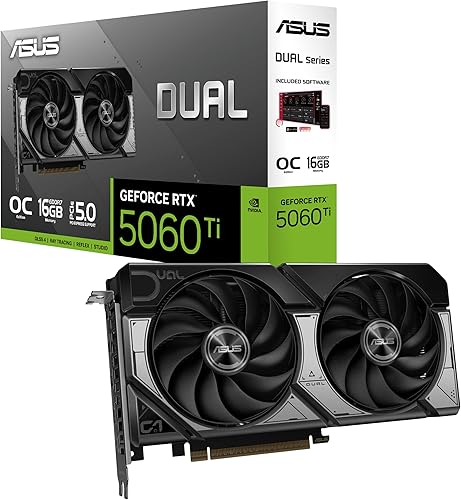
ASUS Dual GeForce RTX 5060 Ti 16GB OC
16GB VRAM, great 1080p/1440p.
- ✓ 16GB VRAM
- ✓ Great value
- ✓ DLSS for gaming

ASUS Prime Radeon RX 9070 XT 16GB OC
16GB, 1K+ bought last month.
- ✓ 16GB VRAM
- ✓ Excellent gaming value
- ✓ Very popular

ASUS TUF Gaming GeForce RTX 5070 Ti 16GB OC
16GB, top 1440p/4K gaming.
- ✓ 16GB VRAM
- ✓ Top performance
- ✓ Quiet TUF cooler
As an Amazon Associate, we earn from qualifying purchases. Prices and deals change often, so check Amazon for the latest price.
How we picked these products
- Checked Amazon US in November 2026 and kept only products with strong “bought in past month” sales.
- Compared ratings and review counts, and dropped listings with too little feedback.
- Matched every product to the exact need in this guide, not just the category.
- Read the top-ranking guides for this topic and added the details they miss or get wrong.
We do not hands-on test every product. Our picks are based on specs, sales, verified buyer feedback and manufacturer information. Last updated: November 2026.
GPUs for AutoCAD and Gaming Compared
| Product | Best for | VRAM / target | Price |
|---|---|---|---|
| ASUS Dual GeForce RTX 5060 Ti 16GB OC | Best overall | 16GB, 1080p-1440p | Check price |
| ASUS PRIME GeForce RTX 5070 12GB OC | Best for 1440p gaming | 12GB, 1440p | Check price |
| ASUS TUF Gaming GeForce RTX 5070 Ti 16GB OC | Best high-end | 16GB, 1440p-4K | Check price |
| ASUS Prime Radeon RX 9070 XT 16GB OC | Best AMD | 16GB, 1440p-4K | Check price |
| ASUS Prime GeForce RTX 5060 8GB OC | Best budget | 8GB, 1080p | Check price |
1. ASUS Dual GeForce RTX 5060 Ti 16GB OC — Best overall
The 16GB RTX 5060 Ti is the sweet spot for dual use: plenty of memory for large AutoCAD 3D drawings and multiple monitors, and strong 1080p and solid 1440p gaming with DLSS.
It has 450+ reviews, a 4.6-star rating and 500+ purchases last month.
Pros
- 16GB VRAM
- Great value
- DLSS for gaming
Cons
- Not a 4K card
- 128-bit bus
2. ASUS PRIME GeForce RTX 5070 12GB OC — Best for 1440p gaming
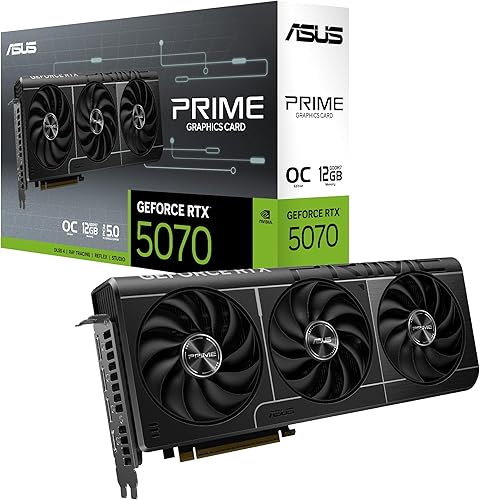
The RTX 5070 is a strong 1440p gaming card and keeps AutoCAD viewports very smooth.
It has 340+ reviews, a 4.8-star rating and 200+ purchases last month.
Pros
- Fast 1440p gaming
- Highly rated
- Good efficiency
Cons
- 12GB VRAM
- Pricier than 5060 Ti
3. ASUS TUF Gaming GeForce RTX 5070 Ti 16GB OC — Best high-end
For high refresh 1440p or 4K gaming plus heavy 3D work and rendering, the RTX 5070 Ti offers 16GB VRAM and big performance with excellent cooling.
It has 540+ reviews, a 4.7-star rating and 200+ purchases last month.
Pros
- 16GB VRAM
- Top performance
- Quiet TUF cooler
Cons
- Expensive
- Large card, needs strong PSU
4. ASUS Prime Radeon RX 9070 XT 16GB OC — Best AMD
AMD’s RX 9070 XT is a top seller with 16GB VRAM and excellent gaming performance. AutoCAD runs well on modern Radeon cards; check Autodesk’s certified hardware list if you need official support.
It has 860+ reviews, a 4.6-star rating and 1K+ purchases last month.
Pros
- 16GB VRAM
- Excellent gaming value
- Very popular
Cons
- Fewer CAD certifications than NVIDIA
- High power draw
5. ASUS Prime GeForce RTX 5060 8GB OC — Best budget
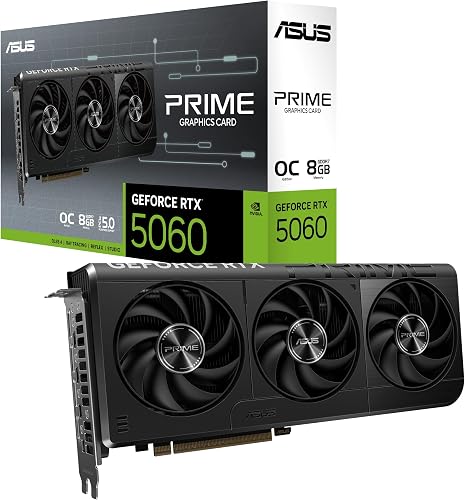
For 2D AutoCAD and 1080p gaming, the RTX 5060 is an affordable, efficient choice.
It has 100+ reviews, a 4.7-star rating and 100+ purchases last month.
Pros
- Affordable
- Efficient
- Good 1080p
Cons
- 8GB limits big 3D models
- Not for 1440p max settings
How to Choose a GPU for AutoCAD and Gaming
Match VRAM to your drawings and GPU speed to your monitor, then choose the right drivers.
How much GPU does AutoCAD need?
AutoCAD 2D is light. AutoCAD 3D, visual styles, and large drawings with many objects benefit from a modern GPU with 8GB or more of VRAM.
Match the GPU to your monitor
For 1080p gaming, an RTX 5060 or 5060 Ti is plenty. For 1440p, consider RTX 5070 or RX 9070 XT. For 4K, aim for RTX 5070 Ti or better.
Studio vs Game Ready drivers
NVIDIA offers Game Ready drivers for games and Studio drivers for creative apps. Studio drivers are a stable choice if work comes first; switch to Game Ready if a new game needs a specific update.
Certification
Autodesk publishes certified graphics hardware. Consumer cards often work well even if not listed, but certification matters for official support at some companies.
Multiple monitors
Many CAD users run two monitors. 12-16GB of VRAM gives more headroom for multiple displays and large drawings.
Power and size
Check your case clearance and PSU wattage and connectors before buying, especially for RTX 5070 Ti and RX 9070 XT cards.
Pick by Your Mix of Work and Play
| Your usage | Gaming target | Best pick |
|---|---|---|
| Mostly 2D AutoCAD, casual games | 1080p | RTX 5060 8GB |
| 3D AutoCAD + 1080p/1440p games | 1080p-1440p | RTX 5060 Ti 16GB |
| 3D work + competitive 1440p | 1440p high refresh | RTX 5070 |
| Heavy 3D + 4K gaming | 4K | RTX 5070 Ti 16GB or RX 9070 XT |
Settings Tips for AutoCAD
- Turn on hardware acceleration in AutoCAD’s Graphics Performance settings.
- Keep GPU drivers updated from NVIDIA or AMD.
- Use a 2D and 3D visual style suited to the task to keep viewports smooth.
- Close games and overlays while working on large drawings.
Frequently Asked Questions
Can a gaming GPU run AutoCAD?
Yes. Modern GeForce and Radeon cards run AutoCAD very well.
Is the RTX 5060 Ti good for AutoCAD and gaming?
Yes, especially the 16GB version for larger drawings and 1440p gaming.
Do I need a workstation GPU for AutoCAD?
Usually not, unless your employer requires certified hardware.
Which drivers should I use?
NVIDIA Studio drivers for work stability; Game Ready if you need the latest game optimizations.
Is AMD good for AutoCAD?
Modern Radeon cards work well; check Autodesk’s certified list for your exact card if support matters.
How much VRAM do I need?
8GB for 2D and light 3D; 12-16GB for big 3D models and multiple monitors.
Final Verdict
The ASUS RTX 5060 Ti 16GB is the best graphics card for AutoCAD and gaming for most people, balancing VRAM and price. Choose the RTX 5070 for 1440p gaming, the RTX 5070 Ti for high-end use, and the RX 9070 XT if you prefer AMD.
As an Amazon Associate, Guide Of Adviser earns from qualifying purchases. Product details and prices can change, so please check Amazon before you buy.