When kids start coding, the keyboard matters more than most parents expect. Block-based tools like Scratch need little typing, but as soon as kids move to Python, JavaScript or game modding, they type brackets, colons, quotes and semicolons all day. A keyboard that is too small, too stiff or has unclear labels slows them down and makes coding frustrating.
Many “kids keyboard” guides focus on bright colors or even piano keyboards, and skip what matters for programming: a standard layout with all the symbol keys, comfortable typing, and compatibility with the Chromebooks and iPads many schools use. This guide picks the best keyboards by age, from big-print starter keyboards to a dedicated coding computer.
Quick answer: Best overall: Logitech Pebble Keys 2 K380s (compact, quiet, works with Windows, Mac, Chromebook and iPad; 2K+ bought last month). Best for ages 6-8: Large Print High Contrast keyboard. Best budget and spill-resistant: Logitech K120. Best for teens: Redragon mechanical keyboard mechanical. Best all-in-one coding computer: Raspberry Pi 5 kit.
Our Top 3 Picks for best keyboard for kids to learn programming
🔥 Black Friday Deals Live
Logitech Pebble Keys 2 K380s Wireless Bluetooth Keyboard
Compact, quiet, works with Chromebook and iPad.
- ✓ Kid-sized but standard layout
- ✓ Works with Chromebook and iPad
- ✓ Quiet keys

Large Print Computer Keyboard, Wired USB, High Contrast
Oversized, high-contrast letters.
- ✓ Very easy to read
- ✓ Plug and play USB
- ✓ Full-size layout
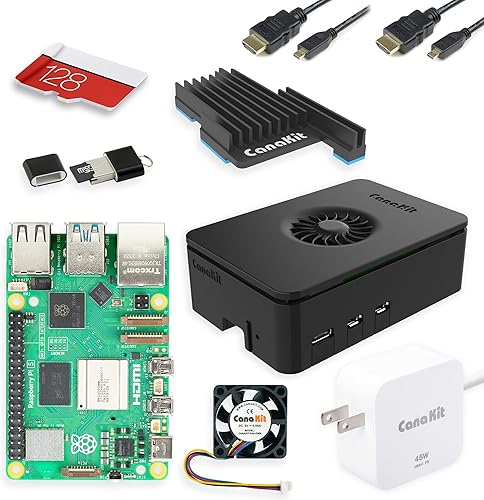
CanaKit Raspberry Pi 5 Starter Kit PRO (8GB)
Raspberry Pi 5 kit, 1K+ bought last month.
- ✓ A real coding computer
- ✓ Great for Scratch and Python
- ✓ Encourages tinkering
As an Amazon Associate, we earn from qualifying purchases. Prices and deals change often, so check Amazon for the latest price.
How we picked these products
- Checked Amazon US in November 2026 and kept only products with strong “bought in past month” sales.
- Compared ratings and review counts, and dropped listings with too little feedback.
- Matched every product to the exact need in this guide, not just the category.
- Read the top-ranking guides for this topic and added the details they miss or get wrong.
We do not hands-on test every product. Our picks are based on specs, sales, verified buyer feedback and manufacturer information. Last updated: November 2026.
Keyboards for Kids Learning Programming Compared
| Product | Best for | Best age / connection | Price |
|---|---|---|---|
| Logitech Pebble Keys 2 K380s Wireless Bluetooth Keyboard | Best overall (ages 8+) | Compact, Bluetooth, multi-device | Check price |
| Large Print Computer Keyboard, Wired USB, High Contrast | Best for ages 6-8 | Wired USB, oversized letters | Check price |
| Logitech MK270 Wireless Keyboard and Mouse Combo | Best family PC combo | Full-size, wireless USB receiver | Check price |
| Logitech K120 Wired Keyboard | Best budget and spill-resistant | Full-size, wired USB | Check price |
| Redragon Mechanical Gaming Keyboard, Hot-Swappable Red Switches | Best for teens (ages 12+) | Mechanical, hot-swappable, wired | Check price |
| CanaKit Raspberry Pi 5 Starter Kit PRO (8GB) | Best all-in-one coding computer | Small coding computer kit | Check price |
1. Logitech Pebble Keys 2 K380s Wireless Bluetooth Keyboard — Best overall (ages 8+)
The K380s is small enough for kids’ hands but keeps a standard layout with all the symbol keys coders need. It pairs with up to three devices over Bluetooth, including Windows, Mac, ChromeOS, iPadOS and Android, so it works with a school Chromebook and a home iPad.
It has 2,140+ reviews, a 4.3-star rating and 2K+ purchases last month, and it is an Amazon’s Choice pick.
Pros
- Kid-sized but standard layout
- Works with Chromebook and iPad
- Quiet keys
Cons
- No number pad
- Bluetooth only (no USB receiver)
2. Large Print Computer Keyboard, Wired USB, High Contrast — Best for ages 6-8
Young kids still hunt for letters. Oversized, high-contrast labels make each key easy to find, which speeds up typing practice and early coding lessons.
It has 5,010+ reviews, a 4.4-star rating and 400+ purchases last month.
Pros
- Very easy to read
- Plug and play USB
- Full-size layout
Cons
- Wired only
- Looks less "grown-up" for older kids
3. Logitech MK270 Wireless Keyboard and Mouse Combo — Best family PC combo
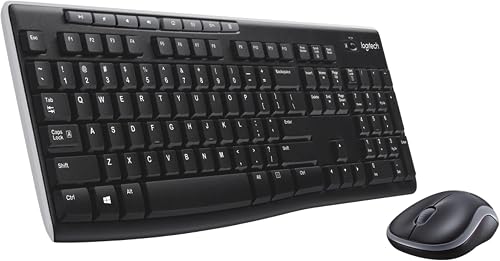
For a shared family desktop, the MK270 gives kids a full-size keyboard with a number pad and a matching mouse on one small USB receiver. It is simple, reliable and one of the best-selling keyboards on Amazon.
It has 111,800+ reviews, a 4.5-star rating and 10K+ purchases last month, and it is an Amazon’s Choice pick.
Pros
- Keyboard and mouse included
- Huge number of reviews
- Full-size with number pad
Cons
- Full-size takes desk space
- Uses batteries (not rechargeable)
4. Logitech K120 Wired Keyboard — Best budget and spill-resistant

The K120 is a simple, durable full-size keyboard with a spill-resistant design, quiet keys and a number pad. It is a cheap, reliable choice for a family desktop.
It has 9,600+ reviews, a 4.6-star rating and 6K+ purchases last month, and it is an Amazon’s Choice pick.
Pros
- Very affordable
- Spill-resistant
- Full-size with number pad
Cons
- Wired only
- Large for small desks
5. Redragon Mechanical Gaming Keyboard, Hot-Swappable Red Switches — Best for teens (ages 12+)
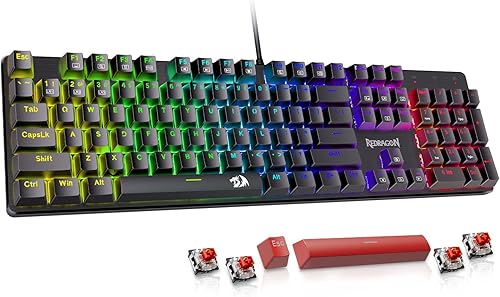
Teens who code and game often want a mechanical keyboard. This Redragon is a budget favorite with smooth red switches, backlighting and hot-swappable switches, so teens can change switches later without soldering.
It has 6,960+ reviews, a 4.3-star rating and 3K+ purchases last month, and it is an Amazon’s Choice pick.
Pros
- Satisfying mechanical typing
- Hot-swappable switches
- Very popular
Cons
- Louder than membrane keyboards
- Wired only
6. CanaKit Raspberry Pi 5 Starter Kit PRO (8GB) — Best all-in-one coding computer
The Raspberry Pi 5 is a tiny, affordable computer made for learning. This CanaKit bundle includes a case, power supply and preloaded card, so kids can add any keyboard from this list, connect a monitor or TV, and start coding with Scratch and Python on Raspberry Pi OS.
It has 1,460+ reviews, a 4.6-star rating and 1K+ purchases last month.
Pros
- A real coding computer
- Great for Scratch and Python
- Encourages tinkering
Cons
- Needs a monitor or TV
- Not a regular Windows PC
How to Choose a Keyboard for a Kid Learning to Code
Choose by age and device, and make sure the keyboard has a standard layout with every symbol key.
Why a standard layout matters for coding
Real programming uses brackets ( ) [ ] { }, quotes, colons and semicolons constantly. Some “kids keyboards” simplify or move these keys. For coding, choose a standard QWERTY layout so skills transfer to any computer.
Ages 6-8: big, clear letters
At this age most coding happens in block-based tools like Scratch Jr and Scratch, and typing practice matters more than speed. A large-print, high-contrast keyboard helps kids find keys quickly.
Ages 8-12: kid-sized, standard keys
As kids move to text coding in Python or JavaScript, a compact standard keyboard like the Logitech K380s fits smaller hands while keeping every symbol key.
Ages 12+: comfort for long sessions
Teens coding for hours may prefer a mechanical keyboard or a full-size keyboard with a number pad. Comfort and good key feel reduce mistakes and fatigue.
Check device compatibility
Many schools use Chromebooks or iPads. Bluetooth keyboards like the K380s work with Windows, Mac, ChromeOS, iPadOS and Android. Wired USB keyboards need a USB-A port or an adapter for USB-C devices.
Build typing skills alongside coding
Touch typing is one of the biggest speed boosts for young coders. Short daily practice sessions with a typing program, plus a keyboard that lets them hide the letters as they improve, pay off quickly.
Durability and spills
Kids eat and drink near computers. A spill-resistant keyboard like the Logitech K120 survives small accidents, and wired keyboards never need charging.
Best Keyboard by Age at a Glance
| Age | What they are learning | Best keyboard type | Pick above |
|---|---|---|---|
| 6-8 | Letters, typing basics, Scratch Jr | Large-print, high-contrast | Large Print Keyboard |
| 8-12 | Scratch, first Python lessons | Compact standard layout | Logitech K380s |
| 12+ | Python, JavaScript, game mods | Comfortable full-size or mechanical | Redragon mechanical, MK270 |
| Any age | Building and coding projects | Coding computer kit | CanaKit Raspberry Pi 5 |
Free Tools to Start Coding
- Scratch and ScratchJr: free block-based coding from MIT, great for ages 5 to 12.
- Code.org: free courses and the Hour of Code activities used in many schools.
- Python with Thonny: a beginner-friendly Python editor included on Raspberry Pi OS and available for Windows and Mac.
- Typing practice sites: short daily sessions build the touch typing that makes text coding faster.
Mouse or No Mouse?
Block coding in Scratch uses a lot of dragging, so a comfortable mouse matters for younger kids. Text coding is mostly typing. A combo like the Logitech MK270 covers both for a family PC.
Related guides
Frequently Asked Questions
What is the best free coding app for kids?
Scratch is the most popular free starting point, followed by Code.org courses and Python with Thonny.
Does a Raspberry Pi need a keyboard?
Yes. Kits like CanaKit include the computer, case and power, but you add a keyboard, mouse and display.
What age should kids start learning to type?
Many kids start basic typing around ages 6 to 8, with more serious touch typing from about 8 to 10.
Do kids need a special keyboard to learn coding?
No. A comfortable standard keyboard with clear labels and all symbol keys is best.
Is a mechanical keyboard good for kids?
Teens often enjoy them, but they are louder; younger kids do fine with quiet membrane keyboards.
Which keyboard works with a Chromebook?
Most USB and Bluetooth keyboards work; the Logitech K380s pairs easily with ChromeOS.
What is a Raspberry Pi?
It is a small, low-cost computer designed for learning to code with tools like Scratch and Python.
Are color-coded keyboards good for coding?
They help very young kids find letters, but older kids benefit more from a standard, clearly labeled layout.
Final Verdict
The Logitech Pebble Keys 2 K380s is the best keyboard for most kids learning programming, with a kid-friendly size, standard layout and support for Chromebooks and iPads. Choose a large-print keyboard for ages 6 to 8, the Redragon mechanical keyboard for teens, or the Raspberry Pi 5 if you want a dedicated coding computer.
As an Amazon Associate, Guide Of Adviser earns from qualifying purchases. Product details and prices can change, so please check Amazon before you buy.