If you have Optimum Fiber, you do not need to buy a modem. Optimum installs fiber equipment that includes its own gateway, which handles the fiber connection. Cable modems such as DOCSIS 3.1 models only work on Optimum’s cable (coax) internet, not on fiber. Many top guides for this keyword still recommend cable modems and never explain this difference.
What you can do is add your own router or mesh system to get better Wi-Fi coverage, newer Wi-Fi standards or more control. This guide explains how that works with Optimum Fiber, which routers are worth buying based on current Amazon sales, and three ways to connect them without causing double NAT problems.
Quick answer: Optimum Fiber does not use a store-bought modem; keep the Optimum gateway and add a router. Best value: TP-Link Archer AX21 (25,000+ reviews, 9K+ bought last month). Best Wi-Fi 7 value: TP-Link Archer BE230 (5K+ bought last month). Best for power users: GL.iNet Flint 2. Best mesh: TP-Link Deco X55 3-pack. Only Optimum cable customers need a DOCSIS modem.
Our Top 3 Picks for best modem for optimum fiber
🔥 Black Friday Deals Live
TP-Link Archer AX21 AX1800 Wi-Fi 6 Router
Wi-Fi 6, 9K+ bought last month.
- ✓ Very affordable
- ✓ Access point mode
- ✓ Huge user base

TP-Link Archer BE230 BE3600 Dual-Band Wi-Fi 7 Router
BE3600 Wi-Fi 7, 5K+ bought last month.
- ✓ Wi-Fi 7 at a low price
- ✓ 2.5G ports
- ✓ Strong sales

TP-Link Deco X55 AX3000 Wi-Fi 6 Mesh System (3-Pack)
3-pack for whole-home coverage.
- ✓ Whole-home coverage
- ✓ Access point mode
- ✓ Simple app
As an Amazon Associate, we earn from qualifying purchases. Prices and deals change often, so check Amazon for the latest price.
How we picked these products
- Checked Amazon US in November 2026 and kept only products with strong “bought in past month” sales.
- Compared ratings and review counts, and dropped listings with too little feedback.
- Matched every product to the exact need in this guide, not just the category.
- Read the top-ranking guides for this topic and added the details they miss or get wrong.
We do not hands-on test every product. Our picks are based on specs, sales, verified buyer feedback and manufacturer information. Last updated: November 2026.
Routers for Optimum Fiber Compared
| Product | Best for | Wi-Fi / ports | Price |
|---|---|---|---|
| TP-Link Archer AX21 AX1800 Wi-Fi 6 Router | Best value | Wi-Fi 6, gigabit ports | Check price |
| TP-Link Archer BE230 BE3600 Dual-Band Wi-Fi 7 Router | Best Wi-Fi 7 value | Wi-Fi 7, 2.5G ports | Check price |
| TP-Link Archer BE400 BE6500 Dual-Band Wi-Fi 7 Router | Faster Wi-Fi 7 step-up | Wi-Fi 7, 1x 2.5G WAN/LAN + 1x 2.5G LAN | Check price |
| GL.iNet GL-MT6000 Flint 2 Wi-Fi 6 Router | Best for power users | Wi-Fi 6, dual 2.5G ports | Check price |
| TP-Link AXE5400 Tri-Band Wi-Fi 6E Router | Best Wi-Fi 6E pick | Wi-Fi 6E tri-band | Check price |
| TP-Link Deco X55 AX3000 Wi-Fi 6 Mesh System (3-Pack) | Best mesh | Wi-Fi 6 mesh, 3 units | Check price |
1. TP-Link Archer AX21 AX1800 Wi-Fi 6 Router — Best value
For Optimum Fiber plans up to about 1 Gig, the Archer AX21 is a proven, affordable Wi-Fi 6 router. It supports access point mode, which is useful if your Optimum gateway cannot be bridged.
It has 24,900+ reviews, a 4.4-star rating and 9K+ purchases last month, and it is an Amazon’s Choice pick.
Pros
- Very affordable
- Access point mode
- Huge user base
Cons
- Gigabit ports limit multi-gig plans
- No 6 GHz band
2. TP-Link Archer BE230 BE3600 Dual-Band Wi-Fi 7 Router — Best Wi-Fi 7 value
The Archer BE230 brings Wi-Fi 7 features like Multi-Link Operation to a low price and adds 2.5G ports, so it can use more of a multi-gig Optimum Fiber plan than a gigabit router.
It has 1,800+ reviews, a 4.2-star rating and 5K+ purchases last month.
Pros
- Wi-Fi 7 at a low price
- 2.5G ports
- Strong sales
Cons
- Dual-band only
- Not for the largest homes
3. TP-Link Archer BE400 BE6500 Dual-Band Wi-Fi 7 Router — Faster Wi-Fi 7 step-up
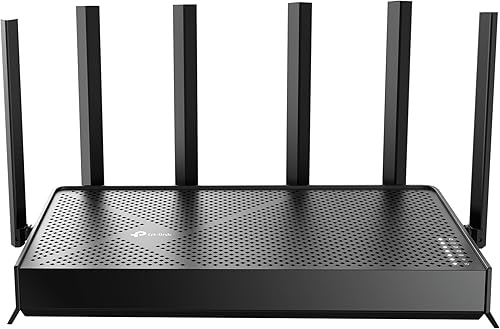
A step up from the BE230 with faster 5 GHz Wi-Fi 7 speeds and coverage up to about 2,400 sq ft for up to 90 devices.
It has 1,750+ reviews, a 4.3-star rating and 4K+ purchases last month, and it is an Amazon’s Choice pick.
Pros
- Faster Wi-Fi 7
- Two 2.5G ports
- Good coverage
Cons
- Costs more than BE230
- Dual-band only
4. GL.iNet GL-MT6000 Flint 2 Wi-Fi 6 Router — Best for power users

Flint 2 runs OpenWrt-based firmware with strong VPN support, ad blocking add-ons and detailed controls. Its dual 2.5G ports suit multi-gig fiber.
It has 3,100+ reviews, a 4.5-star rating and 2K+ purchases last month.
Pros
- Excellent VPN features
- Dual 2.5G ports
- Highly rated
Cons
- Advanced menus
- Wi-Fi 6, not Wi-Fi 7
5. TP-Link AXE5400 Tri-Band Wi-Fi 6E Router — Best Wi-Fi 6E pick

If your phones and laptops support 6 GHz, this tri-band Wi-Fi 6E router gives them a clean, fast band away from crowded 2.4 and 5 GHz networks.
It has 5,500+ reviews, a 4.3-star rating and 3K+ purchases last month.
Pros
- 6 GHz band
- Tri-band
- Well reviewed
Cons
- Wi-Fi 6E, not 7
- Single router range
6. TP-Link Deco X55 AX3000 Wi-Fi 6 Mesh System (3-Pack) — Best mesh
For larger homes, a mesh system spreads Wi-Fi far better than one router. The Deco X55 can run in access point mode behind the Optimum gateway.
It has 17,300+ reviews, a 4.4-star rating and 6K+ purchases last month.
Pros
- Whole-home coverage
- Access point mode
- Simple app
Cons
- Gigabit ports
- Some features need a subscription
How to Use Your Own Router with Optimum Fiber
First confirm whether you have Optimum Fiber or Optimum cable, then choose a router and connection method.
Optimum Fiber vs Optimum cable
Optimum Fiber connects with fiber equipment and an Optimum gateway. Optimum cable internet uses coax and a DOCSIS modem. Only cable customers can shop for a DOCSIS modem. If a technician installed a fiber box and gateway, you have fiber.
Option 1: Bridge or passthrough mode
If your Optimum gateway supports bridge or passthrough mode, it stops routing and passes the connection to your router. This is the cleanest setup. Gateway models and settings vary, so check your gateway settings or ask Optimum support whether your model supports it.
Option 2: DMZ
If bridge mode is not available, you can leave the gateway in router mode and put your router’s address in the gateway’s DMZ setting. This forwards incoming traffic to your router and avoids most double NAT problems.
Option 3: Access point mode
The simplest option is to set your router or mesh to access point mode. The Optimum gateway keeps routing, and your router only provides Wi-Fi. You lose some router features, but setup is easy and there is no double NAT.
Turn off or rename the gateway Wi-Fi
If you use your own Wi-Fi, turn off the gateway Wi-Fi or give it a different name so devices do not jump between networks. If you have Optimum TV boxes that connect over the gateway Wi-Fi, check with Optimum before turning it off.
Match the router to your plan
For plans up to about 1 Gig, a gigabit router works. For multi-gig plans, choose a router with 2.5G or faster ports and connect it to the gateway’s fastest port with Cat6 or better cable.
Which Setup Should You Use?
| Your situation | Best method | Trade-off |
|---|---|---|
| Gateway supports bridge or passthrough | Bridge/passthrough + your router | None; cleanest setup |
| No bridge mode, you need port forwarding or VPN | DMZ to your router | Gateway still routes |
| You just want better Wi-Fi coverage | Router or mesh in access point mode | Fewer router features |
| You have Optimum cable, not fiber | Buy a compatible DOCSIS modem | Check Optimum’s approved list |
Troubleshooting
- Strict NAT on consoles: switch to bridge/passthrough or DMZ so your router handles the public connection.
- Slow speeds on a fast plan: make sure both devices use multi-gig ports and good cables.
- TV boxes stopped working: some Optimum TV equipment relies on the gateway Wi-Fi; turn it back on or ask Optimum.
- Devices see two networks: rename or turn off the gateway Wi-Fi.
Related guides
Frequently Asked Questions
Do I need a modem for Optimum Fiber?
No. Optimum provides the fiber gateway. You can add your own router behind it.
Can I use my own router with Optimum Fiber?
Yes, using bridge or passthrough mode if available, DMZ, or access point mode.
Will a DOCSIS 3.1 modem work with Optimum Fiber?
No. DOCSIS modems are for Optimum’s cable internet, not fiber.
What is double NAT?
It happens when two routers both route traffic. It can cause gaming and VPN issues; bridge, DMZ or access point mode fixes it.
Which router is best for Optimum Fiber?
The Archer AX21 is the best value, and the Archer BE230 is the best low-cost Wi-Fi 7 option.
Should I use mesh with Optimum Fiber?
Yes, in larger homes. Run the mesh in access point mode or behind a bridged gateway.
Final Verdict
Optimum Fiber does not need a store-bought modem, so focus on the router. The TP-Link Archer AX21 is the best value, the Archer BE230 is the best low-cost Wi-Fi 7 upgrade, and the Deco X55 is the best mesh choice for large homes.
As an Amazon Associate, Guide Of Adviser earns from qualifying purchases. Product details and prices can change, so please check Amazon before you buy.