Many people search for a “modem for Starlink,” but Starlink does not use a separate modem. The dish (Starlink calls it the terminal) talks to the satellites, and the Starlink router that comes in the kit handles your home Wi-Fi. There is nothing like a cable or DSL modem to buy.
What you can upgrade is the router. Starlink officially supports third-party routers and mesh systems through a feature called bypass mode. The catch is that the setup depends on which Starlink router you have: the Gen 3 router has built-in Ethernet ports, while the older Gen 2 router needs the Starlink Ethernet adapter. Most top-ranking guides skip these details, recommend Wi-Fi 7 gear you do not need, or list mounts as “routers.” This guide covers what really matters.
Quick answer: Starlink has no separate modem. To get better Wi-Fi, add your own router or mesh and turn on bypass mode in the Starlink app. Gen 2 kits need the Starlink Ethernet adapter; Gen 3 routers have Ethernet ports built in. Best value: TP-Link Archer AX21 (25,000+ reviews, 9K+ bought last month). Best mesh: TP-Link Deco X55 3-pack. Best Wi-Fi 7 upgrade: TP-Link Archer BE400.
Our Top 3 Picks for best modem for starlink
🔥 Black Friday Deals Live
TP-Link Archer AX21 AX1800 Wi-Fi 6 Router
Wi-Fi 6, gigabit WAN, 9K+ bought last month.
- ✓ Low price
- ✓ Huge user base
- ✓ Gigabit WAN is enough for Starlink

TP-Link Deco X55 AX3000 Wi-Fi 6 Mesh System (3-Pack)
3-pack covers large homes and outbuildings.
- ✓ Whole-home coverage
- ✓ Ethernet backhaul support
- ✓ Simple Deco app

FONKEN Ethernet Adapter for Starlink Gen 2 (Rectangular) Kits
Third-party adapter for Gen 2 kits, 500+ bought last month.
- ✓ Adds a wired port to Gen 2 kits
- ✓ Needed for bypass mode on Gen 2
- ✓ Small and simple
As an Amazon Associate, we earn from qualifying purchases. Prices and deals change often, so check Amazon for the latest price.
How we picked these products
- Checked Amazon US in November 2026 and kept only products with strong “bought in past month” sales.
- Compared ratings and review counts, and dropped listings with too little feedback.
- Matched every product to the exact need in this guide, not just the category.
- Read the top-ranking guides for this topic and added the details they miss or get wrong.
We do not hands-on test every product. Our picks are based on specs, sales, verified buyer feedback and manufacturer information. Last updated: November 2026.
Routers and Accessories for Starlink Compared
| Product | Best for | Type | Price |
|---|---|---|---|
| TP-Link Archer AX21 AX1800 Wi-Fi 6 Router | Best value single router | Wi-Fi 6, gigabit WAN | Check price |
| TP-Link Deco X55 AX3000 Wi-Fi 6 Mesh System (3-Pack) | Best mesh for homes and rural properties | Wi-Fi 6 mesh, 3 units | Check price |
| TP-Link Archer BE400 BE6500 Wi-Fi 7 Router | Best Wi-Fi 7 upgrade | Wi-Fi 7, 2.5G WAN/LAN | Check price |
| TP-Link Deco XE75 Pro AXE5400 Wi-Fi 6E Mesh (2-Pack) | Best mesh with 6 GHz | Wi-Fi 6E mesh, 2 units | Check price |
| FONKEN Ethernet Adapter for Starlink Gen 2 (Rectangular) Kits | Required for Gen 2 routers | Ethernet adapter | Check price |
1. TP-Link Archer AX21 AX1800 Wi-Fi 6 Router — Best value single router
Starlink residential speeds are usually well under 1 Gbps, so a reliable Wi-Fi 6 router with a gigabit WAN port is all most homes need. The Archer AX21 is one of the most popular routers on Amazon and easy to set up behind a bypassed Starlink router.
It has 24,900+ reviews, a 4.4-star rating and 9K+ purchases last month.
Pros
- Low price
- Huge user base
- Gigabit WAN is enough for Starlink
Cons
- Single router; limited range in big homes
- No 6 GHz band
2. TP-Link Deco X55 AX3000 Wi-Fi 6 Mesh System (3-Pack) — Best mesh for homes and rural properties
Starlink homes are often rural, spread out or have a shop or garage. A 3-pack mesh like the Deco X55 spreads Wi-Fi far better than Starlink’s single router and lets you wire units together with Ethernet backhaul.
It has 17,300+ reviews, a 4.4-star rating and 6K+ purchases last month.
Pros
- Whole-home coverage
- Ethernet backhaul support
- Simple Deco app
Cons
- Wi-Fi 6, not 6E or 7
- Some security features need a subscription
3. TP-Link Archer BE400 BE6500 Wi-Fi 7 Router — Best Wi-Fi 7 upgrade
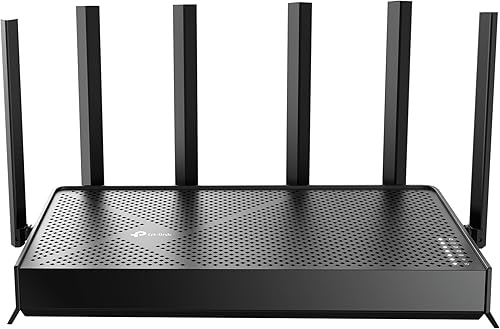
If you have new Wi-Fi 7 phones or laptops and want a router that will outlast your Starlink plan, the Archer BE400 is an affordable Wi-Fi 7 option. Its 2.5G port is more than Starlink needs today, so it leaves room for a future fiber or 5G connection.
It has 1,750+ reviews, a 4.3-star rating and 4K+ purchases last month.
Pros
- Wi-Fi 7 at a low price
- Future-proof ports
- Good coverage
Cons
- Overkill for Starlink speeds alone
- Dual-band only
4. TP-Link Deco XE75 Pro AXE5400 Wi-Fi 6E Mesh (2-Pack) — Best mesh with 6 GHz

The Deco XE75 Pro adds a 6 GHz band that the mesh units can use for a faster, cleaner link between each other, which helps when you cannot run Ethernet between rooms.
It has 3,330+ reviews, a 4.3-star rating and 500+ purchases last month.
Pros
- 6 GHz band
- 2.5G port per unit
- Strong wireless backhaul
Cons
- Costs more than the X55
- Only 2 units in this pack
5. FONKEN Ethernet Adapter for Starlink Gen 2 (Rectangular) Kits — Required for Gen 2 routers
The Gen 2 Starlink router has no Ethernet port. This adapter goes between the dish cable and the router so you can plug a third-party router or a wired device into Starlink. Gen 3 routers and Starlink Mini do not need it. Note that this is a third-party adapter made by FONKEN; Starlink also sells its own official Ethernet adapter in the Starlink shop.
It has 438 reviews, a 4.6-star rating and 500+ purchases last month.
Pros
- Adds a wired port to Gen 2 kits
- Needed for bypass mode on Gen 2
- Small and simple
Cons
- Not needed for Gen 3 or Mini
- Check that it matches your kit
How to Use Your Own Router with Starlink
Know your Starlink hardware, connect correctly, and choose a router sized for Starlink’s real-world speeds.
Starlink does not use a modem
The Starlink terminal (dish) and its power supply bring the internet connection to your home, and the Starlink router creates the Wi-Fi network. There is no cable or DSL style modem in the system, so the only thing you can replace is the router.
Step 1: Identify your Starlink router
Gen 3 routers (included with newer Standard kits) have two Ethernet ports under a rubber cover on the back. Gen 2 routers (older rectangular kits) have no Ethernet ports and need the Starlink Ethernet adapter. Starlink Mini has the router built into the dish; Starlink recommends its official Mini Ethernet cable for wired setups.
Step 2: Connect your router
On Gen 3, plug an Ethernet cable from one of the Starlink router’s ports into the WAN or Internet port of your router. On Gen 2, install the Ethernet adapter between the dish cable and the Starlink router, then connect the adapter to your router’s WAN port.
Step 3: Turn on bypass mode
In the Starlink app, open the router settings and enable bypass mode. This turns off Starlink’s Wi-Fi and routing so your router manages the network. Important: Starlink notes that you need a factory reset of the Starlink router to turn bypass mode off again, so write down your settings first.
Do you even need bypass mode?
You can also leave the Starlink router on and plug your router or mesh in behind it. That works, but it creates double NAT and two Wi-Fi networks. Bypass mode is cleaner for most homes. Starlink also warns that some app features may not work as expected with third-party routers.
Choose a router for Starlink speeds
Starlink residential speeds vary with your location, plan and sky view, but they are typically far below 1 Gbps. A Wi-Fi 6 router or mesh with a gigabit WAN port is enough. Spend your budget on coverage (mesh for large homes and outbuildings) rather than multi-gig ports.
CGNAT and port forwarding
Starlink residential service uses carrier-grade NAT (CGNAT) for IPv4, so traditional port forwarding for game servers, cameras or remote access usually will not work, even with your own router. IPv6 or a VPN/tunnel service can be workarounds. A new router cannot remove CGNAT.
Mesh tips for Starlink homes
Place the main mesh unit near where the Starlink cable enters the house, then space satellites one or two rooms apart. If you have a detached garage or shop, an Ethernet run or an outdoor-rated access point works better than a long wireless hop.
What You Need for Each Starlink Kit
Use this quick chart before you buy anything. Most mistakes happen because people buy an adapter they do not need, or a router without the right connection for their kit.
| Your Starlink hardware | Ethernet port? | To add your own router |
|---|---|---|
| Standard kit with Gen 3 router | Yes, 2 ports under a rubber cover | Plug router into a Gen 3 port, then enable bypass mode |
| Standard Actuated kit with Gen 2 router | No | Add an Ethernet adapter, then enable bypass mode |
| Starlink Mini | Built into the dish | Use the official Mini Ethernet cable for wired setups |
| Gen 1 round dish | Yes, on the Gen 1 router | Replace the Gen 1 router with your own, per Starlink’s guide |
Common Starlink Router Problems and Fixes
- No internet after enabling bypass: confirm the cable goes into your router’s WAN (Internet) port, then restart your router.
- Cannot turn bypass mode off: Starlink requires a factory reset of its router to exit bypass mode.
- Starlink app shows limited stats: Starlink notes some app features may not work as expected with third-party routers.
- Port forwarding does not work: this is usually CGNAT on IPv4, not your router; try IPv6 or a tunnel service.
- Weak Wi-Fi in a shop or barn: run Ethernet to a second mesh unit or outdoor access point instead of relying on a long wireless hop.
Is a New Router Worth It for Starlink?
A new router will not make the satellite connection faster. Your speed depends on the dish, your plan, obstructions and network congestion. What a better router does improve is Wi-Fi coverage, device handling and features like parental controls. If your Starlink Wi-Fi already reaches every room, focus on clearing obstructions in the Starlink app before buying new gear.
Related guides
Frequently Asked Questions
Is the Starlink Ethernet adapter on Amazon official?
Many listings are third-party. The official adapter is sold in the Starlink shop; third-party adapters can work but check reviews and compatibility.
Will a better router make Starlink faster?
Not the satellite link itself, but it can improve Wi-Fi speed and coverage inside your home.
Do I need a modem for Starlink?
No. Starlink has no separate modem. The dish and Starlink router provide your connection; you can add your own router if you want.
Can I use my own router with Starlink?
Yes. Starlink supports third-party routers and mesh systems through bypass mode.
Do I need the Starlink Ethernet adapter?
Only with the Gen 2 router, which has no Ethernet port. Gen 3 routers have built-in ports.
How do I turn off bypass mode?
Starlink says a factory reset of the Starlink router is required to exit bypass mode.
Do I need a Wi-Fi 7 router for Starlink?
No. Starlink speeds are well within what a good Wi-Fi 6 router can handle.
Can I port forward on Starlink?
Usually not on IPv4, because residential Starlink uses CGNAT. IPv6 or a tunnel service can help.
Final Verdict
Starlink does not need a modem, so focus on the router. For most homes the TP-Link Archer AX21 is the best value, the Deco X55 3-pack is the best choice for large homes and rural properties, and Gen 2 owners need the Starlink Ethernet adapter before any third-party router will work.
As an Amazon Associate, Guide Of Adviser earns from qualifying purchases. Product details and prices can change, so please check Amazon before you buy.