If you are shopping for a modem for AT&T Fiber, here is the most important fact first: you cannot replace AT&T’s equipment with a store-bought modem. AT&T Fiber connects to your home through an AT&T gateway (such as the BGW320) that works as the fiber modem and router in one box. Cable modems like DOCSIS 3.1 models from Arris, Motorola or Hitron are made for cable internet and will not work on AT&T Fiber at all.
What you can do is add your own router behind the AT&T gateway. AT&T supports this through a gateway setting called IP Passthrough, and it is how many people get faster Wi-Fi, better coverage, mesh, parental controls or advanced features. Several top-ranking guides for this keyword still recommend cable modems or skip the IP Passthrough setup, so this guide explains what actually works, which routers match each AT&T Fiber speed tier, and how to set it up step by step.
Quick answer: You cannot buy a modem for AT&T Fiber; the AT&T gateway is required. Instead, connect your own router to it with IP Passthrough. Best budget pick: TP-Link Archer BE400 (Wi-Fi 7, 2.5G WAN, 4K+ bought last month). Best for 2 Gig plans: GL.iNet Flint 3 with five 2.5G ports. Best for 5 Gig plans: TP-Link Archer BE600 with a 10G port. Best mesh: TP-Link Deco 7 Pro with a 10G WAN/LAN port.
Our Top 3 Picks for best modem for at&t fiber
🔥 Black Friday Deals Live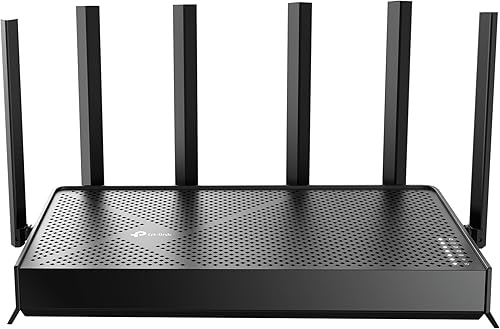
TP-Link Archer BE400 BE6500 Dual-Band Wi-Fi 7 Router
Wi-Fi 7 with 2.5G WAN for 1 Gig and 2 Gig plans.
- ✓ Wi-Fi 7 at a low price
- ✓ Two 2.5G ports
- ✓ Easy app setup

TP-Link Archer BE600 BE9700 Tri-Band Wi-Fi 7 Router
10G port can use AT&T’s fastest tiers.
- ✓ 10G port
- ✓ Tri-band Wi-Fi 7
- ✓ Good price for multi-gig
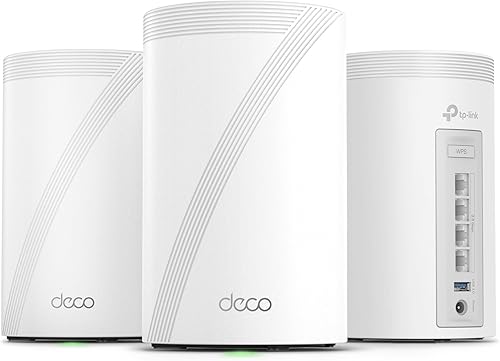
TP-Link Deco 7 Pro BE10000 Wi-Fi 7 Mesh System (3-Pack)
3-pack, 10G WAN/LAN, up to 7,600 sq ft.
- ✓ Whole-home coverage
- ✓ 10G WAN/LAN
- ✓ Simple app
As an Amazon Associate, we earn from qualifying purchases. Prices and deals change often, so check Amazon for the latest price.
How we picked these products
- Checked Amazon US in November 2026 and kept only products with strong “bought in past month” sales.
- Compared ratings and review counts, and dropped listings with too little feedback.
- Matched every product to the exact need in this guide, not just the category.
- Read the top-ranking guides for this topic and added the details they miss or get wrong.
We do not hands-on test every product. Our picks are based on specs, sales, verified buyer feedback and manufacturer information. Last updated: November 2026.
Routers for AT&T Fiber Compared
| Product | Best for | WAN port | Price |
|---|---|---|---|
| TP-Link Archer BE400 BE6500 Dual-Band Wi-Fi 7 Router | Best value for 1 Gig and 2 Gig | 1x 2.5G WAN/LAN + 1x 2.5G LAN | Check price |
| GL.iNet GL-BE9300 Flint 3 Tri-Band Wi-Fi 7 Router | Best for 2 Gig and power users | 5x 2.5G ports | Check price |
| TP-Link Archer BE600 BE9700 Tri-Band Wi-Fi 7 Router | Best for 5 Gig plans | 10G port + 2.5G ports | Check price |
| TP-Link Deco 7 Pro BE10000 Wi-Fi 7 Mesh System (3-Pack) | Best mesh for large homes | 10G WAN/LAN + four 2.5G | Check price |
| TP-Link Deco XE75 Pro AXE5400 Wi-Fi 6E Mesh (2-Pack) | Budget mesh | 2.5G WAN/LAN per unit | Check price |
1. TP-Link Archer BE400 BE6500 Dual-Band Wi-Fi 7 Router — Best value for 1 Gig and 2 Gig
The Archer BE400 brings Wi-Fi 7 features like Multi-Link Operation to a budget price. Its 2.5 Gbps WAN/LAN port is fast enough for AT&T Fiber 1 Gig and close to full speed on 2 Gig, and the second 2.5G port is handy for a gaming PC or NAS. TP-Link rates it for up to 2,400 sq ft and 90 devices.
It is the best seller in this list, with 1,750+ reviews, a 4.3-star rating and 4K+ purchases last month.
Pros
- Wi-Fi 7 at a low price
- Two 2.5G ports
- Easy app setup
Cons
- Dual-band only (no 6 GHz)
- Not enough WAN for 5 Gig plans
2. GL.iNet GL-BE9300 Flint 3 Tri-Band Wi-Fi 7 Router — Best for 2 Gig and power users
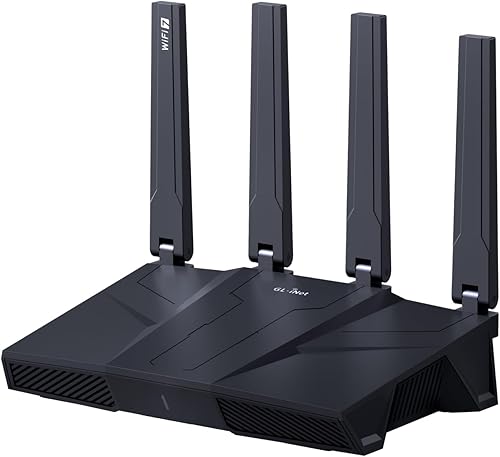
The Flint 3 has five 2.5G ports, so you can run a 2.5G WAN from the AT&T gateway and still wire several fast devices. It runs OpenWrt-based firmware with built-in VPN client and server support, which makes it a favorite for people who want more control than the AT&T gateway allows.
It has 1,180+ reviews, a 4.4-star rating and 1K+ purchases last month.
Pros
- Five 2.5G ports
- Strong VPN features
- Tri-band Wi-Fi 7
Cons
- Advanced menus can overwhelm beginners
- No 10G port for 5 Gig
3. TP-Link Archer BE600 BE9700 Tri-Band Wi-Fi 7 Router — Best for 5 Gig plans
If you pay for AT&T Fiber 5 Gig, a 2.5G router becomes the bottleneck. The Archer BE600 adds a 10G port, so the link from the gateway is no longer the limit, and its tri-band Wi-Fi 7 covers up to about 2,600 sq ft.
It has 680 reviews, a 4.1-star rating and 1K+ purchases last month.
Pros
- 10G port
- Tri-band Wi-Fi 7
- Good price for multi-gig
Cons
- Lower rating than the BE400
- Single unit, not mesh
4. TP-Link Deco 7 Pro BE10000 Wi-Fi 7 Mesh System (3-Pack) — Best mesh for large homes
For big or multi-story homes, the Deco 7 Pro 3-pack covers up to 7,600 sq ft and supports 200+ devices. The 10G WAN/LAN port handles every AT&T Fiber tier, and the Deco app makes IP Passthrough setups simple.
It has 1,690+ reviews, a 4.3-star rating and 4K+ purchases last month.
Pros
- Whole-home coverage
- 10G WAN/LAN
- Simple app
Cons
- Expensive
- Some features need a subscription
5. TP-Link Deco XE75 Pro AXE5400 Wi-Fi 6E Mesh (2-Pack) — Budget mesh

If you want mesh coverage for a 1 Gig or 2 Gig plan without paying for Wi-Fi 7, the Deco XE75 Pro adds a 6 GHz band and one 2.5G port on each unit.
It has 3,330+ reviews, a 4.3-star rating and 500+ purchases last month.
Pros
- Wi-Fi 6E 6 GHz band
- 2.5G port on each unit
- Proven, well reviewed
Cons
- Wi-Fi 6E, not Wi-Fi 7
- 2.5G WAN limits 5 Gig plans
How to Use Your Own Router with AT&T Fiber
Match your router’s WAN port to your AT&T Fiber plan, then set up IP Passthrough so the two devices work together without double NAT.
Why there is no "modem" for AT&T Fiber
AT&T Fiber uses an optical connection, not coaxial cable. AT&T’s gateway (for example the BGW320) contains the fiber modem and authenticates your service, so AT&T requires it to stay connected. DOCSIS cable modems sold as “AT&T compatible” will not work on fiber. Your choice is the router you put behind the gateway.
Pick the right WAN port for your plan
On AT&T Fiber 300, 500 or 1 Gig, any router with a gigabit WAN port works. On 2 Gig, choose a router with a 2.5G WAN port such as the Archer BE400 or Flint 3. On 5 Gig, choose a router with a 10G WAN port such as the Archer BE600 or Deco 7 Pro, and connect it to the gateway’s fastest multi-gig port.
Step 1: Connect the router to the gateway
Run an Ethernet cable from a LAN port on the AT&T gateway to the WAN or Internet port on your router. Use the gateway’s multi-gig port if your plan is faster than 1 Gig, and use Cat6 or better cable.
Step 2: Turn on IP Passthrough
On a computer connected to the gateway, open 192.168.1.254 in a browser, go to Firewall and then IP Passthrough. Set Allocation Mode to Passthrough, choose DHCPS-fixed, and select your router from the device list. Save the settings. Your router then receives AT&T’s public IP address, which prevents double NAT problems for gaming, VPNs and port forwarding.
Step 3: Turn off the gateway’s Wi-Fi
In the gateway’s Home Network settings, turn off its 2.4 GHz and 5 GHz Wi-Fi. Two Wi-Fi networks on the same channels can interfere with each other, and you want every device to connect to your new router.
Step 4: Restart and test
Restart the router, confirm that its WAN status shows a public IP address (not 192.168.x.x), and run a wired speed test. If you still see a private IP, recheck the passthrough device selection and restart both devices.
Mesh or single router?
A single Wi-Fi 7 router covers most apartments and homes up to about 2,500 sq ft. For larger homes, thick walls or several floors, a mesh system like the Deco 7 Pro or Deco XE75 Pro gives better coverage than adding extenders.
Do you need Wi-Fi 7?
Wi-Fi 7 helps most if you have new phones and laptops that support it or a plan faster than 1 Gig. On a 300 or 500 Mbps plan with older devices, a Wi-Fi 6 or 6E router will feel almost the same.
Which Router Do You Need for Your AT&T Fiber Plan?
Use this table to match your plan to the router port you need. Buying more than your plan needs gives you headroom, but buying less creates a bottleneck.
| AT&T Fiber plan | Router WAN port needed | Good picks above |
|---|---|---|
| 300 / 500 Mbps | Gigabit (1G) | Any pick; Deco XE75 Pro for mesh |
| 1 Gig | Gigabit (2.5G gives headroom) | Archer BE400, Deco XE75 Pro |
| 2 Gig | 2.5G | Archer BE400, GL.iNet Flint 3 |
| 5 Gig | 10G | Archer BE600, Deco 7 Pro |
Troubleshooting Your AT&T Fiber Router Setup
- Router shows a 192.168.x.x WAN address: IP Passthrough is not applied to the right device. Recheck the passthrough device on the gateway, then restart the gateway first and your router second.
- Speeds stuck near 940 Mbps on a 2 or 5 Gig plan: you are on a gigabit port or cable. Use the gateway’s multi-gig port, your router’s 2.5G or 10G WAN port, and Cat6 or better cable.
- Some devices still connect to the old network: the gateway Wi-Fi is still on, or devices remember the old name. Turn off gateway Wi-Fi and forget the old network on each device.
- Game consoles report strict NAT: confirm IP Passthrough is working so your router holds the public IP, then enable UPnP on your router.
- Need a static IP for servers: AT&T sells static IP blocks as an add-on; contact AT&T for options.
Should You Keep Using the AT&T Gateway Wi-Fi?
If your home is small and the gateway Wi-Fi reaches every room, you may not need a new router at all. Add your own router or mesh when you have dead zones, want Wi-Fi 7 speeds on new devices, need features like VPN or advanced parental controls, or want to keep your Wi-Fi name and settings the same if you ever switch internet providers.
Related guides
Frequently Asked Questions
Do I have to pay to rent the AT&T gateway?
Gateway fees and terms can change by plan and promotion, so check your AT&T bill or account for current equipment charges.
Will a mesh system work with AT&T Fiber?
Yes. Connect the main mesh unit to the gateway and use IP Passthrough so the mesh system acts as your main router.
Can I use my own modem with AT&T Fiber?
No. AT&T Fiber requires AT&T’s gateway, which acts as the fiber modem. You can add your own router behind it.
Can I use my own router with AT&T Fiber?
Yes. Connect it to the gateway and enable IP Passthrough so your router becomes the main router.
Will a DOCSIS 3.1 cable modem work with AT&T Fiber?
No. DOCSIS modems are for cable internet providers such as Xfinity, Spectrum and Cox.
What is IP Passthrough?
It is an AT&T gateway setting that passes the public IP address to your router, avoiding double NAT.
Do I need a 10G router for AT&T Fiber?
Only for the 5 Gig plan. For 2 Gig, a 2.5G WAN port is enough; for 1 Gig and below, gigabit works.
Should I turn off the AT&T gateway Wi-Fi?
Yes, when you use your own router, turn off the gateway Wi-Fi to avoid interference and confusion.
Final Verdict
There is no store-bought modem for AT&T Fiber, so the smart upgrade is a router behind the AT&T gateway with IP Passthrough. The TP-Link Archer BE400 is the best value for 1 Gig and 2 Gig plans, the Archer BE600 suits 5 Gig, and the Deco 7 Pro is the best choice for large homes.
As an Amazon Associate, Guide Of Adviser earns from qualifying purchases. Product details and prices can change, so please check Amazon before you buy.