
If you work in Excel or Google Sheets all day, your monitor decides how much of your data you can see at once. A bigger, higher-resolution screen shows more columns and rows, which means less scrolling, fewer mistakes and easier comparisons. Resolution matters more than size: a 34-inch ultrawide at 3440 x 1440 or a 27-inch 4K screen shows far more cells than a typical 1080p monitor.
We compared the monitors with the strongest recent Amazon sales for office and spreadsheet work and explain which shape and resolution suit different workflows. Many competing pages recommend gaming monitors or skip text clarity and scaling; this guide focuses on what makes spreadsheets easier to read.
Quick answer: Best overall: SAMSUNG 34″ ViewFinity S50GC Ultra-WQHD (Amazon’s Choice, 2K+ bought last month). Best ultrawide value: Dell 34 S3425DW WQHD (3K+ bought). Best budget ultrawide: Sceptre 34″ Curved WQHD (3K+ bought). Best 27-inch 4K: Dell 27 S2725QS (Amazon’s Choice, 4K+ bought). Best 4K alternative: LG 27US500-W. For spreadsheets, choose 3440 x 1440 or 4K, not 2560 x 1080.
Our Top 3 Picks for best monitor for spreadsheet work
🔥 Black Friday Deals Live
SAMSUNG 34" ViewFinity S50GC Ultra-WQHD Monitor
34" 3440×1440, Amazon’s Choice.
- ✓ Lots of columns visible
- ✓ Great for side-by-side windows
- ✓ Good value
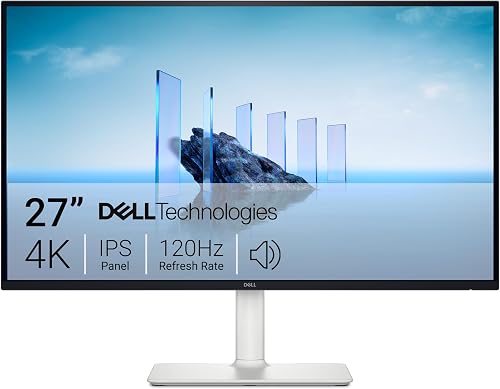
Dell 27 Monitor S2725QS (4K UHD IPS, 120Hz)
27" 4K, 4K+ bought last month.
- ✓ Very sharp text
- ✓ IPS color and angles
- ✓ Smooth 120Hz
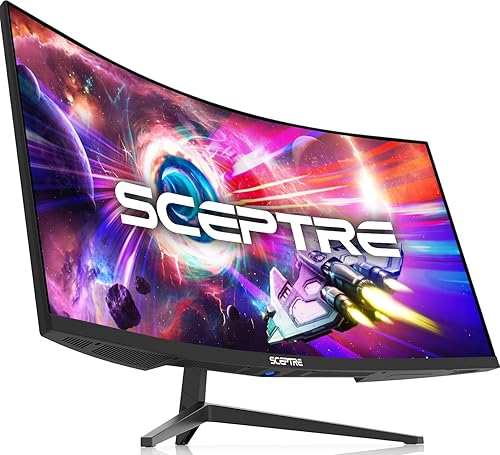
Sceptre 34-Inch Curved Ultrawide WQHD Monitor (3440 x 1440)
34" WQHD, 3K+ bought.
- ✓ Low price for WQHD ultrawide
- ✓ Strong sales
- ✓ Lots of screen space
As an Amazon Associate, we earn from qualifying purchases. Prices and deals change often, so check Amazon for the latest price.
How we picked these products
- Checked Amazon US in November 2026 and kept only products with strong “bought in past month” sales.
- Compared ratings and review counts, and dropped listings with too little feedback.
- Matched every product to the exact need in this guide, not just the category.
- Read the top-ranking guides for this topic and added the details they miss or get wrong.
We do not hands-on test every product. Our picks are based on specs, sales, verified buyer feedback and manufacturer information. Last updated: November 2026.
Monitors for Spreadsheet Work Compared
| Product | Best for | Size / resolution | Price |
|---|---|---|---|
| SAMSUNG 34" ViewFinity S50GC Ultra-WQHD Monitor | Best overall | 34 in, 3440 x 1440, 100Hz | Check price |
| Dell 34 Monitor S3425DW (WQHD, 120Hz) | Best ultrawide value | 34 in, 3440 x 1440, 120Hz | Check price |
| Sceptre 34-Inch Curved Ultrawide WQHD Monitor (3440 x 1440) | Best budget ultrawide | 34 in, 3440 x 1440 | Check price |
| Dell 27 Monitor S2725QS (4K UHD IPS, 120Hz) | Best 27-inch 4K | 27 in, 3840 x 2160, IPS | Check price |
| LG 27US500-W UltraFine 27-Inch 4K UHD Monitor | Best 4K alternative | 27 in, 3840 x 2160 | Check price |
1. SAMSUNG 34" ViewFinity S50GC Ultra-WQHD Monitor — Best overall
A 34-inch ultrawide at 3440 x 1440 shows many more columns than a standard monitor, making wide spreadsheets and side-by-side windows easy. Samsung’s S50GC is a popular, affordable office ultrawide.
It has 1,100+ reviews, a 4.4-star rating and 2K+ purchases last month, and it is an Amazon’s Choice pick.
Pros
- Lots of columns visible
- Great for side-by-side windows
- Good value
Cons
- VA panel viewing angles
- Stand has limited adjustment
2. Dell 34 Monitor S3425DW (WQHD, 120Hz) — Best ultrawide value

Dell’s S3425DW combines WQHD ultrawide resolution with a smooth 120Hz refresh rate and built-in speakers, a strong all-rounder for office work.
It has 690+ reviews, a 4.4-star rating and 3K+ purchases last month.
Pros
- Smooth 120Hz scrolling
- Trusted brand
- Built-in speakers
Cons
- Curved screen not for everyone
- VA panel
3. Sceptre 34-Inch Curved Ultrawide WQHD Monitor (3440 x 1440) — Best budget ultrawide
Sceptre offers ultrawide WQHD resolution at a lower price, a smart pick if you want more columns on a tight budget.
It has 3,100+ reviews, a 4.2-star rating and 3K+ purchases last month.
Pros
- Low price for WQHD ultrawide
- Strong sales
- Lots of screen space
Cons
- Basic stand
- Build quality is simpler
4. Dell 27 Monitor S2725QS (4K UHD IPS, 120Hz) — Best 27-inch 4K
A 27-inch 4K IPS screen makes text very sharp. At 150% scaling it is easy to read, and you can lower scaling to fit more cells if your eyesight allows.
It has 1,100+ reviews, a 4.4-star rating and 4K+ purchases last month, and it is an Amazon’s Choice pick.
Pros
- Very sharp text
- IPS color and angles
- Smooth 120Hz
Cons
- Fewer columns than ultrawide at default scaling
- 4K needs a capable laptop port
5. LG 27US500-W UltraFine 27-Inch 4K UHD Monitor — Best 4K alternative

LG’s UltraFine 27US500 is an affordable 4K option with crisp text for documents and spreadsheets.
It has 510+ reviews, a 4.3-star rating and 1K+ purchases last month.
Pros
- Crisp 4K text
- Affordable
- Clean design
Cons
- 60Hz
- Basic stand
How to Choose a Monitor for Spreadsheets
Pick resolution first, then shape and ergonomics.
Resolution matters more than size
More pixels mean more cells. A 3440 x 1440 ultrawide or 3840 x 2160 (4K) screen shows much more data than 1920 x 1080. Avoid 2560 x 1080 ultrawides for spreadsheets; they are wide but not tall, so you see fewer rows.
Ultrawide vs 27-inch 4K
Ultrawides are best for very wide sheets and side-by-side windows. A 27-inch 4K screen gives sharper text and more rows in a smaller footprint.
Scaling and text clarity
Windows scaling makes text bigger on high-resolution screens. Use 100% to 125% on a 34-inch WQHD ultrawide and around 125% to 150% on a 27-inch 4K, adjusted for comfort.
Panel type
IPS panels have wide viewing angles and good color. VA panels have strong contrast and are common in affordable ultrawides.
Ergonomics
Place the top of the screen at or slightly below eye level and about an arm’s length away. Consider a monitor arm if the stand lacks height adjustment.
Check your laptop ports
Ultrawide WQHD and 4K screens need HDMI 2.0 or DisplayPort/USB-C with DisplayPort to run at full resolution and refresh rate.
How Much Data Can You See?
| Monitor | Resolution | Best for |
|---|---|---|
| 24″ 1080p | 1920 x 1080 | Basic office work |
| 34″ ultrawide WFHD | 2560 x 1080 | Not ideal for spreadsheets (few rows) |
| 34″ ultrawide WQHD | 3440 x 1440 | Wide sheets, side-by-side windows |
| 27″ 4K | 3840 x 2160 | Sharp text, more rows |
Excel Productivity Tips for Big Screens
- Use Windows Snap (Win + arrow keys) to place two workbooks side by side.
- Freeze panes so headers stay visible while scrolling.
- Zoom Excel to 90-110% to fit more cells while keeping text readable.
- Use dark gridlines or banded rows to track rows across wide screens.
Frequently Asked Questions
Is an ultrawide good for Excel?
Yes. A 34-inch 3440 x 1440 ultrawide shows many more columns and makes side-by-side work easy.
Is 4K worth it for spreadsheets?
Yes, for very sharp text and more rows with comfortable scaling.
What size monitor is best for Excel?
27-inch 4K or 34-inch ultrawide WQHD are the sweet spots.
Should I avoid curved monitors for spreadsheets?
Gentle curves on ultrawides help keep edges in view; flat 27-inch screens work well too.
Do I need a high refresh rate for office work?
Not required, but 100-120Hz makes scrolling feel smoother.
Two monitors or one ultrawide?
One ultrawide avoids a center bezel; two monitors can be cheaper and flexible.
Final Verdict
The SAMSUNG 34″ ViewFinity S50GC is the best monitor for spreadsheet work for most people, showing many more columns at an affordable price. Choose the Dell S3425DW for smoother 120Hz scrolling, the Sceptre 34″ on a budget, and the Dell S2725QS if you prefer a sharp 27-inch 4K screen.
As an Amazon Associate, Guide Of Adviser earns from qualifying purchases. Product details and prices can change, so please check Amazon before you buy.