Handwriting notes on a Windows 2-in-1 or tablet can feel as natural as paper, if you pair the right app with the right pen. The best note taking app for Windows with a stylus depends on how you work: some apps are best for organized class notes, others for PDF markup, and some convert handwriting to text.
This guide compares the most useful handwriting apps on Windows and, just as important, explains stylus compatibility. Many people buy a pen that does not work with their laptop because Windows devices use different pen technologies. We list the best-selling styluses on Amazon and which devices they suit.
Quick answer: Best overall app: Microsoft OneNote (free, great organization and ink). Best ink-first app: Microsoft Journal (free). Best for students used to iPad: GoodNotes for Windows. Best handwriting-to-text: Nebo. Best free open-source: Xournal++. Best pens: Metapen M1 for Surface and MPP devices (1K+ bought last month), Lenovo Digital Pen 2, HP Rechargeable Tilt Pen MPP 2.0, Microsoft Surface Pen. Always match the pen protocol (MPP, AES or USI) to your laptop.
Our Top 3 Picks for best note taking app for windows with stylus
🔥 Black Friday Deals Live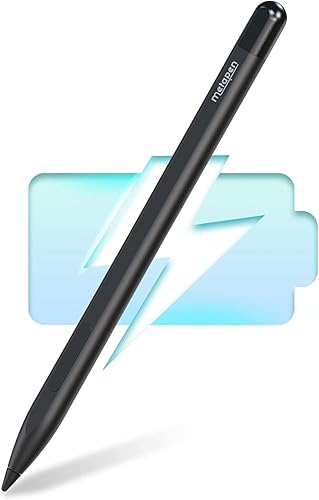
Metapen M1 Stylus for Microsoft Surface (MPP)
Works with Surface/MPP, 1K+ bought last month.
- ✓ Low price
- ✓ Long battery life
- ✓ Good pressure response

Microsoft Surface Pen (Model 1776)
8,500+ reviews.
- ✓ Official compatibility
- ✓ Eraser button
- ✓ Smooth writing

Lenovo Digital Pen 2
Lenovo Digital Pen 2, Amazon’s Choice.
- ✓ Made for Lenovo
- ✓ Good pressure levels
- ✓ Affordable
As an Amazon Associate, we earn from qualifying purchases. Prices and deals change often, so check Amazon for the latest price.
How we picked these products
- Checked Amazon US in November 2026 and kept only products with strong “bought in past month” sales.
- Compared ratings and review counts, and dropped listings with too little feedback.
- Matched every product to the exact need in this guide, not just the category.
- Read the top-ranking guides for this topic and added the details they miss or get wrong.
We do not hands-on test every product. Our picks are based on specs, sales, verified buyer feedback and manufacturer information. Last updated: November 2026.
Styluses for Windows Note Taking Compared
| Product | Best for | Works with | Price |
|---|---|---|---|
| Metapen M1 Stylus for Microsoft Surface (MPP) | Best value pen | Microsoft Pen Protocol devices | Check price |
| Microsoft Surface Pen (Model 1776) | Official Surface pen | Surface devices (MPP) | Check price |
| Metapen M2 Stylus for Surface (Premium) | Best premium third-party | Microsoft Pen Protocol devices | Check price |
| Lenovo Digital Pen 2 | Best for Lenovo laptops | Supported Lenovo Yoga/IdeaPad models | Check price |
| HP Rechargeable Tilt Pen (MPP 2.0) | Best for HP laptops | HP MPP 2.0 devices | Check price |
1. Metapen M1 Stylus for Microsoft Surface (MPP) — Best value pen
Metapen’s M1 works with Surface devices and many other laptops that support Microsoft Pen Protocol (MPP), with long battery life and pressure sensitivity at a fraction of the official pen price.
It has 5,900+ reviews, a 4.4-star rating and 1K+ purchases last month.
Pros
- Low price
- Long battery life
- Good pressure response
Cons
- Only for MPP devices
- No Bluetooth button features
2. Microsoft Surface Pen (Model 1776) — Official Surface pen
The official Surface Pen offers tilt, pressure sensitivity and an eraser button, with reliable performance on supported Surface models.
It has 8,500+ reviews, a 4.6-star rating and 400+ purchases last month.
Pros
- Official compatibility
- Eraser button
- Smooth writing
Cons
- Higher price
- Uses AAAA battery
3. Metapen M2 Stylus for Surface (Premium) — Best premium third-party

The M2 adds premium features like a magnetic body and finer control for people who write all day on Surface and MPP devices.
It has 2,500+ reviews, a 4.5-star rating and 700+ purchases last month.
Pros
- Premium feel
- Fine control
- Magnetic attach
Cons
- MPP devices only
- Costs more than M1
4. Lenovo Digital Pen 2 — Best for Lenovo laptops
Lenovo’s Digital Pen 2 offers 4,096 pressure levels for supported Lenovo touchscreen laptops. Check Lenovo’s compatibility list for your model.
It has 2,000+ reviews, a 4.4-star rating and 500+ purchases last month, and it is an Amazon’s Choice pick.
Pros
- Made for Lenovo
- Good pressure levels
- Affordable
Cons
- Limited to supported models
- Battery powered
5. HP Rechargeable Tilt Pen (MPP 2.0) — Best for HP laptops
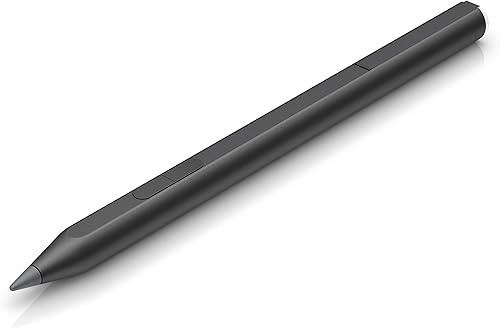
HP’s rechargeable tilt pen suits supported HP Spectre, ENVY and other MPP 2.0 touchscreen laptops, with tilt support for shading.
It has 900+ reviews, a 4.4-star rating and 500+ purchases last month.
Pros
- Rechargeable
- Tilt support
- Made for HP
Cons
- HP compatibility only
- Fewer reviews
Best Note Taking Apps for Windows with a Stylus
Pick an app that fits your notes, then buy a pen that matches your device’s pen technology.
Microsoft OneNote (free)
OneNote is the best all-around choice: notebooks, sections and pages keep notes organized, ink works well with a stylus, and notes sync through your Microsoft account. It also searches handwriting in many cases.
Microsoft Journal (free)
Journal is an ink-first app from Microsoft that feels like an infinite notebook with smart selection and quick gestures. It is great for people who mostly write by hand.
GoodNotes for Windows
If you used GoodNotes on iPad, the Windows version brings a familiar notebook-and-PDF workflow, popular with students who annotate slides.
Nebo
Nebo focuses on converting handwriting into clean, editable text and diagrams, ideal if you want typed notes from handwriting.
Xournal++ (free, open source)
Xournal++ is a lightweight free app for handwriting and PDF annotation, a good choice on older or budget devices.
Match the pen technology
Windows devices use different pen standards: Microsoft Pen Protocol (MPP) for Surface and many HP and Lenovo devices, Wacom AES for some others, and USI mostly for Chromebooks. A pen only works if it matches your device. Check your laptop’s specs or support page first.
App Comparison at a Glance
| App | Price | Best for | Handwriting to text |
|---|---|---|---|
| Microsoft OneNote | Free | Organized class and work notes | Yes |
| Microsoft Journal | Free | Pure handwriting, freeform notes | Search and conversion features |
| GoodNotes for Windows | Subscription / paid | Students annotating slides and PDFs | Search |
| Nebo | Paid | Converting handwriting to clean text | Yes, strong |
| Xournal++ | Free (open source) | Lightweight PDF annotation | No |
Pricing and features change; check each app’s store page.
Pen Compatibility Quick Guide
| Device family | Pen standard (typical) | Pens above |
|---|---|---|
| Microsoft Surface | MPP | Metapen M1/M2, Surface Pen |
| Many HP Spectre/ENVY | MPP 2.0 | HP Rechargeable Tilt Pen, Metapen |
| Many Lenovo Yoga/IdeaPad | Lenovo pens / AES or MPP by model | Lenovo Digital Pen 2 |
| Chromebooks | USI | USI pens (not covered here) |
Related guides
Frequently Asked Questions
What is the best free note taking app for Windows with a stylus?
Microsoft OneNote and Microsoft Journal are excellent free choices.
Does GoodNotes work on Windows?
Yes, GoodNotes offers a Windows version.
Can I convert handwriting to text on Windows?
Yes. OneNote has ink-to-text, and Nebo specializes in handwriting conversion.
Will any stylus work with my Windows laptop?
No. The pen must match your device’s pen technology, such as MPP or AES.
Is the Metapen as good as the Surface Pen?
For most note taking, yes, at a lower price, though the official pen has extra features like the eraser.
Do I need a touchscreen laptop?
Yes, you need a pen-enabled touchscreen device.
Final Verdict
Microsoft OneNote is the best note taking app for Windows with a stylus for most people, with Microsoft Journal as a great ink-first alternative. Pair it with a compatible pen: the Metapen M1 for Surface and MPP devices, or the official Lenovo or HP pen for those laptops.
As an Amazon Associate, Guide Of Adviser earns from qualifying purchases. Product details and prices can change, so please check Amazon before you buy.