
Lightroom Classic used to rely mostly on the CPU, but recent versions use the GPU for display, image processing, AI masking and AI Denoise. A capable graphics card can make AI Denoise much faster and keep sliders responsive on high-resolution raw files. For photographers who process big shoots, the GPU now makes a real difference.
We compared graphics cards that sell well on Amazon right now and matched them to typical photography workloads. Many competing pages repeat outdated advice that the GPU barely matters in Lightroom; this guide reflects how Lightroom Classic uses the GPU today and explains how to enable it.
Quick answer: Best overall: ASUS RTX 5060 Ti 16GB (500+ bought last month) for fast AI Denoise and smooth editing. Best performance: ASUS RTX 5070 12GB. Best budget: GIGABYTE RTX 3060 12GB. Best AMD: ASUS Radeon RX 9060 XT 16GB. Turn on GPU acceleration in Lightroom Classic preferences after installing.
Our Top 3 Picks for best graphics card for lightroom classic
🔥 Black Friday Deals Live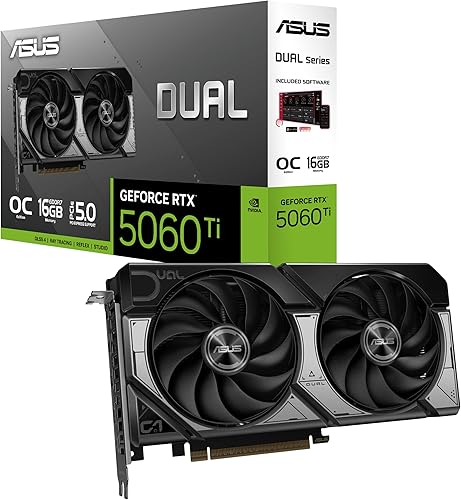
ASUS Dual GeForce RTX 5060 Ti 16GB OC
16GB VRAM, 500+ bought last month.
- ✓ Fast AI Denoise
- ✓ 16GB VRAM
- ✓ Efficient and quiet
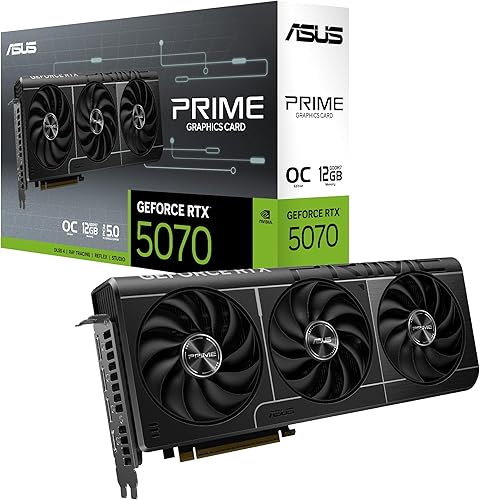
ASUS PRIME GeForce RTX 5070 12GB OC
Fast AI processing.
- ✓ Faster batch processing
- ✓ Highly rated
- ✓ Great for gaming too

GIGABYTE GeForce RTX 3060 Gaming OC 12G
12GB VRAM, 5,800+ reviews.
- ✓ 12GB VRAM
- ✓ Affordable
- ✓ Proven
As an Amazon Associate, we earn from qualifying purchases. Prices and deals change often, so check Amazon for the latest price.
How we picked these products
- Checked Amazon US in November 2026 and kept only products with strong “bought in past month” sales.
- Compared ratings and review counts, and dropped listings with too little feedback.
- Matched every product to the exact need in this guide, not just the category.
- Read the top-ranking guides for this topic and added the details they miss or get wrong.
We do not hands-on test every product. Our picks are based on specs, sales, verified buyer feedback and manufacturer information. Last updated: November 2026.
Graphics Cards for Lightroom Classic Compared
| Product | Best for | VRAM | Price |
|---|---|---|---|
| ASUS Dual GeForce RTX 5060 Ti 16GB OC | Best overall | 16GB GDDR7 | Check price |
| ASUS PRIME GeForce RTX 5070 12GB OC | Best performance | 12GB GDDR7 | Check price |
| GIGABYTE GeForce RTX 3060 Gaming OC 12G | Best budget | 12GB GDDR6 | Check price |
| ASUS Dual Radeon RX 9060 XT 16GB | Best AMD | 16GB GDDR6 | Check price |
| ASUS Dual GeForce RTX 5060 Ti 8GB OC | Value NVIDIA pick | 8GB GDDR7 | Check price |
1. ASUS Dual GeForce RTX 5060 Ti 16GB OC — Best overall
A modern NVIDIA card with tensor cores speeds up Lightroom’s AI features, and 16GB of VRAM leaves headroom for large raw files and multiple monitors.
It has 450+ reviews, a 4.6-star rating and 500+ purchases last month.
Pros
- Fast AI Denoise
- 16GB VRAM
- Efficient and quiet
Cons
- Not needed for light editing
- Mid-range price
2. ASUS PRIME GeForce RTX 5070 12GB OC — Best performance
For professionals denoising hundreds of images, a faster card like the RTX 5070 cuts batch times further.
It has 340+ reviews, a 4.8-star rating and 200+ purchases last month.
Pros
- Faster batch processing
- Highly rated
- Great for gaming too
Cons
- 12GB VRAM
- Higher price
3. GIGABYTE GeForce RTX 3060 Gaming OC 12G — Best budget
The RTX 3060 12GB is an affordable way to get GPU-accelerated Lightroom features with plenty of VRAM.
It has 5,800+ reviews, a 4.7-star rating and 100+ purchases last month.
Pros
- 12GB VRAM
- Affordable
- Proven
Cons
- Slower AI processing than newer cards
- Older generation
4. ASUS Dual Radeon RX 9060 XT 16GB — Best AMD

Lightroom Classic supports modern AMD GPUs too. The RX 9060 XT offers 16GB of VRAM at a good price for photographers who also game.
It has 440+ reviews, a 4.7-star rating and 400+ purchases last month.
Pros
- 16GB VRAM
- Good value
- Strong gaming performance
Cons
- AI features may run faster on NVIDIA
- Higher power use
5. ASUS Dual GeForce RTX 5060 Ti 8GB OC — Value NVIDIA pick
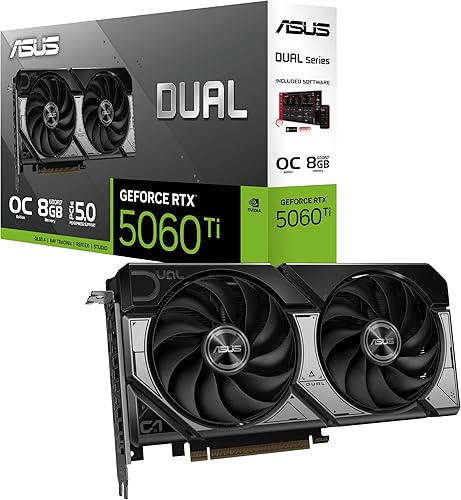
If you edit 20-30MP files on one monitor, the 8GB RTX 5060 Ti is a cheaper option with the same AI acceleration features.
It has 110+ reviews, a 4.7-star rating and 400+ purchases last month.
Pros
- Lower price
- Modern NVIDIA features
- Efficient
Cons
- 8GB VRAM for big files
- Less headroom for multi-monitor
How Lightroom Classic Uses Your GPU
Choose a modern GPU with enough VRAM, enable acceleration, and balance CPU, RAM and storage.
What the GPU speeds up
Lightroom Classic can use the GPU for display (smooth zoom and panning), image processing (slider responsiveness), AI masking and AI Denoise. AI Denoise sees the biggest speed difference between slow and fast GPUs.
Enable GPU acceleration
Go to Preferences, Performance tab, and set Use Graphics Processor to Auto or Custom with display and image processing enabled. Restart Lightroom after driver updates.
VRAM for high-megapixel files
High-resolution raw files and multiple or 4K monitors benefit from 12 to 16GB of VRAM. 8GB works for many photographers on a single monitor.
Do not forget the CPU and RAM
Import, export and preview building still rely heavily on the CPU. Use at least 32GB of RAM for large catalogs and fast NVMe storage for your catalog and cache.
Keep drivers updated
Use the latest NVIDIA Studio or AMD drivers. Adobe also publishes GPU troubleshooting guidance if features are disabled.
Pick by Photography Workload
| Workload | Suggested GPU | Why |
|---|---|---|
| Hobby edits, 20-30MP | RTX 5060 Ti 8GB or RTX 3060 12GB | Smooth editing at low cost |
| Event and wedding batches | RTX 5060 Ti 16GB | Fast AI Denoise across many photos |
| High-megapixel pro work | RTX 5070 or RTX 5060 Ti 16GB | Speed plus VRAM |
| Photo + gaming | RX 9060 XT 16GB or RTX 5070 | Great at both |
Lightroom Performance Checklist
- Enable GPU acceleration in Preferences > Performance.
- Put the catalog and Camera Raw cache on an NVMe SSD.
- Increase the Camera Raw cache size.
- Build Smart Previews for faster editing on large shoots.
- Use 32GB RAM or more for big catalogs.
Related guides
Frequently Asked Questions
Does Lightroom Classic use the GPU?
Yes, for display, image processing, AI masking and AI Denoise.
What is the best GPU for Lightroom AI Denoise?
A modern NVIDIA RTX card like the RTX 5060 Ti or RTX 5070 runs it quickly.
How much VRAM do I need for Lightroom?
8GB for many users; 12-16GB for high-megapixel files and multiple monitors.
Is AMD good for Lightroom?
Yes, modern Radeon cards are supported, though NVIDIA often leads in AI tasks.
Will a GPU speed up exports?
Exports depend more on the CPU, though GPU export acceleration exists in recent versions.
Do I need a GPU for basic edits?
No, but a modern GPU makes editing smoother and AI tools much faster.
Final Verdict
The ASUS RTX 5060 Ti 16GB is the best graphics card for Lightroom Classic for most photographers, offering fast AI Denoise and ample VRAM. Choose the RTX 5070 for faster batch work, the RTX 3060 12GB on a budget, and the RX 9060 XT 16GB if you prefer AMD.
As an Amazon Associate, Guide Of Adviser earns from qualifying purchases. Product details and prices can change, so please check Amazon before you buy.