
When arthritis affects your hands, a regular flat mouse can turn everyday computer work into a painful chore. Gripping, twisting your forearm flat and clicking with stiff fingers all add strain. The right mouse depends on where it hurts: the wrist, the thumb, or the finger joints. That is why there is no single “best” mouse for everyone with arthritis.
This guide sorts the options by the type of pain they help avoid, explains which shape fits which hand, and includes picks for left-handed users. Many top-ranking guides skip roller bar mice and button force, or recommend a thumb trackball without warning that it can be the wrong choice for thumb arthritis. We cover those gaps. This is general buying advice, not medical advice; an occupational therapist can help you choose for your specific condition.
Quick answer: Best overall: Logitech Lift vertical mouse for small to medium hands (14,000+ reviews, 8K+ bought last month). Best for larger hands: Logitech MX Vertical. Best budget: Anker vertical mouse. Best if your thumb hurts: finger-operated trackballs like the Kensington Expert or ELECOM Huge, not thumb trackballs. Best for left-handers: Logitech Lift Left.
Our Top 3 Picks for best mouse for arthritic hand and fingers
🔥 Black Friday Deals Live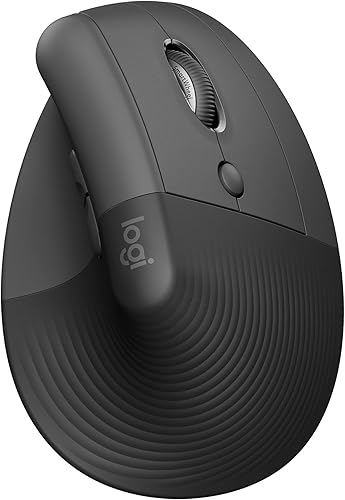
Logitech Lift Vertical Ergonomic Wireless Mouse
57-degree vertical grip, quiet clicks, 8K+ bought monthly.
- ✓ Natural handshake grip
- ✓ Quiet clicks
- ✓ Sized for smaller hands

Kensington Expert Trackball Mouse (Wired, K64325)
Large ball moved with fingers, not the thumb.
- ✓ No thumb movement
- ✓ Ambidextrous
- ✓ Hand stays still

Anker 2.4G Wireless Vertical Ergonomic Mouse
53,000+ reviews at a low price.
- ✓ Very affordable
- ✓ Huge number of reviews
- ✓ Lightweight
As an Amazon Associate, we earn from qualifying purchases. Prices and deals change often, so check Amazon for the latest price.
How we picked these products
- Checked Amazon US in November 2026 and kept only products with strong “bought in past month” sales.
- Compared ratings and review counts, and dropped listings with too little feedback.
- Matched every product to the exact need in this guide, not just the category.
- Read the top-ranking guides for this topic and added the details they miss or get wrong.
We do not hands-on test every product. Our picks are based on specs, sales, verified buyer feedback and manufacturer information. Last updated: November 2026.
Mice for Arthritic Hands Compared
| Product | Best for | Type | Price |
|---|---|---|---|
| Logitech Lift Vertical Ergonomic Wireless Mouse | Best overall (small to medium hands) | Vertical, 57 degrees | Check price |
| Logitech MX Vertical Wireless Ergonomic Mouse | Best for medium to large hands | Vertical, 57 degrees, rechargeable | Check price |
| Anker 2.4G Wireless Vertical Ergonomic Mouse | Best budget vertical mouse | Vertical, USB receiver | Check price |
| Kensington Expert Trackball Mouse (Wired, K64325) | Best for thumb arthritis | Finger-operated trackball, ambidextrous | Check price |
| Logitech Ergo M575S Wireless Trackball | Best if your wrist hurts (thumb is fine) | Thumb trackball | Check price |
| Logitech Lift Left Vertical Ergonomic Mouse | Best for left-handed users | Vertical, left-handed | Check price |
| ELECOM Huge Trackball Mouse, Wireless, Index Finger Control | Best large finger trackball | 52mm finger trackball | Check price |
| Logitech Wave Keys and Lift Vertical Mouse Combo | Best keyboard and mouse combo | Wave keyboard + vertical mouse | Check price |
1. Logitech Lift Vertical Ergonomic Wireless Mouse — Best overall (small to medium hands)
The Lift holds your hand in a relaxed handshake position, which avoids twisting the forearm flat. Logitech designed it for small to medium hands, it has quiet, light-feeling clicks and a soft thumb rest, and it works over Bluetooth or a USB receiver.
It is one of the best-selling ergonomic mice on Amazon, with 14,300+ reviews, a 4.4-star rating and 8K+ purchases last month.
Pros
- Natural handshake grip
- Quiet clicks
- Sized for smaller hands
Cons
- Too small for large hands
- Takes a few days to get used to
2. Logitech MX Vertical Wireless Ergonomic Mouse — Best for medium to large hands

The MX Vertical uses the same 57-degree angle in a larger body, so bigger hands can rest fully on the mouse instead of pinching it. It is rechargeable and can switch between computers.
It has 15,190+ reviews, a 4.4-star rating and 6K+ purchases last month.
Pros
- Fits larger hands
- Rechargeable
- Multi-device
Cons
- Heavier than the Lift
- Higher price
3. Anker 2.4G Wireless Vertical Ergonomic Mouse — Best budget vertical mouse
If you want to try a vertical mouse before spending more, the Anker is a low-cost way to test the handshake position. It is very light and simple to use.
It has 53,600+ reviews, a 4.2-star rating and 5K+ purchases last month.
Pros
- Very affordable
- Huge number of reviews
- Lightweight
Cons
- Clicks are firmer than Logitech
- Uses AAA batteries
4. Kensington Expert Trackball Mouse (Wired, K64325) — Best for thumb arthritis
A large ball that you roll with your fingers keeps the thumb still and the hand stationary. The symmetrical shape works for left and right hands, and the scroll ring is easier to turn than a small wheel.
It has 4,500+ reviews, a 4.3-star rating and 500+ purchases last month.
Pros
- No thumb movement
- Ambidextrous
- Hand stays still
Cons
- Wired model
- Flat hand position for some users
5. Logitech Ergo M575S Wireless Trackball — Best if your wrist hurts (thumb is fine)
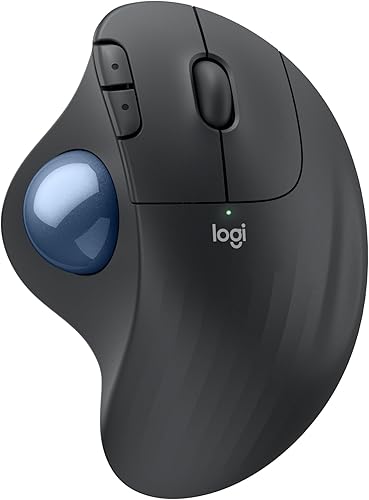
The M575S keeps your arm and wrist completely still while your thumb moves the cursor. It is a great choice for wrist or shoulder pain, but avoid it if your thumb joints are the problem.
It has 2,600+ reviews, a 4.5-star rating and 8K+ purchases last month, and it is an Amazon’s Choice pick.
Pros
- Wrist and arm stay still
- Long battery life
- Affordable
Cons
- Uses the thumb heavily
- Right-handed only
6. Logitech Lift Left Vertical Ergonomic Mouse — Best for left-handed users
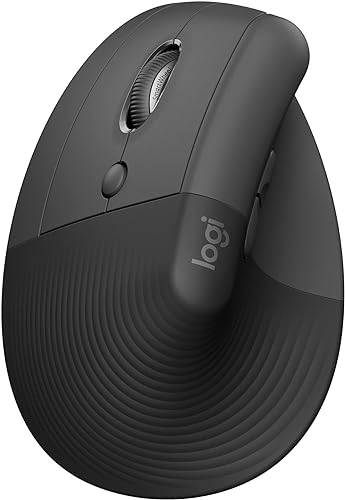
Most ergonomic mice are right-handed only. The Lift Left is a true mirror of the Lift, so left-handed users get the same relaxed vertical grip.
It has 1,330+ reviews, a 4.4-star rating and 1K+ purchases last month.
Pros
- True left-handed design
- Same comfort as Lift
- Quiet clicks
Cons
- Sized for small to medium hands
- Limited color choice
7. ELECOM Huge Trackball Mouse, Wireless, Index Finger Control — Best large finger trackball

The ELECOM Huge has a big ball under your fingers and a palm rest that supports the whole hand, which helps people who cannot grip a mouse at all.
It has 3,340+ reviews, a 4.2-star rating and 200+ purchases last month.
Pros
- Full palm support
- Big ball, little effort
- Many programmable buttons
Cons
- Large footprint
- Right-handed only
8. Logitech Wave Keys and Lift Vertical Mouse Combo — Best keyboard and mouse combo

Arthritis rarely affects only the mouse hand. This Logitech bundle pairs the Lift vertical mouse with Wave Keys, a curved keyboard with a cushioned palm rest that keeps wrists in a more relaxed position while typing.
It has 630+ reviews, a 4.4-star rating and 2K+ purchases last month, and it is an Amazon’s Choice pick.
Pros
- Matching keyboard and mouse
- Cushioned palm rest
- Quiet, light-feeling keys
Cons
- Mouse sized for small to medium hands
- Wave layout takes a few days to learn
How to Choose a Mouse for Arthritis
Start with where your hand hurts, then match the mouse type and size to your hand.
Wrist or forearm pain: try a vertical mouse
A vertical mouse keeps your hand in a handshake position, which reduces forearm twisting. Start with the Logitech Lift for smaller hands or MX Vertical for larger hands.
Thumb pain: avoid thumb trackballs
Thumb trackballs like the M575S move the cursor with repeated thumb motion. If your thumb base is the painful joint, a finger-operated trackball (Kensington Expert, ELECOM Huge) or a roller bar is usually a better fit.
Finger joint pain: look for light clicks
Stiff finger joints struggle with heavy click switches. Look for mice described with quiet or light clicks, and use software to remap buttons so frequent actions need less force. Many Logitech mice let you change button functions in the free Logi Options+ app.
Measure your hand
Measure from the wrist crease to the tip of your middle finger. Under about 7 inches usually suits small mice like the Lift; above about 7.5 inches often suits larger designs like the MX Vertical. Your whole palm should rest on the mouse without pinching.
Lower the cursor effort
Raise pointer speed (or DPI) in your computer settings so small hand movements move the cursor farther. This reduces how much you need to move your hand.
Give yourself time to adjust
New shapes feel strange at first. Use the new mouse for a short period each day for one to two weeks before deciding.
Check comfort beyond the mouse
Keep the mouse close to the keyboard, rest your forearm on the desk or chair armrest, and take short breaks. If pain persists, ask your doctor or an occupational therapist about adaptive equipment.
Hand Size Guide: Which Mouse Fits You?
Measure from the crease of your wrist to the tip of your middle finger. These ranges are general guidance; comfort varies, so check each maker’s sizing notes.
| Hand length | Best shape | Picks in this guide |
|---|---|---|
| Under about 7 in (18 cm) | Small vertical mouse | Logitech Lift, Lift Left |
| About 7 to 7.5 in | Medium vertical or finger trackball | Logitech Lift, Kensington Expert |
| Over about 7.5 in (19 cm) | Large vertical or large trackball | Logitech MX Vertical, ELECOM Huge |
Make Any Mouse Easier on Painful Joints
- Raise pointer speed: in Windows Settings or macOS System Settings, increase pointer speed so small movements go farther.
- Remap hard actions: use Logi Options+ or your mouse software to put copy, paste, back and double-click on easy-to-reach buttons.
- Turn on ClickLock (Windows): lets you drag without holding the button down.
- Use keyboard shortcuts: fewer clicks means less strain.
- Try speech or touch: Windows Voice Access, macOS Voice Control and touchscreens can reduce mouse use on bad days.
Quick Pick by Pain Area
| Where it hurts | Avoid | Try |
|---|---|---|
| Wrist / forearm | Flat mice that twist the forearm | Vertical mouse (Lift, MX Vertical) |
| Thumb base | Thumb trackballs | Finger trackball (Kensington Expert, ELECOM Huge) |
| Finger joints | Heavy click buttons | Light-click mice + button remapping |
| Shoulder | Reaching far for the mouse | Keep mouse close; trackball or roller bar |
| Several joints | Gripping all day | Mix devices; roller bar or voice tools |
Roller bar mice, such as the Contour RollerMouse, are another option for people with pain in several joints, but they are expensive and sell in much smaller numbers on Amazon, so we did not include one in our main picks.
Related guides
Frequently Asked Questions
What is ClickLock?
A Windows mouse setting that lets you drag items without holding the button down, which reduces finger strain.
Is a roller bar mouse good for arthritis?
It can be, because you move the cursor with light pressure and no grip, but it is expensive and needs space in front of the keyboard.
Is a vertical mouse or trackball better for arthritis?
Vertical mice suit wrist and forearm pain; finger-operated trackballs suit thumb pain or limited hand movement.
Are thumb trackballs good for arthritis?
They keep the wrist still, but they can aggravate thumb arthritis because the thumb does all the work.
What mouse is best for small hands with arthritis?
The Logitech Lift is designed for small to medium hands.
Is there an ergonomic mouse for left-handed people?
Yes. The Logitech Lift Left is a true left-handed vertical mouse, and the Kensington Expert is ambidextrous.
How do I make clicking easier?
Choose a mouse with light clicks and remap buttons in software so frequent actions need less force.
Can a mouse cure arthritis pain?
No. The right mouse can reduce strain, but talk to a doctor or occupational therapist about managing arthritis.
Final Verdict
The Logitech Lift is the best mouse for arthritic hands and fingers for most people with small to medium hands, and the MX Vertical suits larger hands. If your thumb hurts, choose a finger-operated trackball like the Kensington Expert instead of a thumb trackball.
As an Amazon Associate, Guide Of Adviser earns from qualifying purchases. Product details and prices can change, so please check Amazon before you buy.