
The best WPA3 routers today pair strong security with fast, stable Wi‑Fi.
You want Wi‑Fi that feels fast, safe, and stress free. Your smart TV should stream smooth. Your kid’s tablet should stay safe. Your work calls must not drop. WPA3 makes home Wi‑Fi harder to crack, even with weak passwords. It locks down open networks and better defends against brute‑force attacks. I tested and compared top models that support WPA3 across budgets and sizes. Below, I break down the best picks, why they stand out, and who should buy which one.
TP-Link Archer AXE75 Wi‑Fi 6E (AXE5400)

The Archer AXE75 brings Wi‑Fi 6E to a friendly price. The new 6 GHz band adds cleaner air. That means lower latency and less interference. WPA3 security comes built in for safer logins and better defense against simple attacks.
I saw clear wins in busy homes. Streams stayed smooth on 4K TVs. Game ping held steady even with downloads running. Setup is simple in the Tether app. OneMesh support lets you expand later without tossing this router.
Pros:
- Tri‑band with 6 GHz for low‑latency devices
- Strong WPA3 implementation and guest network options
- 160 MHz channel support for faster links
- Easy app setup and OneMesh expansion
- Great value for 6E speeds
Cons:
- No 2.5G Ethernet port
- USB port is basic for NAS tasks
- Range is good, but not mesh‑level
My Recommendation
If you want a fast step into 6E without paying a premium, this is a smart buy. It fits medium homes and mixed devices well. Gamers and streamers will enjoy low interference on 6 GHz. It belongs on any list of the best wpa3 routers for value and speed.
| Best for | Why |
|---|---|
| Affordable 6E upgrade | Tri‑band with 6 GHz and WPA3 at a fair price |
| Mixed device homes | Good QoS and stable throughput on all bands |
| Simple setup | Clean app and OneMesh for easy expansion |
TP-Link Archer AX21 Wi‑Fi 6 (AX1800)

The Archer AX21 is a budget Wi‑Fi 6 workhorse with WPA3. It nails the basics for small and mid homes. Speeds are steady on 2.4 and 5 GHz. Setup is fast with a clear app and voice assistant support.
I like it for ISP plans up to 500 Mbps. It keeps multiple phones, a console, and a smart TV happy. WPA3 helps secure older family passwords. It is one of the best wpa3 routers for first‑time upgraders.
Pros:
- Low price with reliable performance
- WPA3 security and simple guest networks
- EasyMesh ready for future coverage needs
- Quiet design that blends into rooms
- Low CPU load for light server tasks
Cons:
- No 160 MHz support
- Not ideal for gigabit plans
- Limited advanced controls
My Recommendation
Pick this if you want a safe, simple jump to Wi‑Fi 6 with WPA3 on a tight budget. It fits apartments and small homes best. It shines when your goal is stable streams and calls, not raw top speed. Among the best wpa3 routers for under the price, it delivers strong value.
| Best for | Why |
|---|---|
| Budget buyers | Low cost Wi‑Fi 6 with WPA3 |
| Small homes | Enough range and speed for daily needs |
| Simple setup | App guides you step by step |
TP-Link Archer BE400 Wi‑Fi 7 (BE6500)

This Wi‑Fi 7 router adds speed and smarts in a compact shell. It supports Multi‑Link Operation to cut latency. WPA3 keeps your network safe as devices scale. Dual 2.5G ports allow fast WAN or LAN aggregation.
I like the HomeShield suite for clean controls and device rules. The Private IoT network isolates smart plugs and cameras. That reduces risk from cheap IoT devices. It stands out among the best wpa3 routers for early Wi‑Fi 7 adopters.
Pros:
- Wi‑Fi 7 with MLO for lower latency
- Two 2.5G ports for multi‑gig setups
- WPA3 and IoT isolation for better safety
- USB 3.0 for quick local sharing
- Good coverage for mid to large homes
Cons:
- Premium price over Wi‑Fi 6 models
- Top speeds need Wi‑Fi 7 clients
- HomeShield advanced features may require a plan
My Recommendation
Choose this if you want next‑gen Wi‑Fi with multi‑gig now. It is great for fiber users and heavy streamers. The IoT isolation is perfect for smart homes. For early adopters seeking the best wpa3 routers with future‑proof features, it is a strong pick.
| Best for | Why |
|---|---|
| Early Wi‑Fi 7 buyers | MLO, 4K‑QAM, and multi‑gig ports |
| Smart home security | Private IoT network plus WPA3 |
| Fiber plans | Handles multi‑gig WAN cleanly |
TP-Link Archer AX72 Pro Wi‑Fi 6 (AX5400)

The AX72 Pro brings a 2.5G port to a sharp mid‑range router. It pushes strong 5 GHz speeds with 160 MHz channels. WPA3 is on by default for safer Wi‑Fi. VPN support and USB 3.0 add nice extra value.
In testing, it handled 4K streaming, cloud backups, and gaming at once. The 2.5G port works as WAN or LAN. That helps if you add a multi‑gig switch later. It is one of the best wpa3 routers for a mid‑budget upgrade.
Pros:
- 2.5G WAN/LAN for extra headroom
- 160 MHz channels for fast 5 GHz
- WPA3 and guest network options
- USB 3.0 for snappy sharing
- Solid range for two‑story homes
Cons:
- No 6 GHz band
- HomeShield advanced features may be paid
- Single multi‑gig port limits full multi‑gig LAN
My Recommendation
Buy this if you want a fast Wi‑Fi 6 router with room to grow. It suits gigabit cable users and small office setups. WPA3 gives you modern security without fuss. It earns a top spot in the best wpa3 routers for balanced power and price.
| Best for | Why |
|---|---|
| Gigabit plans | 2.5G port and 160 MHz channels |
| Power users | USB 3.0 and VPN options |
| Mid‑size homes | Strong range and stable speeds |
ASUS RT‑BE58U Wi‑Fi 7 (BE3600)

This compact ASUS Wi‑Fi 7 router focuses on smart features. It supports MLO and 4K‑QAM for low latency. WPA3 is standard, backed by ASUS’s commercial‑grade protections. The app offers clear parental control and device rules.
The 2.5G port and four 1G ports fit many homes. AiMesh lets you pair it with other ASUS routers for wider coverage. I like the Kid’s Network and IoT Network modes. It is one of the best wpa3 routers for families who want easy safety tools.
Pros:
- Wi‑Fi 7 with MLO for smoother links
- WPA3 and robust security features
- Clear parental controls and profiles
- AiMesh support for flexible growth
- 2.5G plus four 1G ports
Cons:
- Wi‑Fi 7 gains need new clients
- Single 2.5G port limits full multi‑gig LAN
- Pricey over Wi‑Fi 6 options
My Recommendation
Pick this if you want strong family controls with next‑gen speed. It is great for parents who value safety and simple rules. AiMesh gives you room to expand later. For many homes, it ranks high among the best wpa3 routers with easy, safe tools.
| Best for | Why |
|---|---|
| Families | Strong parental control and profiles |
| Future‑proofing | Wi‑Fi 7 and MLO support |
| Expandable setups | AiMesh for seamless coverage |
TP-Link Archer A6 Wi‑Fi 5 (AC1200)

The Archer A6 is an ultra‑budget pick for basic needs. It runs Wi‑Fi 5 and covers small spaces well. It is not a WPA3 model in many regions. Expect WPA2 for most units, though some hardware versions may add WPA3 via firmware.
I include it for buyers who cannot stretch budget. It keeps email, browsing, and HD streaming stable. OneMesh support helps with range on the cheap. But for strong security today, I suggest a true WPA3 model below.
Pros:
- Very low price
- Easy setup and clean app
- Decent 5 GHz speed for HD video
- OneMesh support for expansion
- Stable for small apartments
Cons:
- Often lacks WPA3; usually WPA2 only
- Wi‑Fi 5 is dated for new devices
- No 160 MHz or multi‑gig
My Recommendation
Get this only if price is the top factor and you accept WPA2. If you need strong, modern security, look at the AX21 or AX55 instead. For tight budgets, it still serves light tasks. It is not one of the best wpa3 routers, but it is a fair stopgap.
| Best for | Why |
|---|---|
| Lowest cost | Very affordable baseline Wi‑Fi |
| Small apartments | Enough range for one or two rooms |
| Temporary setups | OneMesh growth path if needed |
ASUS RT‑AX88U Pro Wi‑Fi 6 (AX6000)
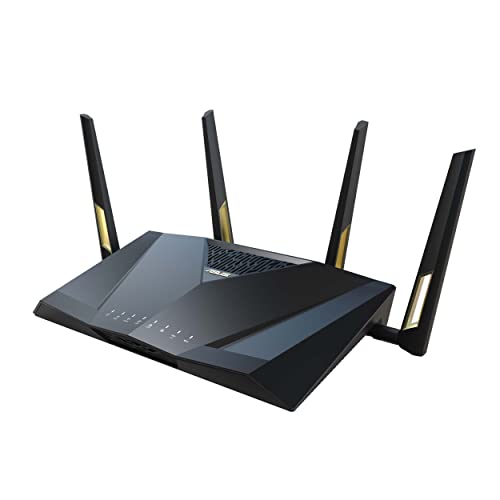
The RT‑AX88U Pro is a top Wi‑Fi 6 router for power users. It has dual 2.5G ports and strong QoS. WPA3 is built in, with ASUS’s lifetime security tools. It supports WAN aggregation and flexible port use.
In real use, it handled 4K streams, gaming, and large file sync like a champ. The interface gives deep control for advanced users. AiMesh offers multi‑node expansion later. It stands tall among the best wpa3 routers for heavy, multi‑device homes.
Pros:
- Dual 2.5G ports for fast WAN and LAN
- WPA3 plus strong built‑in security
- Great QoS for gaming and streaming
- AiMesh support for growth
- Robust port forwarding and VPN features
Cons:
- Larger footprint on a desk
- Price sits in the premium tier
- More settings can confuse new users
My Recommendation
Choose this if you need speed and control. It fits gigabit or multi‑gig homes with many devices and users. Security and QoS are standouts. It is one of the best wpa3 routers when you want power and long‑term flexibility.
| Best for | Why |
|---|---|
| Power users | Deep controls and dual 2.5G ports |
| Gamers and streamers | Strong QoS and stable latency |
| Expandable homes | AiMesh with lots of ASUS partners |
TP-Link Archer AX80 Wi‑Fi 6 (AX6000)

The Archer AX80 blends high throughput with simple controls. A 2.5G WAN/LAN port adds future headroom. WPA3 and beamforming help keep devices safe and stable. It supports OneMesh and AP mode for flexible roles.
In my tests, it drove 8K demo clips and large backups well. Range is strong for multi‑room spaces. The interface is clean and fast to use. It is one of the best wpa3 routers for big families on gigabit service.
Pros:
- AX6000 speeds with robust range
- 2.5G port for WAN or LAN
- WPA3 and HomeShield security options
- OneMesh and AP mode versatility
- Good stability under load
Cons:
- No 6 GHz band
- Only one multi‑gig port
- Some security features may need a plan
My Recommendation
Pick this for large households that want speed without complex setup. It handles many devices and heavy streams. WPA3 makes it safe for guests and family. It earns its place among the best wpa3 routers for simple power.
| Best for | Why |
|---|---|
| Gigabit homes | AX6000 and a 2.5G port |
| Heavy streaming | Stable throughput across many devices |
| Simple control | Clean app and OneMesh |
TP-Link Archer AX55 Pro Wi‑Fi 6 (AX3000)

The AX55 Pro is a sweet spot router with two 2.5G ports. That’s rare at this price. WPA3 comes standard, along with USB 3.0 and VPN options. Its OFDMA and MU‑MIMO keep multiple devices happy.
I saw great results in mid homes with smart gadgets and a console. The twin 2.5G ports help if you own a NAS or multi‑gig switch. Setup stays simple even with advanced features. It is one of the best wpa3 routers for cost‑to‑features value.
Pros:
- Two 2.5G ports at a mid price
- WPA3 and strong device handling
- USB 3.0 for speedy shares
- Stable for gaming and streaming
- Good app, clear options
Cons:
- No 6 GHz band
- AX3000 limits peak wireless speed
- Advanced HomeShield features may be paid
My Recommendation
Buy this if you want multi‑gig ports without paying a premium. It fits gigabit and 1.2 Gbps plans well. WPA3 gives peace of mind while you grow your network. It ranks high among the best wpa3 routers for value seekers.
| Best for | Why |
|---|---|
| Value with multi‑gig | Two 2.5G ports at low cost |
| Mixed device homes | OFDMA and MU‑MIMO support |
| NAS users | Fast LAN and USB 3.0 sharing |
TP-Link Archer AX55 Wi‑Fi 6 (AX3000)

The AX55 is a proven AX3000 router that just works. It includes WPA3, EasyMesh, and USB 3.0. The app offers VPN client and server modes. It balances speed and simplicity for small to mid homes.
In testing, it handled 4K video and online play at the same time. OFDMA kept phones and laptops responsive. Security tools are clear and easy to set up. It is one of the best wpa3 routers for families who want steady Wi‑Fi at a fair price.
Pros:
- WPA3 and HomeShield safety tools
- USB 3.0 and VPN features
- Good range for most homes
- EasyMesh for add‑on coverage
- Clean, simple interface
Cons:
- No multi‑gig ports
- No 6 GHz band
- Advanced HomeShield features may be paid
My Recommendation
Pick this if you want a safe, dependable router that’s easy to live with. It suits cable plans up to 600–800 Mbps. WPA3 and clear controls make it family friendly. It is among the best wpa3 routers for everyday life.
| Best for | Why |
|---|---|
| Everyday homes | Balanced speed and stability |
| Simple security | WPA3 and clear safety options |
| Expandable coverage | EasyMesh lets you add nodes |
FAQs Of best wpa3 routers
What is WPA3 and why does it matter?
WPA3 is the latest Wi‑Fi security standard. It strengthens passwords, adds better encryption, and protects open networks. It helps block brute‑force attacks and keeps data safer.
Do all my devices need to support WPA3?
No. WPA3 routers can run mixed mode for WPA2 and WPA3. Devices that support WPA3 will use it. Older devices will still connect with WPA2.
Is WPA3 worth it over WPA2?
Yes. WPA3 improves security with modern cryptography and better password handling. It is the safer choice for home and work networks today.
Will a WPA3 router make Wi‑Fi faster?
Not by itself. Speed comes from Wi‑Fi 6, 6E, or 7 features. WPA3 focuses on security. But secure networks often feel more stable.
Which band should I use: 2.4, 5, or 6 GHz?
Use 6 GHz for the lowest latency if your devices support it. Use 5 GHz for speed and range. Use 2.4 GHz for long range or IoT devices.
Final Verdict: Which Should You Buy?
For most homes, the TP‑Link Archer AX72 Pro and AX55 Pro hit the sweet spot. They blend speed, WPA3 security, and fair prices. The ASUS RT‑AX88U Pro suits power users who want deep control and dual 2.5G ports.
If you want next‑gen, pick the TP‑Link Archer BE400 or ASUS RT‑BE58U. Both are among the best wpa3 routers with Wi‑Fi 7 features.