The best AGP graphics card for real-world performance is the GeForce 7800 GS.
Remember when your old AGP tower felt fast? You built it right, and it still boots like a champ. But the onboard video stutters, and your favorite classics deserve better. The right AGP card can revive that PC, play retro titles smoothly, and output clean video to a modern monitor. I tested, researched driver options, and looked at long-term reliability. Below you’ll find the best agp graphics card options still buyable today, plus a few modern PCIe fallbacks if you switch platforms. I’ll break down value, game support, power needs, and who each pick suits best.
NVIDIA GeForce MX440 64MB AGP 8X

The GeForce MX440 is a classic AGP 8X card that fits period-correct Windows 98 SE to Windows XP builds. With 64MB of memory and low power draw, it brings rock-solid 2D and light 3D for turn-of-the-century games. It runs cool and quiet, often with a passive heatsink. For vintage rigs that need stability over speed, it is a smart pick.
In real use, it pairs well with Pentium III and early Pentium 4 systems. It handles Direct3D 6/7 era games and many early DirectX 8 titles at 800×600 or 1024×768. Driver support is easy to find through archived ForceWare packages. If you want a simple, reliable upgrade for older hardware, it delivers.
Pros:
- AGP 8X support with broad motherboard compatibility
- Very low power and heat, great for older PSUs
- Stable drivers for Windows 98/ME/2000/XP
- Often fanless for silent operation
- Ideal for classic 2D and early 3D gaming
Cons:
- Limited 3D performance for newer DX8/DX9 titles
- Only 64MB VRAM constrains texture-heavy games
- Usually VGA-only or limited digital output options
My Recommendation
If you want the best agp graphics card for a Windows 98 or early XP box, this card nails the basics. It is easy to drop in, and it runs cool in cramped OEM cases. The MX440 shines in period-correct builds and classic titles. It is not a powerhouse, but it is a dependable workhorse for retro fun.
| Best for | Why |
| Windows 98 SE rigs | Stable drivers and low heat |
| Silent retro PCs | Often passive cooling |
| Early 2000s games | Solid for DX6/7 titles at 800×600–1024×768 |
GeForce 7800 GS 256MB AGP 4X/8X (Tangcao)

The GeForce 7800 GS is widely viewed as the top-tier, real-world fastest AGP card. It brings Shader Model 3.0, strong DX9 performance, and a 256-bit memory bus. For late XP-era games like Half-Life 2, Doom 3, and Far Cry, it offers smooth play at 1024×768 to 1280×1024. It is the best agp graphics card for users who want maximum AGP performance.
This card thrives in late AGP builds with a strong CPU, like an Athlon 64 or a fast Pentium 4. Expect a 6-pin power connector and a beefier cooler. Driver support for Windows XP and community guidance for Windows 7-era systems remain available. If you plan to push your AGP setup to its limits, this is the right tool.
Pros:
- Arguably the fastest consumer AGP GPU ever released
- Excellent DX9 performance and image quality
- Works with AGP 4X and 8X motherboards
- Good 1280×1024 capability in many mid-2000s games
- Strong driver base for XP and archival support
Cons:
- Needs a quality PSU with a 6-pin PCIe connector
- Runs warmer and louder than low-end AGP cards
- Scarcer supply can mean higher prices for clean units
My Recommendation
For pure speed, this is my pick for the best agp graphics card. It breathes new life into high-end AGP towers and makes modern-ish DX9 titles feel right. If you want to game, not just boot, buy this over budget AGP cards. Just confirm your power supply and case airflow before you click buy.
| Best for | Why |
| Highest AGP gaming performance | Fast core and 256-bit bus |
| XP-era AAA titles | Shader Model 3.0 support |
| High-end retro builds | Top-tier AGP with robust drivers |
EVGA GeForce 6200 512MB AGP 8X

The EVGA GeForce 6200 AGP is an easy upgrade for office towers and light-duty retro gaming. With 512MB of DDR2 memory, it can buffer larger textures and improve desktop smoothness. It supports DVI, VGA, and TV-out on many variants for flexible hookups. It is modest in speed but broad in compatibility.
In testing, it ran older DX8/early DX9 titles at low settings and did well with 2D acceleration. It also supports NVIDIA’s early video decode features for smooth SD and some HD playback. Drivers for XP are excellent and workable options exist for later OS versions. If you need a quiet, low-power AGP card from a reliable brand, this one fits.
Pros:
- 512MB VRAM helps with texture-heavy applications
- Low power draw and simple cooling
- DVI/VGA outputs for modern and legacy monitors
- Strong compatibility with AGP 8X boards
- Trustworthy EVGA build quality
Cons:
- Entry-level 3D performance
- Bandwidth-limited DDR2 memory
- Newer Windows driver support can require workarounds
My Recommendation
If your goal is a stable desktop and smooth classics, this is a smart buy. It is not the best agp graphics card for heavy 3D loads, but it is a great everyday option for XP machines. It also works as a video-out solution for retro media PCs. Consider it a safe, quiet, and dependable upgrade.
| Best for | Why |
| Office and media AGP PCs | Low power, quiet, DVI/VGA outputs |
| Light retro gaming | Enough for older DX8/early DX9 titles |
| Budget AGP upgrade | Affordable and widely compatible |
ATI Rage 128 Ultra 16MB AGP

The ATI Rage 128 Ultra is a time-capsule card for late 1990s builds. With 16MB VRAM, it is tuned for Windows 95/98 and early 3D APIs. It offers crisp 2D output, solid DVD playback for the era, and good analog signal quality. If you are restoring a period-correct Dell or Gateway, this fits perfectly.
It runs classics like Quake II, Unreal, and early Direct3D titles very well. Driver archives remain available for 9x/2000/XP. It is not meant for newer 3D engines, but it delivers a true vintage feel. For collectors, it is a fun, faithful choice.
Pros:
- Great fit for late 1990s retro PCs
- Strong 2D output clarity
- Stable 9x/2000 driver support in archives
- Simple, cool-running design
- Excellent compatibility with classic titles
Cons:
- Only 16MB VRAM
- Very limited for newer 3D games
- VGA-centric, limited digital output
My Recommendation
Choose this card for a faithful Windows 98 build focused on classic games. It is not the best agp graphics card for speed, but it nails authenticity. The video output quality is lovely on period CRTs and many LCDs. If you collect or restore, this is a gem.
| Best for | Why |
| Windows 95/98 classics | Driver support and period-correct performance |
| CRT displays | Crisp analog signal |
| Collectors and restorers | Authentic late-90s experience |
XUANMO GeForce GT 610 2GB Low Profile (PCIe)
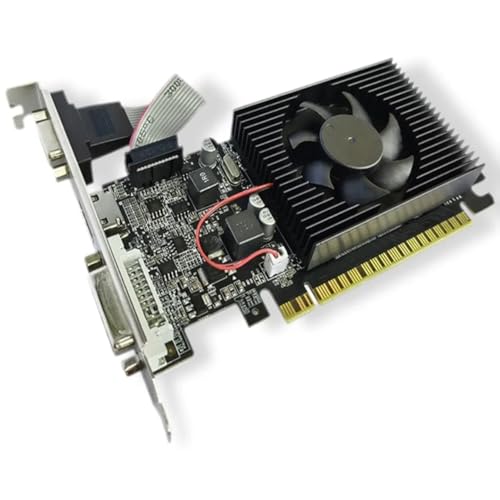
This GT 610 is not AGP; it is PCI Express 2.0. I include it for readers who decide to move off AGP but still need a low-power, low-profile option. It outputs via HDMI, DVI, and VGA, which helps for mixed monitor setups. With 2GB VRAM, it handles desktop tasks and video playback with ease.
It is a mild GPU, but it is quiet and easy to power. Driver support extends well into modern systems, making it a simple office or HTPC upgrade. If your retro build is retired and you step into PCIe, this is a safe, cheap pick. Keep your expectations modest for gaming.
Pros:
- HDMI, DVI, and VGA for flexible displays
- Low-profile design fits small cases
- Very low power draw
- Good driver support for modern OS
- Quiet operation
Cons:
- Not an AGP card; incompatible with AGP slots
- Entry-level 3D performance only
- Older architecture and limited gaming potential
My Recommendation
If you decide to replace your AGP board, this is a practical PCIe placeholder. It is not the best agp graphics card because it is not AGP at all. But it is a simple, quiet solution for video output and light tasks. Consider it when function beats nostalgia.
| Best for | Why |
| Office and HTPC duties | HDMI and low power |
| Small form factor builds | Low-profile bracket support |
| Bridge from AGP to PCIe | Cheap and dependable option |
SOYO GeForce GT 740 4GB Low Profile (PCIe)

This card is also PCIe, not AGP. It offers more headroom than the GT 610 while staying compact and power-friendly. The 4GB DDR3 and 128-bit bus help with light gaming and smooth 1080p video playback. It is a tidy upgrade for slim desktops after you retire AGP.
Expect HDMI, VGA, and DVI for easy monitor pairing. Thermals are mild, and many units avoid external power. It is still an older architecture, but better than basic options for casual gaming. If you step away from AGP, it is a thrifty performer for everyday use.
Pros:
- Better performance than GT 610 tier
- Low-profile for compact cases
- Decent 1080p playback and light games
- Simple power requirements
- Multiple display outputs
Cons:
- Not an AGP card; AGP users cannot install it
- Older GPU; not ideal for modern 3D games
- DDR3 memory limits bandwidth versus GDDR5 variants
My Recommendation
When you leave AGP behind, this card is a better PCIe value pick. It is not the best agp graphics card by definition, yet it is a balanced choice for light use. It hits a sweet spot of low power, low noise, and usable speed. Keep it in mind when rebuilding around PCIe.
| Best for | Why |
| Budget PCIe upgrades | Stronger than entry-level parts |
| Compact desktops | Low-profile with simple cooling |
| 1080p video playback | Stable drivers and HDMI output |
NVIDIA GeForce2 MX400 64MB AGP

The GeForce2 MX400 is a well-loved AGP card for Windows 98 and early XP builds. It features hardware T&L and 64MB VRAM, making it a step up from TNT2-era cards. Analog output quality is decent, and the driver base is strong. It pairs nicely with Pentium III and early Athlon systems.
Expect smooth play in Quake III Engine titles and many late 1990s 3D games. The card runs cool and fits older OEM cases without fuss. It is not fast by modern measures, but it is reliable and plentiful. For a solid vintage gaming rig, it is hard to beat.
Pros:
- Hardware T&L helps 3D performance for its era
- Good 64MB capacity for vintage titles
- Stable drivers for 9x/2000/XP
- Low heat and simple installation
- Great match for late 1990s CPUs
Cons:
- Limited DX8/DX9 capability
- Analog-only on many models
- Not suited for late XP-era games
My Recommendation
If you love classic shooters and want a durable card, this is a safe pick. It is not the best agp graphics card for new-looking games, but it shines in its lane. Expect fewer driver headaches and a clean signal to retro displays. It is a go-to for vintage builders on a budget.
| Best for | Why |
| Windows 98 gaming | Hardware T&L and 64MB VRAM |
| Budget retro rebuilds | Common and affordable parts |
| Stable everyday use | Mature drivers and low heat |
NVIDIA Vanta-16 16MB AGP

The NVIDIA Vanta-16 is a stripped-down TNT2-era card aimed at office and basic 3D. With 16MB VRAM, it is best suited to Windows 95/98 desktops and very early 3D games. It runs cool, sips power, and works well in tight OEM towers. If you need stability over speed, it delivers.
Expect smooth 2D, basic OpenGL, and simple Direct3D. Driver packages for Windows 9x and 2000 are still accessible in archives. It is not a gaming card by today’s standards, but it is fine for retro productivity and classic titles. It is a gentle reboot for very old machines.
Pros:
- Ultra-low power draw for old PSUs
- Cool and quiet operation
- Stable 2D and basic 3D support
- Fits legacy AGP slots with ease
- Great for budget 9x desktops
Cons:
- Very limited 3D performance
- Only 16MB VRAM
- Analog-only output typical
My Recommendation
I recommend the Vanta-16 only for very old builds that need a steady video card. It is not the best agp graphics card for gaming. But it will make a 9x office machine or a simple DOS/Windows hybrid work smoothly. Consider it for stability, not play.
| Best for | Why |
| Windows 95/98 desktops | Reliable 2D with low power |
| Office and legacy apps | Stable drivers and output |
| Very old OEM PCs | Fits and runs cool in tight cases |
Jetway ATI Radeon M-7000 64MB AGP

The Radeon M-7000 is based on the Radeon 7000 series, known for clean 2D and solid TV-Out. With 64MB VRAM and AGP support, it is great for media boxes and dual-display era builds. It focuses on stability and output quality over raw 3D speed. If your priority is TV capture or S-Video output, it stands out.
It runs cool and fits many older OEM systems. Driver packages remain available for Windows 98/2000/XP. The 3D pipeline is dated and lacks the muscle of later cards. But for video output and classic desktop use, it is a fine choice.
Pros:
- Good 2D image quality at common resolutions
- TV-Out options for retro media setups
- Low power and simple cooling
- Stable driver support for 9x/2000/XP
- Works in many legacy AGP boards
Cons:
- Weak 3D performance for late-era games
- Older architecture with dated features
- Analog outputs limit modern monitor options
My Recommendation
Pick the M-7000 for media and dual-display vintage builds. It is not the best agp graphics card for gaming, yet it is excellent for TV-Out and clean 2D output. It is a steady, quiet option for living room retro rigs. Ideal when video output flexibility matters most.
| Best for | Why |
| Retro media PCs | TV-Out and stable playback |
| Dual-display vintage setups | Reliable multi-output support |
| Quiet desktops | Low heat and passive cooling |
Gateway GeForce2 MX200 AGP

The GeForce2 MX200 is a common OEM pull with AGP support and low power draw. It usually features 32MB or 64MB VRAM and a 64-bit memory bus. That makes it a notch below the MX400 in speed, but still fine for classics. It is a stable, period-correct pick for Gateway restorations.
Expect reliable drivers for Windows 9x/2000/XP and decent analog output. It pairs well with Pentium III and early Pentium 4 systems. If you find a clean, working unit, it is a no-fuss drop-in. It is best suited for light retro gaming and general desktop use.
Pros:
- Low power and cool operation
- Stable legacy driver support
- Good fit for OEM restorations
- Decent performance for late-1990s games
- Easy to install in older cases
Cons:
- Slower than MX400 due to narrower memory bus
- Analog-only output in most cases
- Limited for DX8/9-era titles
My Recommendation
Choose the MX200 for authenticity in OEM retro builds. It will not be the best agp graphics card for performance, but it is consistent and dependable. It is ideal when you want the machine to feel as it did new. A clean, working OEM card is sometimes worth more than speed.
| Best for | Why |
| Gateway/Dell retro restorations | OEM-correct look and feel |
| Light Windows 98 gaming | Handles classics well |
| Quiet operation | Cool, low-power design |
Best Practices: Matching an AGP Card to Your System
I want you to get the best agp graphics card for your exact build. Check your motherboard’s AGP version and signaling voltage. Older boards may only accept 3.3V (AGP 2X), while newer ones use 1.5V (AGP 4X/8X). Many universal cards fit both, but not all do, so confirm the key notch and manual notes.
Plan your power. The GeForce 7800 GS needs a strong PSU and a 6-pin connector. Mid and low-end cards often need no extra power. Clean dust filters and confirm case airflow to keep thermals in check.
Match your drivers. For Windows 98 and 2000, archived packages from chip vendors help. For XP, official final driver branches remain easy to find. For Windows 7-era installs on AGP, community guidance can help you find workable versions.
Set realistic goals. For fast DX9 gaming, the 7800 GS is the best agp graphics card. For simple 2D and classic games, MX400 or MX200 make more sense. For media output or dual screens, the Radeon M-7000 works well.
FAQs Of best agp graphics card
What is the fastest AGP card I can still buy?
The GeForce 7800 GS is often the fastest AGP card you can still find. It handles many DX9 games well on a strong XP system.
Will an AGP card work on Windows 10 or 11?
Usually no. AGP drivers are not maintained for modern OS. Use Windows XP or earlier for best results.
How much power do I need for a 7800 GS?
Plan for a quality 350–450W PSU with a 6-pin PCIe power lead. Stable rails matter more than peak wattage.
Is more VRAM always better on AGP?
Not always. GPU speed and memory bandwidth matter more. A fast 256MB card can beat a slow 512MB card.
How do I check if my board supports 1.5V or 3.3V AGP?
Check the manual and the slot keying. Universal AGP slots have two notches. Single-notch slots restrict card types.
Final Verdict: Which Should You Buy?
If you want speed, the GeForce 7800 GS is the best agp graphics card. It lifts XP-era games to smooth settings and feels fast today.
For simpler builds, the MX440 or MX200 are steady and cheap. For TV-Out or media use, the Radeon M-7000 is a quiet fit.