Gaming on Linux has never been easier. Steam’s Proton runs a huge share of Windows games, and distributions like Fedora, Bazzite, Pop!_OS and Linux Mint make setup simple. The graphics card you choose still makes a big difference, mainly because of drivers.
AMD Radeon cards use open-source drivers (AMDGPU in the kernel and Mesa’s RADV for Vulkan) that come built into most distributions, so they usually work with no extra setup. NVIDIA has improved a lot, but still relies on its own driver package. We picked the cards buyers are choosing now: every GPU below showed “bought in past month” sales on Amazon in November 2026 with ratings of 4.4 stars or higher.
Quick answer: The Radeon RX 9070 XT (such as the ASUS Prime OC) is the best GPU for Linux gaming: fast at 1440p and 4K, 16GB of VRAM and open-source drivers that work out of the box on current distributions. The RX 9060 XT 16GB is the best value, and the RX 7600 is the budget 1080p pick.
Our Top 3 Picks for best gpu for linux gaming
🔥 Black Friday Deals Live
ASUS Prime Radeon RX 9070 XT 16GB OC Edition
Fast RDNA 4 card with 16GB; over 1,000 bought last month.
- ✓ Excellent 1440p and 4K performance
- ✓ 16GB VRAM
- ✓ Open-source drivers

XFX Swift Radeon RX 9060 XT OC 16GB
16GB RDNA 4 card for 1080p and 1440p at a much lower price.
- ✓ Great value
- ✓ 16GB VRAM
- ✓ Low power
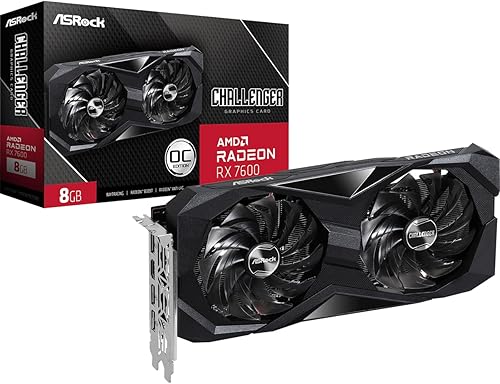
ASRock Radeon RX 7600 Challenger 8GB OC
Mature RDNA 3 drivers and solid 1080p performance.
- ✓ Low price
- ✓ Very mature drivers
- ✓ Compact
As an Amazon Associate, we earn from qualifying purchases. Prices and deals change often, so check Amazon for the latest price.
How we picked these products
- Checked Amazon US in November 2026 and kept only products with strong “bought in past month” sales.
- Compared ratings and review counts, and dropped listings with too little feedback.
- Matched every product to the exact need in this guide, not just the category.
- Read the top-ranking guides for this topic and added the details they miss or get wrong.
We do not hands-on test every product. Our picks are based on specs, sales, verified buyer feedback and manufacturer information. Last updated: November 2026.
Quick Comparison
| Product | Best for | Key specs | Price |
|---|---|---|---|
| ASUS Prime Radeon RX 9070 XT 16GB OC Edition | Best overall GPU for Linux gaming | RDNA 4 · 16GB GDDR6 · 256-bit · open-source AMDGPU/RADV drivers · triple fan | Check price |
| XFX Swift Radeon RX 9070 XT Triple Fan Gaming Edition 16GB | Best alternative RX 9070 XT | RDNA 4 · 16GB GDDR6 · triple fan · dual-slot-plus design | Check price |
| ASRock Radeon RX 9070 XT Challenger 16GB OC | Best compact RX 9070 XT | RDNA 4 · 16GB · shorter Challenger design | Check price |
| XFX Swift Radeon RX 9070 OC 16GB | Best efficient high-end card | RDNA 4 · 16GB · lower power than the XT | Check price |
| XFX Swift Radeon RX 9060 XT OC 16GB | Best value Linux GPU | RDNA 4 · 16GB GDDR6 · triple fan · low power | Check price |
| ASRock Radeon RX 7600 Challenger 8GB OC | Best budget 1080p card | RDNA 3 · 8GB GDDR6 · mature drivers · compact | Check price |
| ASUS Dual GeForce RTX 5060 Ti 16GB OC | Best NVIDIA option for Linux | 16GB GDDR7 · NVIDIA proprietary or open kernel modules · DLSS | Check price |
1. ASUS Prime Radeon RX 9070 XT 16GB OC Edition — Best overall GPU for Linux gaming
The RX 9070 XT is AMD’s fastest mainstream card and an excellent Linux performer. With a current kernel and Mesa, it runs Proton games at high settings in 1440p and handles many titles at 4K. FSR upscaling works well in supported games.
Over 1,000 bought last month with 4.6 stars. Linux users report it works out of the box on up-to-date distributions; older LTS releases may need a newer kernel.
Pros
- Excellent 1440p and 4K performance
- 16GB VRAM
- Open-source drivers
- Quiet triple-fan cooler
Cons
- Needs a recent kernel and Mesa
- High power draw
2. XFX Swift Radeon RX 9070 XT Triple Fan Gaming Edition 16GB — Best alternative RX 9070 XT

XFX’s Swift model is a popular RX 9070 XT with a good cooler. Choose it or the ASUS Prime depending on price and case fit.
About 1,000 bought last month with 4.6 stars.
Pros
- Same fast GPU
- Good cooling
- Popular with Linux gamers
Cons
- Large card
- Price varies a lot
3. ASRock Radeon RX 9070 XT Challenger 16GB OC — Best compact RX 9070 XT

The ASRock Challenger is a more compact RX 9070 XT, which helps in mid-size cases.
About 500 bought last month with 4.7 stars.
Pros
- More compact
- Strong rating
- Simple design
Cons
- Fewer extras than premium models
4. XFX Swift Radeon RX 9070 OC 16GB — Best efficient high-end card

The non-XT RX 9070 is a little slower than the XT but runs cooler and draws less power, which suits smaller cases and quieter builds.
About 100 bought last month with 4.7 stars.
Pros
- Efficient
- 16GB VRAM
- Quieter
Cons
- Slower than the XT
- Price close to the XT at times
5. XFX Swift Radeon RX 9060 XT OC 16GB — Best value Linux GPU
The RX 9060 XT 16GB is ideal for 1080p and entry-level 1440p gaming on Linux. The 16GB version avoids running out of VRAM in newer games.
About 500 bought last month with 4.6 stars.
Pros
- Great value
- 16GB VRAM
- Low power
Cons
- Not for 4K
- Avoid the 8GB version for new games
6. ASRock Radeon RX 7600 Challenger 8GB OC — Best budget 1080p card
The RX 7600 has had years of driver maturity on Linux. It is a reliable choice for 1080p gaming at medium to high settings.
About 200 bought last month with 4.6 stars.
Pros
- Low price
- Very mature drivers
- Compact
Cons
- 8GB VRAM limits new games
- 1080p only
7. ASUS Dual GeForce RTX 5060 Ti 16GB OC — Best NVIDIA option for Linux
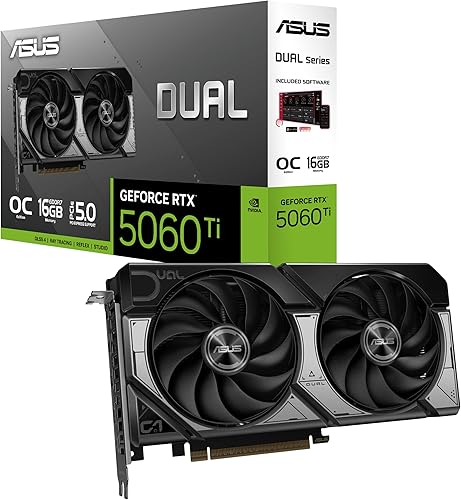
If you need CUDA for work, or want DLSS, an NVIDIA card is still usable on Linux. Install the driver package from your distribution (Pop!_OS and Bazzite include it). Wayland support has improved greatly.
About 500 bought last month with 4.6 stars.
Pros
- CUDA and DLSS
- 16GB VRAM
- Low power
Cons
- Separate driver install
- Occasional issues after kernel updates
How to Choose a GPU for Linux Gaming
Driver support is the most important factor on Linux, followed by VRAM and price.
Why AMD is the default choice
AMD’s drivers are part of the Linux kernel and Mesa, so they update with your system and work out of the box. NVIDIA needs its own driver package, which works well on many distributions but can break after a kernel update.
Kernel and Mesa versions
New cards like the RDNA 4 RX 9070 series need a recent kernel and Mesa. Rolling or fast-moving distributions (Fedora, Arch, Bazzite) support them first; older LTS releases may need an update.
VRAM
Proton games use the same VRAM as on Windows. Choose 16GB for 1440p and newer games; 8GB is fine for 1080p and older titles.
Anti-cheat
Some multiplayer games block Linux through their anti-cheat. Check ProtonDB or Are We Anti-Cheat Yet before buying hardware for a specific game.
Power and case size
RX 9070 XT cards draw a lot of power and are long. Check your power supply and case clearance.
Pick by Resolution
| Target | Recommended card | Notes |
|---|---|---|
| 4K / high-refresh 1440p | Radeon RX 9070 XT | Best overall |
| 1440p, quieter build | Radeon RX 9070 | Lower power |
| 1080p–1440p value | Radeon RX 9060 XT 16GB | Best price per frame |
| 1080p budget | Radeon RX 7600 | Mature drivers |
| Need CUDA or DLSS | RTX 5060 Ti 16GB | Install NVIDIA driver |
Quick Setup Checklist
- Update your distribution to get the latest kernel and Mesa.
- Enable Steam Play (Proton) for all titles in Steam settings.
- Install MangoHud to monitor FPS and temperatures.
- Use GameMode to set performance governors while gaming.
- Check ProtonDB ratings for your favorite games.
Related guides
Frequently Asked Questions
Is AMD or NVIDIA better for Linux gaming?
AMD is easier because its open-source drivers are built into most distributions. NVIDIA works well too, but needs a separate driver install.
Does the RX 9070 XT work on Linux?
Yes, with a recent kernel and Mesa. Up-to-date distributions like Fedora, Arch and Bazzite support it out of the box.
Can I use DLSS on Linux?
Yes. DLSS works through Proton on NVIDIA cards with the proprietary driver. AMD cards use FSR.
Which distro is best for gaming?
Bazzite, Pop!_OS, Fedora, Nobara and Linux Mint are popular. Bazzite and Nobara are tuned for gaming out of the box.
Final Verdict
For most Linux gamers, the Radeon RX 9070 XT gives the best performance with the least hassle. The RX 9060 XT 16GB is the best value, and the RX 7600 is a reliable budget card.
Choose an NVIDIA card like the RTX 5060 Ti 16GB only if you need CUDA or DLSS and are comfortable installing drivers.
As an Amazon Associate, Guide Of Adviser earns from qualifying purchases. Product details and prices can change, so please check Amazon before you buy.