
Running AI models on your own PC, with tools such as Ollama, LM Studio, llama.cpp or ComfyUI, keeps your data private and avoids monthly fees. The single most important spec for this is not raw gaming speed but video memory (VRAM). If a model does not fit in VRAM, it spills into system RAM and slows to a crawl.
We built this list around VRAM, software support and what buyers are actually purchasing. Every card below showed “bought in past month” sales on Amazon in November 2026, with ratings of 4.4 stars or higher. Graphics card prices have been unusually high and changeable this year, so check the current price before you buy.
Quick answer: For most people starting with local AI, a 16GB RTX 5060 Ti (such as the ASUS Dual OC) is the best value: enough VRAM for 7B to 14B models and Stable Diffusion, plus NVIDIA’s CUDA support. If you need more speed, the RTX 5070 Ti is the step up, and a used or renewed 24GB RTX 3090 is still the cheapest route to 24GB of VRAM.
Our Top 3 Picks for best gpu for local ai models
🔥 Black Friday Deals Live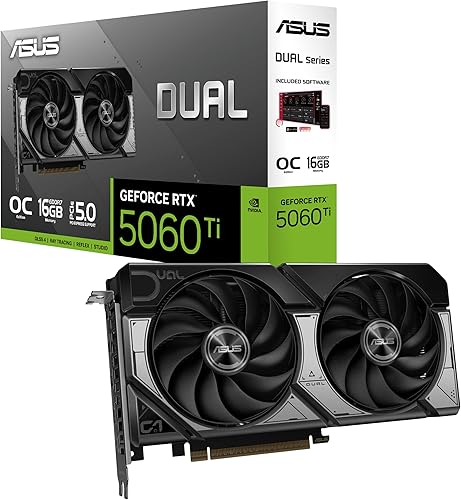
ASUS Dual GeForce RTX 5060 Ti 16GB GDDR7 OC Edition
16GB GDDR7 and CUDA at the lowest price tier; the best-selling card in this search.
- ✓ 16GB VRAM at the lowest tier
- ✓ Full CUDA support
- ✓ Low power, quiet

PNY GeForce RTX 5070 Ti 16GB OC Triple-Fan
Much faster 16GB card for quicker token generation and image renders.
- ✓ Much faster than the 5060 Ti
- ✓ Wide memory bus
- ✓ Strong cooler

EVGA GeForce RTX 3090 FTW3 Ultra 24GB (Renewed)
24GB lets you run larger quantized models that will not fit in 16GB.
- ✓ 24GB VRAM
- ✓ Wide memory bus
- ✓ Full CUDA support
As an Amazon Associate, we earn from qualifying purchases. Prices and deals change often, so check Amazon for the latest price.
How we picked these products
- Checked Amazon US in November 2026 and kept only products with strong “bought in past month” sales.
- Compared ratings and review counts, and dropped listings with too little feedback.
- Matched every product to the exact need in this guide, not just the category.
- Read the top-ranking guides for this topic and added the details they miss or get wrong.
We do not hands-on test every product. Our picks are based on specs, sales, verified buyer feedback and manufacturer information. Last updated: November 2026.
Quick Comparison
| Product | Best for | Key specs | Price |
|---|---|---|---|
| ASUS Dual GeForce RTX 5060 Ti 16GB GDDR7 OC Edition | Best value GPU for local AI | 16GB GDDR7 · 128-bit bus · CUDA and Tensor cores · dual-fan, 2.5-slot | Check price |
| PNY GeForce RTX 5060 Ti 16GB OC Dual-Fan | Best alternative 16GB card | 16GB GDDR7 · dual fan · compact length | Check price |
| PNY GeForce RTX 5070 Ti 16GB OC Triple-Fan | Best performance under the flagship tier | 16GB GDDR7 · 256-bit bus · triple-fan cooler | Check price |
| ASUS TUF Gaming GeForce RTX 5070 Ti 16GB OC | Best premium-built 5070 Ti | 16GB GDDR7 · military-grade components · large triple-fan cooler | Check price |
| ASUS Dual Radeon RX 9060 XT 16GB | Best AMD budget option | 16GB GDDR6 · ROCm/Vulkan support · low power | Check price |
| GIGABYTE Radeon RX 9070 XT Gaming OC 16G | Best AMD performance card | 16GB GDDR6 · 256-bit bus · triple-fan cooler | Check price |
| EVGA GeForce RTX 3090 FTW3 Ultra 24GB (Renewed) | Most VRAM for the money | 24GB GDDR6X · 384-bit bus · CUDA (Amazon Renewed listing) | Check price |
1. ASUS Dual GeForce RTX 5060 Ti 16GB GDDR7 OC Edition — Best value GPU for local AI
The 16GB RTX 5060 Ti is the entry point we recommend for local AI. 16GB comfortably holds 7B and 8B models at good quality and 13B to 14B models with 4-bit quantization, and it runs SDXL image generation well. CUDA support means almost every AI tool works out of the box.
It was the best-selling card in our search, with 500+ bought last month and a 4.6-star rating. Owners like its quiet cooling and low power draw; the narrow memory bus makes it slower than higher-end cards on large models.
Pros
- 16GB VRAM at the lowest tier
- Full CUDA support
- Low power, quiet
- Compact dual-fan design
Cons
- Slower memory bandwidth
- Avoid the 8GB version for AI
2. PNY GeForce RTX 5060 Ti 16GB OC Dual-Fan — Best alternative 16GB card

The PNY version uses the same GPU and 16GB of memory. Pick whichever 5060 Ti 16GB is cheaper on the day; performance is nearly identical.
About 500 bought last month with 4.5 stars. Buyers report it fits small cases easily.
Pros
- Same 16GB GPU
- Often priced lower
- Short card
Cons
- Basic cooler
- Fans louder under long loads
3. PNY GeForce RTX 5070 Ti 16GB OC Triple-Fan — Best performance under the flagship tier
The RTX 5070 Ti keeps 16GB but doubles the memory bus width, which makes a large difference in tokens per second and image generation speed. It is the card to choose if you use AI daily and want faster results.
About 200 bought last month with 4.6 stars. Owners praise the speed; the price is much higher than the 5060 Ti.
Pros
- Much faster than the 5060 Ti
- Wide memory bus
- Strong cooler
Cons
- Still 16GB, not 24GB
- Expensive right now
4. ASUS TUF Gaming GeForce RTX 5070 Ti 16GB OC — Best premium-built 5070 Ti

ASUS’s TUF model is a sturdier, cooler-running version of the 5070 Ti. That helps for long AI jobs that keep the GPU at full load for hours.
About 200 bought last month with 4.7 stars.
Pros
- Excellent cooling
- Durable build
- Quiet under load
Cons
- Very large card
- Premium price
5. ASUS Dual Radeon RX 9060 XT 16GB — Best AMD budget option

AMD cards are a reasonable choice if you mainly use llama.cpp, LM Studio or Ollama, which support AMD through ROCm or Vulkan. The RX 9060 XT gives 16GB for less than most NVIDIA options. Some image and training tools are still easiest on NVIDIA.
About 400 bought last month with 4.7 stars.
Pros
- 16GB at a lower price
- Good Linux support
- Efficient
Cons
- Fewer AI tools optimized for AMD
- Slower than the 5070 Ti
6. GIGABYTE Radeon RX 9070 XT Gaming OC 16G — Best AMD performance card
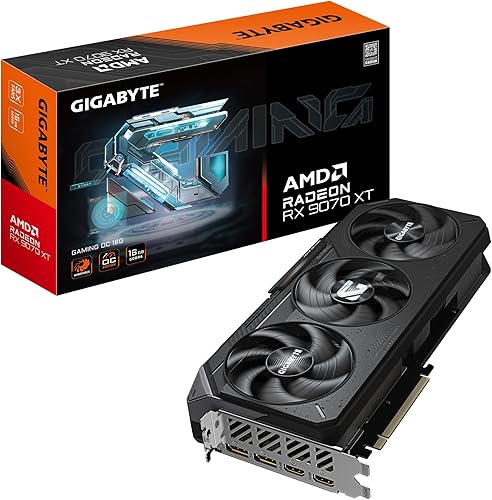
The RX 9070 XT is AMD’s fastest mainstream card and handles local LLMs well with ROCm-supported tools. It is also a strong gaming card if your PC does double duty.
About 300 bought last month with 4.6 stars.
Pros
- Fast with good bandwidth
- Great for gaming too
- 16GB VRAM
Cons
- CUDA-only tools will not run
- High power draw
7. EVGA GeForce RTX 3090 FTW3 Ultra 24GB (Renewed) — Most VRAM for the money
24GB of VRAM opens up larger quantized models (for example 30B-class models at 4-bit) that will not fit in 16GB. A renewed RTX 3090 remains the most affordable way to get 24GB with CUDA, even though it is an older card.
About 50 sold last month as a renewed listing, rated 4.4 stars. Check the renewal warranty, and make sure your power supply can handle its high power draw.
Pros
- 24GB VRAM
- Wide memory bus
- Full CUDA support
Cons
- Older, hotter, power-hungry
- Renewed, not new
How to Choose a GPU for Local AI
Choose by VRAM first, software support second and speed third.
VRAM decides which models you can run
As a rough guide, 8GB handles small 3B to 7B models, 12GB is tight for 7B to 8B at higher quality, 16GB handles 7B to 14B models comfortably, and 24GB opens up 30B-class models with 4-bit quantization. Larger 70B models need 48GB or more, or multiple GPUs.
NVIDIA vs AMD
NVIDIA’s CUDA is supported by almost every AI tool, including PyTorch, ComfyUI and most training scripts. AMD works well with llama.cpp, Ollama and LM Studio through ROCm or Vulkan, especially on Linux, but some tools need extra setup.
Memory bandwidth affects speed
Once a model fits, speed mostly depends on memory bandwidth. This is why a 5070 Ti (256-bit bus) generates text much faster than a 5060 Ti (128-bit bus), even with the same 16GB.
Power and case size
Check your power supply wattage and case length. High-end cards and the RTX 3090 need a strong PSU and good airflow, especially for long AI jobs.
System RAM and storage
Pair your GPU with at least 32GB of system RAM and a fast NVMe SSD. Models are large files and load much faster from NVMe.
What Can Each Card Run?
| VRAM | Example cards | Comfortable model sizes (4-bit) | Image generation |
|---|---|---|---|
| 16GB | RTX 5060 Ti 16GB, RTX 5070 Ti, RX 9060 XT, RX 9070 XT | 7B–14B, some 20B | SDXL and Flux (with optimizations) |
| 24GB | RTX 3090, RTX 4090 | Up to ~30B | Flux and larger image models |
| 32GB | RTX 5090 | Up to ~32B with room for long context | Everything consumer-level |
Model sizes are approximate and depend on quantization and context length.
Starter Software
- Ollama: the easiest way to download and run open models from the command line.
- LM Studio: a desktop app with a chat window and model browser.
- llama.cpp: fast, flexible engine that supports NVIDIA, AMD and Apple GPUs.
- ComfyUI: node-based interface for Stable Diffusion and Flux image models.
Related guides
Frequently Asked Questions
How much VRAM do I need for local LLMs?
16GB is the sweet spot for most users and runs popular 7B to 14B models well. Get 24GB if you want 30B-class models, and 48GB or more for 70B models.
Is the RTX 5060 Ti 8GB good for AI?
It can run small models, but 8GB fills up quickly. For AI work, the 16GB version is a much better buy.
Can AMD GPUs run local AI models?
Yes. Ollama, LM Studio and llama.cpp support recent AMD cards. NVIDIA still has wider support for image generation and training tools.
Is a used RTX 3090 still worth it?
For VRAM per dollar, yes. Buy from a seller with a warranty, such as an Amazon Renewed listing, and make sure your power supply is large enough.
Final Verdict
Start with a 16GB RTX 5060 Ti if you are new to local AI and want the widest software support for the least money. Move up to an RTX 5070 Ti for faster results, or choose a renewed RTX 3090 if 24GB of VRAM matters more than efficiency.
AMD’s RX 9060 XT and RX 9070 XT are good choices for Ollama and LM Studio users, especially on Linux.
As an Amazon Associate, Guide Of Adviser earns from qualifying purchases. Product details and prices can change, so please check Amazon before you buy.