
Financial modeling is a keyboard sport. Analysts and associates navigate with Ctrl and arrow keys, anchor references with F4, edit cells with F2, and fire off Alt-key ribbon sequences hundreds of times a day, often trying never to touch the mouse. A keyboard that gets in the way of those shortcuts costs real time.
The best keyboard for modeling has a full number pad, a standard layout with dedicated Home, End, Page Up and Page Down keys, function keys that work without holding Fn (or a reliable Fn lock), and keys that stay comfortable through long sessions. Every pick below had “bought in past month” sales on Amazon in November 2026 and 4.0 stars or higher.
Quick answer: The Logitech MX Keys S is the best keyboard for financial modeling: full-size layout with a number pad, quiet, precise low-profile keys, an Fn lock for function keys and multi-device switching between work and personal computers. Choose the Logitech MX Mechanical if you prefer the feel of mechanical switches, or the Signature K650 for a comfortable budget option with a palm rest.
Our Top 3 Picks for best keyboard for financial modeling
🔥 Black Friday Deals Live
Logitech MX Keys S Wireless Keyboard
Full-size, quiet low-profile keys, Fn lock, multi-device; 6,000+ bought last month.
- ✓ Full layout with numpad
- ✓ Fn lock for F2/F4
- ✓ Quiet for offices

Logitech MX Mechanical Wireless Illuminated Keyboard (Tactile)
Tactile low-profile mechanical switches with the same full-size layout.
- ✓ Satisfying mechanical feel
- ✓ Full-size layout
- ✓ Low profile for comfort

Logitech Signature K650 Comfort Full-Size Wireless Keyboard
Comfortable full-size board with an integrated palm rest at a low price.
- ✓ Integrated palm rest
- ✓ Quiet typing
- ✓ Low price
As an Amazon Associate, we earn from qualifying purchases. Prices and deals change often, so check Amazon for the latest price.
How we picked these products
- Checked Amazon US in November 2026 and kept only products with strong “bought in past month” sales.
- Compared ratings and review counts, and dropped listings with too little feedback.
- Matched every product to the exact need in this guide, not just the category.
- Read the top-ranking guides for this topic and added the details they miss or get wrong.
We do not hands-on test every product. Our picks are based on specs, sales, verified buyer feedback and manufacturer information. Last updated: November 2026.
Quick Comparison
| Product | Best for | Key specs | Price |
|---|---|---|---|
| Logitech MX Keys S Wireless Keyboard | Best overall keyboard for financial modeling | Full-size with number pad · low-profile scissor keys · smart backlighting · Fn lock (Fn + Esc) · Bluetooth/receiver · up to 3 devices · USB-C | Check price |
| Logitech MX Mechanical Wireless Illuminated Keyboard (Tactile) | Best mechanical keyboard for modeling | Full-size · low-profile tactile mechanical switches · backlit · multi-device · USB-C | Check price |
| Logitech Signature K650 Comfort Full-Size Wireless Keyboard | Best value with palm rest | Full-size · integrated palm rest · quiet keys · Bluetooth or receiver | Check price |
| Keychron B6 Pro Ultra-Slim Full-Size Wireless Keyboard | Best slim multi-OS option | Full-size ultra-slim · Windows and Mac layouts · multi-device · long battery | Check price |
| Logitech G413 SE Full-Size Mechanical Keyboard | Best wired mechanical | Full-size · tactile mechanical switches · aluminum top · wired USB | Check price |
| AULA F108 PRO Wireless Mechanical Keyboard with Knob | Best for customization | Full-size · hot-swappable mechanical switches · volume knob · tri-mode wireless | Check price |
| Logitech K270 Full-Size Wireless Keyboard | Best budget pick | Full-size · number pad · USB receiver · long battery life | Check price |
1. Logitech MX Keys S Wireless Keyboard — Best overall keyboard for financial modeling
The MX Keys S has become a standard in finance offices. The full layout keeps Home, End, Page Up and Page Down where Excel users expect them, the number pad speeds up data entry, and Fn lock lets you use F2 and F4 without holding Fn. Keys are quiet enough for open-plan offices.
More than 6,000 bought last month with 4.4 stars. Owners praise typing feel and battery life; the backlight shortens battery life if left on.
Pros
- Full layout with numpad
- Fn lock for F2/F4
- Quiet for offices
- Switches between 3 devices
Cons
- Low-profile keys feel shallow to some
- Backlight drains battery
2. Logitech MX Mechanical Wireless Illuminated Keyboard (Tactile) — Best mechanical keyboard for modeling
If you prefer the clear feedback of mechanical switches, the MX Mechanical offers it in a low, office-friendly design with a full number pad and the same multi-device convenience as the MX Keys.
More than 1,000 bought last month with 4.2 stars. Choose tactile switches for the office; the clicky version is loud.
Pros
- Satisfying mechanical feel
- Full-size layout
- Low profile for comfort
Cons
- Louder than MX Keys S
- Pricier
3. Logitech Signature K650 Comfort Full-Size Wireless Keyboard — Best value with palm rest
The K650 has a full layout and a built-in palm rest that keeps wrists relaxed during long modeling sessions, for much less than the MX line.
More than 2,000 bought last month with 4.3 stars.
Pros
- Integrated palm rest
- Quiet typing
- Low price
Cons
- Takes up more desk space
- No backlight
4. Keychron B6 Pro Ultra-Slim Full-Size Wireless Keyboard — Best slim multi-OS option

A thin, full-size keyboard that switches between Windows and Mac layouts, useful for analysts who use a Mac at home and Windows at work.
About 400 bought last month with 4.0 stars.
Pros
- Very slim
- Mac and Windows layouts
- Long battery life
Cons
- Shallow key travel
- Lower rating than Logitech
5. Logitech G413 SE Full-Size Mechanical Keyboard — Best wired mechanical
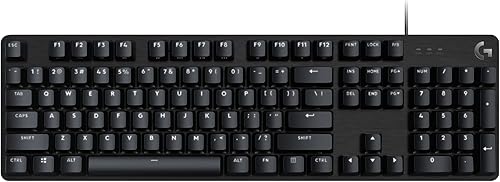
A sturdy wired mechanical board with no batteries to charge and no wireless lag. Gaming roots mean it registers fast key combinations reliably.
More than 1,000 bought last month with 4.5 stars.
Pros
- No batteries
- Durable aluminum top
- Reliable key rollover
Cons
- Wired only
- Taller keys, may need a wrist rest
6. AULA F108 PRO Wireless Mechanical Keyboard with Knob — Best for customization

For those who like to tinker, the F108 Pro offers hot-swappable switches, a knob and three connection modes at a mid-range price.
About 500 bought last month with 4.5 stars.
Pros
- Customizable switches
- Wireless and wired
- Good value
Cons
- Tall profile
- Gaming styling
7. Logitech K270 Full-Size Wireless Keyboard — Best budget pick

A no-frills, full-size wireless keyboard that covers all the keys you need for Excel at a very low price. A good spare or home-office board.
More than 7,000 bought last month with over 10,000 reviews.
Pros
- Very cheap
- Full layout
- Long battery life
Cons
- Basic typing feel
- Receiver only, no Bluetooth
How to Choose a Keyboard for Financial Modeling
For modeling, layout and function-key behavior matter more than RGB lighting or gaming features.
Full-size layout
A number pad and dedicated Home, End, Page Up, Page Down, Insert and Delete keys are essential for modeling. Compact 75% and 65% boards hide these behind Fn combinations.
Function keys and Fn lock
F2 (edit), F4 (anchor), F5 (go to) and F9 (calculate) are used constantly. Choose a keyboard where function keys work directly or with a reliable Fn lock.
Key feel
Low-profile scissor keys are quiet and fast; mechanical switches give stronger feedback. Both work well; pick based on preference and office noise.
Comfort
Long sessions demand comfort. A palm rest, low-profile keys and a neutral wrist position reduce fatigue.
Multi-device
Many analysts work on a laptop and a desktop. Multi-device switching saves buying two keyboards.
Keys Financial Modelers Use Most
| Shortcut | What it does | Why layout matters |
|---|---|---|
| F2 | Edit active cell | Needs direct function keys or Fn lock |
| F4 | Toggle absolute/relative references | Used constantly while building formulas |
| Ctrl + Arrow | Jump to edge of data | Dedicated arrow keys |
| Ctrl + Page Up/Down | Switch worksheets | Dedicated Page keys |
| Alt sequences | Ribbon commands without the mouse | Comfortable Alt key placement |
| Number pad | Fast data entry | Full-size keyboard |
Set Up Your Keyboard for Modeling
- Turn on Fn lock so F-keys work directly.
- Disable Caps Lock in software if you hit it by accident.
- Program spare keys for Paste Special or Format Cells if your keyboard allows.
- Pair with a mouse that has a horizontal scroll wheel for wide models.
Related guides
Frequently Asked Questions
Do I need a number pad for financial modeling?
Yes, for most people. It speeds up data entry and keeps the full layout of navigation keys that Excel shortcuts rely on.
Is a mechanical keyboard better for Excel?
Not necessarily. Mechanical switches give feedback some people like, but quiet low-profile keyboards like the MX Keys S are just as fast and better for shared offices.
How do I use F4 without pressing Fn?
Use the keyboard’s Fn lock (on Logitech MX keyboards, press Fn + Esc) or set function keys as default in the manufacturer’s software.
What is the difference between this and a general Excel keyboard?
Financial modeling leans even harder on keyboard-only navigation and function keys, so layout and Fn behavior matter more than extras.
Final Verdict
The Logitech MX Keys S is the best keyboard for most financial modelers. Choose the MX Mechanical for a mechanical feel, the Signature K650 for comfort on a budget, and the Logitech K270 for a cheap full-size spare.
As an Amazon Associate, Guide Of Adviser earns from qualifying purchases. Product details and prices can change, so please check Amazon before you buy.