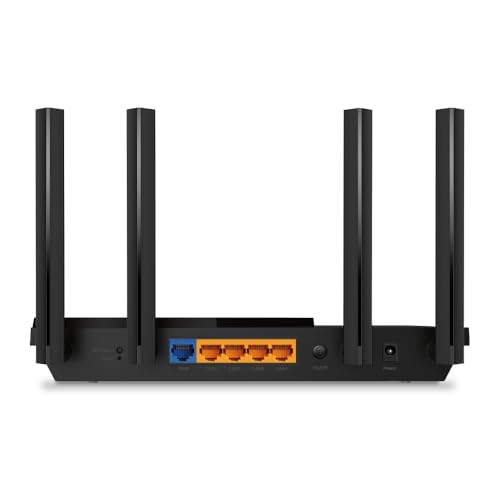
For bufferbloat, GL.iNet Flint 2 with CAKE SQM is my top pick.
Picture this. You click to join a video call, your kid starts a download, and your game pings jump from 25 ms to 300 ms. That sudden lag spike is not slow internet speed—it’s bufferbloat. The right router fixes it by shaping traffic so queues don’t choke your connection. In this guide, I share the best router for bufferbloat for different budgets and homes. I also explain what matters—like SQM, CAKE, QoS, and 2.5G ports—so you can pick fast, stable networking that keeps your calls crisp and your games smooth.
TP-Link Archer AX21 WiFi 6 Router

The TP-Link Archer AX21 is a budget WiFi 6 router that handles everyday loads well. It supports AX1800 speeds with OFDMA and MU-MIMO to help many devices share the air. Setup is simple with the Tether app, and it plays nice with voice assistants. For a small apartment or starter home, it offers a strong baseline and good coverage for the price.
For bufferbloat, the Archer AX21 brings simple QoS and traffic prioritization. It does not include advanced Smart Queue Management like CAKE out of the box. Still, with careful QoS rules, you can tame mild lag spikes during uploads and backups. If you want the best router for bufferbloat on a tight budget, this is a sensible entry step.
Pros:
- Affordable entry into WiFi 6 with stable performance
- Easy app setup and clean interface
- OFDMA and MU-MIMO help with busy homes
- Decent QoS to prioritize calls or gaming
- Supports TP-Link EasyMesh for expansion later
Cons:
- No built-in CAKE or advanced SQM features
- 1 Gbps ports only; no 2.5G for multi-gig ISPs
- Basic QoS needs manual tuning to curb bufferbloat
My Recommendation
If you stream, work from home, and need a basic fix for peak-time lag, the AX21 fits. It is not the best router for bufferbloat in raw tech, but it can reduce spikes with simple QoS. If you later upgrade to faster fiber or want stronger SQM, you can move it to mesh duty.
| Best for | Why |
|---|---|
| Budget households | Low cost, stable WiFi 6, simple QoS tools |
| Small apartments | Good coverage for small spaces and 15–20 devices |
| First bufferbloat fix | Basic traffic priority can tame mild latency |
GL.iNet Flint 2 (GL-MT6000) WiFi 6 Router

The GL.iNet Flint 2 is a powerhouse for people who care about latency. It runs a modern, optimized OpenWrt-based firmware with a fast quad-core processor. It includes two 2.5G Ethernet ports, making it a great match for fiber plans. The interface gives power users deep control while keeping common tasks simple.
For bufferbloat control, this is where it shines. You get Smart Queue Management with CAKE, which is the gold standard for keeping ping stable under load. It handles heavy uploads, cloud backups, and video calls without breaking a sweat. If you want the best router for bufferbloat today, this is an easy top choice.
Pros:
- Built-in SQM with CAKE for elite bufferbloat control
- 2 x 2.5G ports for multi-gig WAN/LAN
- OpenWrt-based firmware with frequent updates
- Excellent VPN speeds for WireGuard and OpenVPN
- Handles many devices with low latency and strong range
Cons:
- Interface can feel advanced for beginners
- Costs more than entry WiFi 6 routers
- Not a tri-band; backhaul planning needed if used in mesh
My Recommendation
If you work from home, game, or upload often, pick the Flint 2. Its CAKE SQM is why I call it the best router for bufferbloat for most people in 2026. It keeps latency flat even when the whole family hammers the connection.
| Best for | Why |
|---|---|
| Serious bufferbloat fixes | CAKE SQM delivers rock-steady ping under load |
| Fiber and multi-gig users | 2.5G WAN/LAN with strong CPU for high throughput |
| Privacy and VPN users | Fast WireGuard, flexible OpenWrt features |
NETGEAR R6700AX WiFi 6 Router

The NETGEAR R6700AX is a clean, compact AX1800 router for up to 1,500 sq. ft. It covers around 20 devices with WiFi 6 features like OFDMA and beamforming. The Nighthawk app is simple and fast to use. If you want a set-and-forget router for a small home, it fits the bill.
On bufferbloat, it offers basic traffic priority but not CAKE or advanced SQM. You can still improve latency by capping upload speed and prioritizing gaming or calls. It is not the best router for bufferbloat, but it balances cost and reliability. For light gaming and streaming, it is a steady choice.
Pros:
- Simple app setup and management
- Solid WiFi 6 for small to mid homes
- Basic QoS to improve call and game stability
- Good value for the feature set
- Compact design fits tight spaces
Cons:
- No advanced SQM like CAKE
- 1 Gbps ports only
- Limited control for power users
My Recommendation
If you want a simple, stable router and mild help with lag, the R6700AX works. It is not the best router for bufferbloat, but it makes daily use smooth with basic QoS. It suits small households that do not push their uplink hard.
| Best for | Why |
|---|---|
| Small homes | Right-sized coverage and easy controls |
| Basic latency tuning | Simple QoS to prioritize key devices |
| First Nighthawk | Good entry to the Nighthawk ecosystem |
NETGEAR Nighthawk RS90 WiFi 7 Router

The RS90 brings WiFi 7 features like 320 MHz channels, 4K QAM, and multi-link. It is a dual-band design tuned for low-latency traffic. With a 2.5G internet port, it is ready for faster fiber. The hardware is strong, the app is polished, and it handles many devices with ease.
For bufferbloat, WiFi 7’s multi-link helps keep latency steady over wireless. However, WAN-side queue control still relies on QoS and traffic priority. There is no built-in CAKE SQM. It is not the best router for bufferbloat by itself, but it keeps wireless latency low and feels snappy, even with busy airspace.
Pros:
- WiFi 7 speed with multi-link for low-latency WiFi
- 2.5G internet port for high-speed plans
- Strong app and easy setup
- Handles many devices without bogging down
- Great for next-gen phones and laptops
Cons:
- No CAKE or advanced SQM for WAN bufferbloat
- Dual-band may need careful channel planning
- Premium price for early WiFi 7 adoption
My Recommendation
If you want next-gen wireless speed and smooth WiFi latency, the RS90 is a thrill. It is not the best router for bufferbloat control on the WAN, but it reduces WiFi queuing and feels fast under load. Add good QoS rules for uploads, and your pings will stay near target.
| Best for | Why |
|---|---|
| Early WiFi 7 adopters | Multi-link and 320 MHz unlock peak speeds |
| Multi-device homes | Strong concurrency and stable wireless latency |
| 1–2 Gbps fiber users | 2.5G WAN keeps full speed to the router |
NETGEAR Nighthawk RS140 WiFi 7 Router

The RS140 pushes WiFi 7 performance further with more total bandwidth and better device capacity. It remains a dual-band design but focuses on clean throughput and lower latency. The 2.5G internet port supports faster ISP plans, and the Nighthawk app helps you optimize traffic quickly. It is built for people with many modern WiFi 7 devices.
Against bufferbloat, it improves wireless behavior thanks to 6 GHz and multi-link. On the WAN, it depends on traffic priority rules rather than CAKE SQM. It is a great router for speed and smooth WiFi, but not the best router for bufferbloat on uploads out of the box. Add upload rate limits and prioritization, and your calls will stay steady.
Pros:
- WiFi 7 with wide channels and strong device capacity
- 2.5G WAN support for multi-gig fiber
- Polished app, fast to deploy and manage
- Low-latency wireless with modern client devices
- Good long-term upgrade path
Cons:
- No CAKE SQM; relies on basic QoS
- Dual-band can limit backhaul if you expand to mesh
- Premium cost vs. WiFi 6 routers
My Recommendation
If you want WiFi 7 speed and a stable feel in busy homes, the RS140 is a smart pick. It is not the best router for bufferbloat on the WAN side, yet it tames WiFi latency and runs clean in the 6 GHz band. It pairs well with a multi-gig plan and modern laptops or phones.
| Best for | Why |
|---|---|
| WiFi 7 households | Great speeds and low-latency wireless |
| 2.5G fiber users | Full-speed WAN with strong CPU |
| Homes with 50–80 devices | Handles high device counts gracefully |
ASUS RT-BE92U WiFi 7 Tri-Band Router

The ASUS RT-BE92U is a tri-band WiFi 7 router designed for speed and flexibility. It supports 320 MHz bandwidth, 4096-QAM, and Multi-Link Operation for steady wireless latency. ASUS’s interface offers Adaptive QoS, advanced VPN, and strong security without a subscription. It also supports AiMesh, so you can link more ASUS routers for wider coverage.
For bufferbloat, Adaptive QoS helps a lot, especially for calls and gaming. Still, it does not include CAKE by default, so WAN queue control is not as surgical as SQM. It is not the best router for bufferbloat in pure WAN shaping, but for a large, busy home, it delivers smooth WiFi sessions with smart traffic control.
Pros:
- WiFi 7 tri-band keeps wireless latency low
- Adaptive QoS with device and app-level priority
- Subscription-free network security
- AiMesh support for clean scale-up
- Good VPN features for remote work
Cons:
- No built-in CAKE SQM for WAN bufferbloat
- Premium pricing for WiFi 7 hardware
- Best features shine with newer WiFi clients
My Recommendation
If your home is big and busy, the RT-BE92U keeps WiFi fast and steady. It is not the best router for bufferbloat for uploads under stress, but Adaptive QoS smooths out daily spikes. If you add rate limits and prioritize calls, it becomes a stellar all-rounder.
| Best for | Why |
|---|---|
| Large homes | Tri-band WiFi 7 and AiMesh support |
| Work-from-home | Adaptive QoS prioritizes calls and meetings |
| Security-focused users | Strong, subscription-free security suite |
TP-Link Archer AX73 WiFi 6 Router

The Archer AX73 is a strong mid-range WiFi 6 router built for speed and reach. With AX5400 class bandwidth, it manages 4K streaming, gaming, and smart homes without strain. The design runs cool, and the Tether app is easy to use. For most families, it is a sweet spot of price and performance.
For bufferbloat, TP-Link’s HomeShield QoS helps prioritize voice, video, and gaming. It does not ship with CAKE, but careful QoS rules can keep ping stable during uploads. It is not the best router for bufferbloat in strict terms, yet it handles busy hours better than entry models. If you want fast WiFi with decent latency control, it delivers.
Pros:
- Fast WiFi 6 with strong range
- HomeShield QoS for priority traffic
- Good thermal design and stability
- Easy setup and parental controls
- Great value for AX5400 performance
Cons:
- No CAKE SQM; manual QoS tuning needed
- 1 Gbps ports limit multi-gig potential
- Advanced tweaks limited vs. OpenWrt-based routers
My Recommendation
If you want a fast, reliable mid-range router with better-than-basic QoS, the AX73 is a winner. It is not the best router for bufferbloat if you saturate uploads daily, but it balances speed and stability very well for family use. Turn on QoS and cap uploads for the smoothest calls.
| Best for | Why |
|---|---|
| Families and streamers | AX5400 horsepower and wide reach |
| Latency-aware households | HomeShield QoS supports call and game priority |
| Value seekers | Strong performance without a premium price |
Bosch PR20EVS Colt Palm Router (Tool)
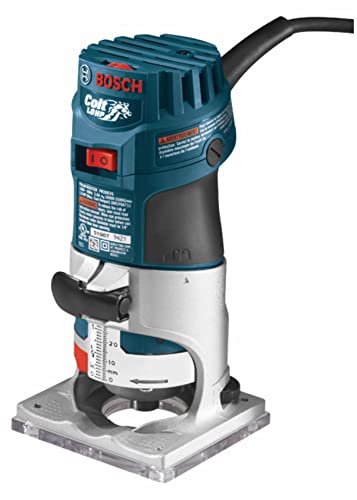
This Bosch Colt is a woodworking palm router, not a WiFi router. It uses a 1.0 HP motor for precise edge work, trimming, and small cuts. The soft-start feature and ergonomic grip make it easy to control. For DIY furniture or crafts, it is a reliable, compact tool.
Because it is a power tool, it does not affect internet latency or bufferbloat. If you are searching for the best router for bufferbloat, this product does not apply. It is excellent for wood projects but unrelated to network performance. Keep this in the shop, not the network cabinet.
Pros:
- Compact and easy to handle
- Soft start reduces kickback
- Consistent speed under load
- Durable build with aluminum base
- Great for edge profiles and trim work
Cons:
- Not a networking device
- Cannot address bufferbloat or WiFi issues
- Single-purpose tool for woodworking only
My Recommendation
If you came here for internet performance, skip this. For woodworking, the Colt is a handy, dependable palm router. It is not the best router for bufferbloat because it is a shop tool, but it is a great pick for clean edges and detail work.
| Best for | Why |
|---|---|
| Woodworking beginners | Easy control and soft-start motor |
| Trim and edge work | Compact size with steady power |
| DIY furniture | Reliable cuts and durable base |
Bosch 1617EVSPK Router Kit (Tool)

The Bosch 1617EVSPK is a pro-grade woodworking router kit with fixed and plunge bases. It runs a 2.25 HP motor for tough cuts and fine control. The variable speed and constant response circuitry keep bits steady. Builders and cabinet makers love its power and precision.
This is not a WiFi router, so it does not solve bufferbloat or ping spikes. If your goal is the best router for bufferbloat, look to network routers on this list. If you need a high-end wood router, though, this kit is a classic pick with long-term value.
Pros:
- Powerful 2.25 HP motor
- Both plunge and fixed bases included
- Excellent control with variable speed
- Durable and serviceable over years
- Great for furniture and cabinetry
Cons:
- Not a networking device
- Heavy for casual users
- Pricier than basic woodworking routers
My Recommendation
Skip this for networking. Choose it if your workshop needs a reliable, strong wood router. It is not the best router for bufferbloat at all, but for making precise grooves, dados, and edges, it is excellent and time-tested.
| Best for | Why |
|---|---|
| Pro woodworkers | High power and dual bases for flexibility |
| Detailed cabinetry | Smooth control and steady speed |
| Long-term workshop use | Durable build with broad accessory support |
NETGEAR Nighthawk XR500 Gaming Router
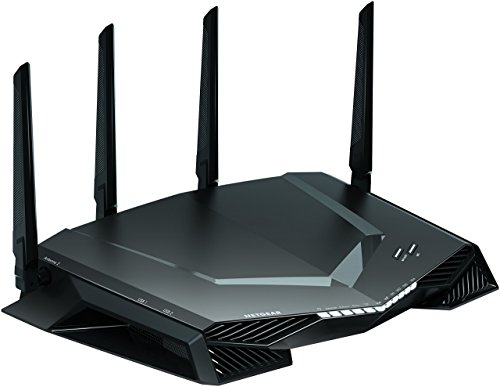
The XR500 is a gaming-focused AC2600 router that runs DumaOS. It is older than WiFi 6 models, but its QoS toolkit is still beloved by gamers. You get geo-filtering, device prioritization, and the famous Anti-Bufferbloat feature. Even with many devices, it keeps game traffic smooth when tuned right.
On bufferbloat, this router is special. Anti-Bufferbloat lets you set how much bandwidth games get during peak times. It is not CAKE, but it is effective and simple. If you want the best router for bufferbloat under budget, the XR500 still deserves a look.
Pros:
- Anti-Bufferbloat QoS is easy and effective
- Geo-filtering helps find closer game servers
- Clear dashboard with live stats
- Strong wired performance with four LAN ports
- Great price on older but capable hardware
Cons:
- WiFi 5 (AC) only; no WiFi 6/7 features
- Age means shorter long-term updates
- No CAKE SQM; relies on DumaOS shaping
My Recommendation
If gaming ping matters more than raw WiFi speed, the XR500 is a sleeper hit. It is not the newest, yet its Anti-Bufferbloat settings make a real difference. It is not the absolute best router for bufferbloat, but it is a smart, low-cost fix for lag under load.
| Best for | Why |
|---|---|
| Budget gamers | Anti-Bufferbloat keeps ping stable |
| Console users | Easy device priority and geo-filtering |
| Small to mid homes | Stable WiFi 5 and strong wired ports |
FAQs Of best router for bufferbloat
What causes bufferbloat at home?
Large queues form in modems and routers when uploads spike. This adds delay and jitter. Video calls, gaming, and voice suffer first.
How do I fix bufferbloat fast?
Turn on QoS. Set an upload cap at 85–95% of your real upstream. Prioritize calls and games. For best results, use SQM with CAKE.
Which features matter most in the best router for bufferbloat?
Smart Queue Management (CAKE or FQ-CoDel), a strong CPU, and at least a 2.5G WAN for fast fiber. Clear QoS controls help too.
Do I need WiFi 7 to reduce bufferbloat?
No. WiFi 7 lowers WiFi latency, but WAN bufferbloat needs SQM or good QoS. A WiFi 6 router with CAKE can beat faster routers without it.
How can I test for bufferbloat?
Run a latency test while uploading or downloading. If ping jumps a lot during the test, you have bufferbloat. Enable QoS or SQM and retest.
Final Verdict: Which Should You Buy?
The GL.iNet Flint 2 is the best router for bufferbloat for most people. Its CAKE SQM, 2.5G ports, and fast CPU keep ping steady under heavy use.
Pick ASUS or NETGEAR WiFi 7 for cutting-edge wireless and stable WiFi latency. Choose XR500 if you want a budget gaming fix with Anti-Bufferbloat tools.