People still search for a “modem for Frontier Fios,” but Frontier Fiber does not use a traditional modem. Frontier says its fiber plans include an Optical Network Terminal (ONT) that works as your modem by converting the fiber signal to Ethernet, plus an eero router for Wi-Fi. That means DSL or cable modems will not work on Frontier Fiber, even though some top-ranking guides still recommend them.
So the real question is which router to use with the ONT. Frontier’s included eero is fine for many homes, but you may want your own router for more coverage, faster wired ports or advanced features. This guide shows the best routers based on current Amazon sales, what Frontier says about using your own equipment, and how to set it up.
Quick answer: Frontier Fiber uses an ONT as the modem, so you do not buy one. To upgrade, connect your own router to the ONT. Best value Wi-Fi 7: TP-Link Archer BE400 (4K+ bought last month). Best for multi-gig plans: TP-Link Archer BE600 with a 10G port. Best mesh: TP-Link Deco 7 Pro. Note: Frontier asks you to use its router for first activation and only supports Frontier equipment.
Our Top 3 Picks for best modem for frontier fios
🔥 Black Friday Deals Live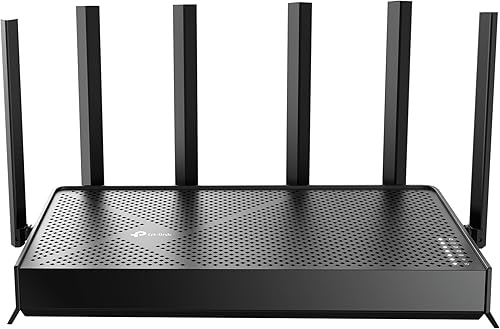
TP-Link Archer BE400 BE6500 Wi-Fi 7 Router
Wi-Fi 7 with 2.5G WAN, 4K+ bought monthly.
- ✓ Wi-Fi 7 at a low price
- ✓ 2.5G WAN
- ✓ Easy app

TP-Link Archer BE600 BE9700 Tri-Band Wi-Fi 7 Router
10G port for the fastest tiers.
- ✓ 10G port
- ✓ Tri-band Wi-Fi 7
- ✓ Good multi-gig value
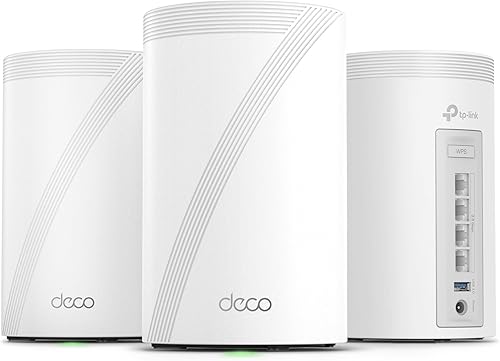
TP-Link Deco 7 Pro BE10000 Wi-Fi 7 Mesh (3-Pack)
3-pack, 10G WAN/LAN, 4K+ bought monthly.
- ✓ Huge coverage
- ✓ 10G WAN/LAN
- ✓ Simple app
As an Amazon Associate, we earn from qualifying purchases. Prices and deals change often, so check Amazon for the latest price.
How we picked these products
- Checked Amazon US in November 2026 and kept only products with strong “bought in past month” sales.
- Compared ratings and review counts, and dropped listings with too little feedback.
- Matched every product to the exact need in this guide, not just the category.
- Read the top-ranking guides for this topic and added the details they miss or get wrong.
We do not hands-on test every product. Our picks are based on specs, sales, verified buyer feedback and manufacturer information. Last updated: November 2026.
Routers for Frontier Fiber Compared
| Product | Best for | WAN port | Price |
|---|---|---|---|
| TP-Link Archer BE400 BE6500 Wi-Fi 7 Router | Best value | 1x 2.5G WAN/LAN + 1x 2.5G LAN | Check price |
| TP-Link Archer BE600 BE9700 Tri-Band Wi-Fi 7 Router | Best for multi-gig plans | 10G port + 2.5G ports | Check price |
| GL.iNet GL-BE9300 Flint 3 Wi-Fi 7 Router | Best for power users | 5x 2.5G ports | Check price |
| TP-Link Deco 7 Pro BE10000 Wi-Fi 7 Mesh (3-Pack) | Best mesh for large homes | 10G WAN/LAN + four 2.5G | Check price |
| TP-Link Archer AX21 AX1800 Wi-Fi 6 Router | Best budget pick | Wi-Fi 6, gigabit WAN | Check price |
1. TP-Link Archer BE400 BE6500 Wi-Fi 7 Router — Best value
The BE400 pairs Wi-Fi 7 with a 2.5G WAN port, which is enough for Frontier Fiber 1 Gig and 2 Gig plans. It covers up to about 2,400 sq ft and up to 90 devices.
It has 1,750+ reviews, a 4.3-star rating and 4K+ purchases last month, and it is an Amazon’s Choice pick.
Pros
- Wi-Fi 7 at a low price
- 2.5G WAN
- Easy app
Cons
- Dual-band only
- Not enough for the fastest tiers
2. TP-Link Archer BE600 BE9700 Tri-Band Wi-Fi 7 Router — Best for multi-gig plans
Frontier’s fastest fiber tiers need more than a 2.5G connection. The BE600’s 10G port removes that bottleneck when your ONT has a multi-gig Ethernet port.
It has 680 reviews, a 4.1-star rating and 1K+ purchases last month.
Pros
- 10G port
- Tri-band Wi-Fi 7
- Good multi-gig value
Cons
- Lower rating
- Single router
3. GL.iNet GL-BE9300 Flint 3 Wi-Fi 7 Router — Best for power users
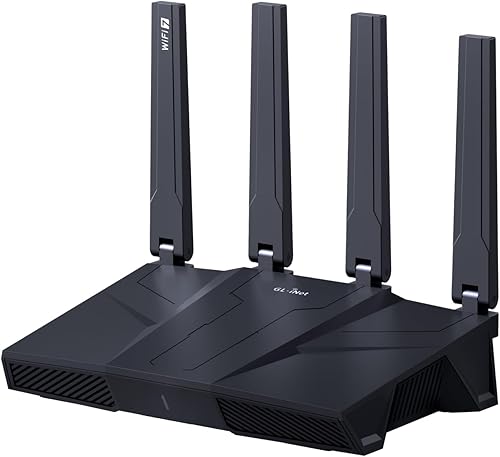
Five 2.5G ports and OpenWrt-based firmware make Flint 3 a favorite for VPNs, ad blocking and detailed network control.
It has 1,180+ reviews, a 4.4-star rating and 1K+ purchases last month.
Pros
- Five 2.5G ports
- Strong VPN tools
- Tri-band Wi-Fi 7
Cons
- Advanced settings
- No 10G port
4. TP-Link Deco 7 Pro BE10000 Wi-Fi 7 Mesh (3-Pack) — Best mesh for large homes
The 3-pack covers up to 7,600 sq ft and supports 200+ devices, with a 10G WAN/LAN port for any Frontier Fiber tier.
It has 1,690+ reviews, a 4.3-star rating and 4K+ purchases last month.
Pros
- Huge coverage
- 10G WAN/LAN
- Simple app
Cons
- Expensive
- Some features are subscription-based
5. TP-Link Archer AX21 AX1800 Wi-Fi 6 Router — Best budget pick

For Frontier Fiber 500 or 1 Gig plans in smaller homes, the AX21 is a reliable budget router.
It has 24,900+ reviews, a 4.4-star rating and 9K+ purchases last month.
Pros
- Very affordable
- Proven reliability
- Easy setup
Cons
- Gigabit WAN only
- No 6 GHz
How to Use Your Own Router with Frontier Fiber
Understand the ONT, activate service first, then connect your own router.
The ONT is your modem
Frontier installs an Optical Network Terminal that converts the fiber signal into Ethernet. Your router plugs into the ONT’s Ethernet port. There is no separate modem to buy.
Activate with Frontier’s router first
Frontier’s help center says the first time you activate service, you must use the Frontier router. Get your service working with the included eero, then switch to your own router.
Connect your own router
Unplug the Frontier router from the ONT, connect your router’s WAN port to the ONT Ethernet port with Cat6 cable, and restart the ONT and your router. Your router should get an internet address automatically.
Know the support trade-off
Frontier only provides technical support for its own equipment, so keep the eero in case you need help from Frontier or a service check.
Older Frontier Fios homes
Some older Fios installs (originally from Verizon) used coax from the ONT to the router. If your ONT has no active Ethernet connection, contact Frontier to enable Ethernet so you can use your own router at full speed.
Choose by plan speed
Gigabit WAN works for 500 Mbps and 1 Gig plans. Choose 2.5G WAN for 2 Gig, and 10G WAN for faster multi-gig tiers.
Frontier Plan vs Router Port
| Frontier Fiber plan | Router WAN port | Picks above |
|---|---|---|
| 500 Mbps / 1 Gig | Gigabit or faster | Archer AX21, Archer BE400 |
| 2 Gig | 2.5G | Archer BE400, Flint 3 |
| Faster multi-gig tiers | 10G | Archer BE600, Deco 7 Pro |
Keep the eero or Replace It?
- Keep it if Wi-Fi reaches every room and you want Frontier support.
- Add mesh if you have dead zones; you can also expand an eero system with more eero units.
- Replace it if you want advanced VPN, gaming or parental control features, or faster multi-gig wired ports.
Troubleshooting
- No internet on your router: restart the ONT, then the router; some setups need a few minutes to release the old connection.
- Speed capped near 1 Gbps: check the ONT port, your router WAN port and your cable rating.
- Frontier support asks for their router: reconnect the eero during troubleshooting.
Related guides
Frequently Asked Questions
Do I need a modem for Frontier Fiber?
No. Frontier’s ONT works as the modem. You only need a router, and Frontier includes one.
Can I use my own router with Frontier?
Yes, connected to the ONT, but Frontier asks you to activate with its router first and only supports its own equipment.
Will a DSL or cable modem work with Frontier Fiber?
No. DSL and cable modems are for different types of internet.
What router does Frontier provide?
Frontier says its fiber plans include an eero router.
Do I need a 10G router?
Only for Frontier’s fastest multi-gig plans; 2.5G is enough for 2 Gig.
What if my ONT only has coax?
Contact Frontier to enable the ONT Ethernet port so your router can connect directly.
Final Verdict
Frontier Fiber already includes the ONT (your modem) and an eero router. If you want an upgrade, the TP-Link Archer BE400 is the best value, the Archer BE600 suits multi-gig plans, and the Deco 7 Pro is best for large homes.
As an Amazon Associate, Guide Of Adviser earns from qualifying purchases. Product details and prices can change, so please check Amazon before you buy.