
Video editing, streaming, 3D rendering and photo work push a PC hard for long periods. Your motherboard decides how well a high-core CPU holds its speed, how many fast SSDs you can install for footage, how quickly you can move files over USB and the network, and how much RAM you can add later. A board that is fine for gaming can become a bottleneck for creators.
We compared AM5 motherboards that are selling well on Amazon right now, from value B650 boards to X870 boards with USB4. Many competing guides list boards without connecting features to creator needs; this guide explains which features matter for editing, streaming and rendering.
Quick answer: Best overall: ASUS TUF Gaming X870-PLUS WiFi (USB4, strong VRM, 300+ bought last month). Best value: GIGABYTE B650 AORUS Elite AX (1,500+ reviews, 500+ bought). Best mid-range B650: ASUS ROG Strix B650-A Gaming WiFi. Best X870 alternative: GIGABYTE X870 AORUS Elite WIFI7. Best newer chipset value: MSI B850 Gaming Plus WiFi. Pair with a Ryzen 9 9950X for heavy creator work.
Our Top 3 Picks for best motherboard for content creation
🔥 Black Friday Deals Live
ASUS TUF Gaming X870-PLUS WiFi (AM5, ATX)
X870 with USB4, 300+ bought last month.
- ✓ USB4 for fast external storage
- ✓ Robust power delivery
- ✓ Wi-Fi 7

GIGABYTE B650 AORUS Elite AX (AM5, ATX)
B650, 1,500+ reviews, 500+ bought.
- ✓ Great value
- ✓ Solid VRM
- ✓ Multiple M.2 slots

ASUS ROG Strix B650-A Gaming WiFi (AM5, ATX)
ROG Strix B650-A, 500+ bought.
- ✓ Highly rated
- ✓ PCIe 5.0 M.2
- ✓ Strong VRM
As an Amazon Associate, we earn from qualifying purchases. Prices and deals change often, so check Amazon for the latest price.
How we picked these products
- Checked Amazon US in November 2026 and kept only products with strong “bought in past month” sales.
- Compared ratings and review counts, and dropped listings with too little feedback.
- Matched every product to the exact need in this guide, not just the category.
- Read the top-ranking guides for this topic and added the details they miss or get wrong.
We do not hands-on test every product. Our picks are based on specs, sales, verified buyer feedback and manufacturer information. Last updated: November 2026.
Content Creation Motherboards Compared
| Product | Best for | Chipset / key feature | Price |
|---|---|---|---|
| ASUS TUF Gaming X870-PLUS WiFi (AM5, ATX) | Best overall | X870, USB4, 16+2+1 power stages | Check price |
| GIGABYTE B650 AORUS Elite AX (AM5, ATX) | Best value | B650, multiple M.2, Wi-Fi | Check price |
| ASUS ROG Strix B650-A Gaming WiFi (AM5, ATX) | Best mid-range B650 | B650, premium layout | Check price |
| GIGABYTE X870 AORUS Elite WIFI7 (AM5, ATX) | Best X870 alternative | X870, USB4, Wi-Fi 7 | Check price |
| MSI B850 Gaming Plus WiFi (AM5, ATX) | Best newer chipset value | B850, Wi-Fi | Check price |
| MSI MAG B650 Tomahawk WiFi (AM5, ATX) | Best for connectivity value | B650, 2.5G LAN, Wi-Fi | Check price |
1. ASUS TUF Gaming X870-PLUS WiFi (AM5, ATX) — Best overall
X870 boards include USB4, which is useful for fast external drives and docks. The TUF X870-PLUS pairs that with a robust VRM for Ryzen 9 CPUs, multiple M.2 slots and Wi-Fi 7.
It has 650+ reviews, a 4.6-star rating and 300+ purchases last month.
Pros
- USB4 for fast external storage
- Robust power delivery
- Wi-Fi 7
Cons
- Costs more than B650
- ATX size only
2. GIGABYTE B650 AORUS Elite AX (AM5, ATX) — Best value
A proven, well-reviewed B650 board with strong VRMs for the price, several M.2 slots and Wi-Fi, a great value base for editing builds.
It has 1,590+ reviews, a 4.4-star rating and 500+ purchases last month.
Pros
- Great value
- Solid VRM
- Multiple M.2 slots
Cons
- No USB4
- Fewer premium extras
3. ASUS ROG Strix B650-A Gaming WiFi (AM5, ATX) — Best mid-range B650
The Strix B650-A is a popular creator-friendly board with good power delivery, PCIe 5.0 M.2 support and easy BIOS tools, in a clean white design.
It has 1,300+ reviews, a 4.6-star rating and 500+ purchases last month.
Pros
- Highly rated
- PCIe 5.0 M.2
- Strong VRM
Cons
- Pricier than basic B650
- No USB4
4. GIGABYTE X870 AORUS Elite WIFI7 (AM5, ATX) — Best X870 alternative
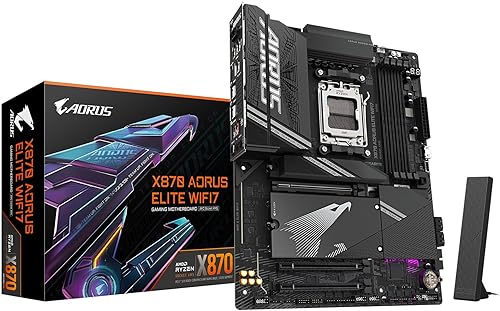
Another strong X870 option with USB4, Wi-Fi 7 and four M.2 slots for large footage libraries.
It has 490+ reviews, a 4.4-star rating and 300+ purchases last month.
Pros
- Four M.2 slots
- USB4
- Wi-Fi 7
Cons
- Slightly lower rating
- Premium price
5. MSI B850 Gaming Plus WiFi (AM5, ATX) — Best newer chipset value

B850 is a newer mid-range chipset. The MSI Gaming Plus WiFi offers modern features at a good price for creators on a budget.
It has 160+ reviews, a 4.6-star rating and 200+ purchases last month.
Pros
- Newer chipset
- Good value
- Highly rated
Cons
- Fewer reviews
- No USB4
6. MSI MAG B650 Tomahawk WiFi (AM5, ATX) — Best for connectivity value
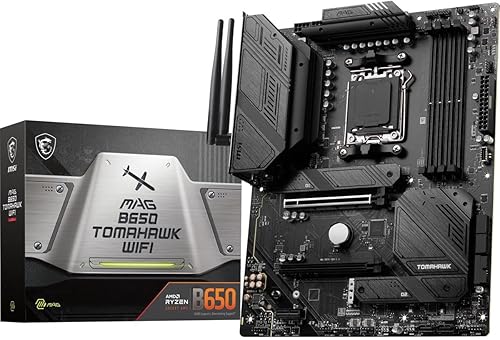
The Tomahawk is known for solid power delivery and plenty of rear I/O, handy for capture cards, audio interfaces and drives.
It has 1,360+ reviews, a 4.4-star rating and 300+ purchases last month.
Pros
- Lots of I/O
- Solid VRM
- Well reviewed
Cons
- No USB4
- Basic aesthetics
How to Choose a Motherboard for Content Creation
Prioritize VRM quality, storage slots, I/O speed and RAM capacity.
VRM quality for long renders
Rendering and encoding run CPUs at full load for minutes or hours. A strong VRM with good heatsinks keeps a Ryzen 9 at high clocks without throttling.
M.2 slots and storage plans
Creators often use separate SSDs for the OS, active projects and cache files. Look for at least three M.2 slots, and PCIe 5.0 support if you want the fastest future drives.
USB4 and fast I/O
USB4 (standard on X870) is useful for fast external SSDs, docks and some capture devices. Plenty of USB 3.2 ports also help with card readers and drives.
Networking
2.5G or faster Ethernet speeds up transfers to a NAS. Wi-Fi 7 is a bonus for laptops-to-desktop transfers but wired is best for big files.
RAM capacity
Four DIMM slots let you reach 64GB to 128GB or more. Editing 4K timelines and heavy After Effects work benefit from 64GB+.
Expansion for capture and audio
If you use a capture card, 10G network card or audio interface, check PCIe slot layout so a large GPU does not block them.
Creator Feature Checklist
| Feature | Why creators need it | Look for |
|---|---|---|
| VRM | Stable clocks in long renders | Robust power stages, large heatsinks |
| M.2 slots | Separate OS, projects, cache | 3-4 slots, PCIe 5.0 support |
| USB4 | Fast external SSDs and docks | X870 / X870E boards |
| Ethernet | NAS transfers | 2.5G or faster |
| RAM slots | 64-128GB for editing | 4 DIMM slots |
Example Build Pairings
| Creator type | CPU | Board |
|---|---|---|
| YouTube editor | Ryzen 7 9700X | MSI B850 Gaming Plus WiFi |
| 4K editor / streamer | Ryzen 9 9950X | ASUS TUF X870-PLUS WiFi |
| 3D artist | Ryzen 9 9950X | GIGABYTE X870 AORUS Elite WIFI7 |
Related guides
Frequently Asked Questions
Is X870 worth it over B650 for creators?
X870 adds USB4 and newer features; B650 offers better value if you do not need USB4.
How many M.2 slots do I need for video editing?
At least three is comfortable: OS, projects and cache.
Does the motherboard affect rendering speed?
Indirectly. Weak VRMs can throttle high-core CPUs during long renders.
How much RAM should a content creation PC have?
32GB minimum; 64GB or more for 4K editing and heavy effects.
Do I need Wi-Fi on a creator board?
It is convenient, but wired Ethernet is better for large file transfers.
Which CPU pairs best with these boards?
A Ryzen 9 9950X or 9950X3D for heavy work; Ryzen 7 9700X for lighter creators.
Final Verdict
The ASUS TUF Gaming X870-PLUS WiFi is the best motherboard for content creation for most AM5 builds, with USB4 and strong power delivery. Choose the GIGABYTE B650 AORUS Elite AX for value, the ROG Strix B650-A for a premium mid-range board, and MSI’s B850 Gaming Plus for a newer chipset on a budget.
As an Amazon Associate, Guide Of Adviser earns from qualifying purchases. Product details and prices can change, so please check Amazon before you buy.