Running Stable Diffusion and similar image models on your own PC is fast, private and free after you buy the hardware. The graphics card is the most important part, and the single most important spec is VRAM (video memory). More VRAM lets you use larger models like SDXL and newer architectures, generate bigger images, and run add-ons like ControlNet and LoRAs without running out of memory.
We ranked the best graphics cards for Stable Diffusion that are selling well on Amazon right now, putting VRAM first, then speed and software support. Many guides recommend cards by gaming performance alone; for AI image generation, a 16GB mid-range card often beats a faster 8GB card.
Quick answer: Best overall: NVIDIA RTX 5060 Ti 16GB (ASUS Dual, 500+ bought last month), the best balance of VRAM and price. Best high-end: RTX 5070 Ti 16GB (ASUS TUF). Best budget: RTX 3060 12GB (GIGABYTE). Avoid 8GB cards if you plan to use SDXL or newer models. NVIDIA cards have the broadest software support via CUDA.
Our Top 3 Picks for best graphics card for stable diffusion
🔥 Black Friday Deals Live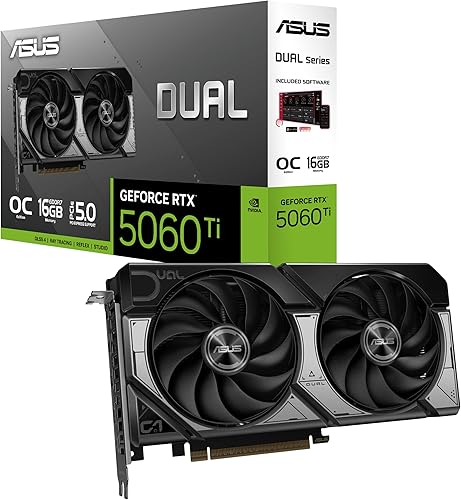
ASUS Dual GeForce RTX 5060 Ti 16GB OC
16GB VRAM, 500+ bought last month.
- ✓ 16GB VRAM
- ✓ Good price per GB
- ✓ Efficient

ASUS TUF Gaming GeForce RTX 5070 Ti 16GB OC
16GB, much faster generation.
- ✓ Fast generation
- ✓ 16GB VRAM
- ✓ Excellent cooling

GIGABYTE GeForce RTX 3060 WINDFORCE OC 12G
12GB VRAM at a low price.
- ✓ 12GB at a low price
- ✓ Wide software support
- ✓ Proven for SD
As an Amazon Associate, we earn from qualifying purchases. Prices and deals change often, so check Amazon for the latest price.
How we picked these products
- Checked Amazon US in November 2026 and kept only products with strong “bought in past month” sales.
- Compared ratings and review counts, and dropped listings with too little feedback.
- Matched every product to the exact need in this guide, not just the category.
- Read the top-ranking guides for this topic and added the details they miss or get wrong.
We do not hands-on test every product. Our picks are based on specs, sales, verified buyer feedback and manufacturer information. Last updated: November 2026.
Graphics Cards for Stable Diffusion Compared
| Product | Best for | VRAM | Price |
|---|---|---|---|
| ASUS Dual GeForce RTX 5060 Ti 16GB OC | Best overall | 16GB GDDR7 | Check price |
| ASUS TUF Gaming GeForce RTX 5070 Ti 16GB OC | Best high-end | 16GB GDDR7 | Check price |
| GIGABYTE GeForce RTX 3060 WINDFORCE OC 12G | Best budget | 12GB GDDR6 | Check price |
| ASUS PRIME GeForce RTX 5070 12GB OC | Fast mid-range | 12GB GDDR7 | Check price |
| ASUS Dual Radeon RX 9060 XT 16GB | AMD alternative | 16GB GDDR6 | Check price |
1. ASUS Dual GeForce RTX 5060 Ti 16GB OC — Best overall
The RTX 5060 Ti 16GB gives you 16GB of VRAM at a mid-range price, enough for SDXL, LoRAs and many newer models. It also supports NVIDIA’s latest software features and is efficient.
It has 450+ reviews, a 4.6-star rating and 500+ purchases last month.
Pros
- 16GB VRAM
- Good price per GB
- Efficient
Cons
- Slower than RTX 5070 Ti
- 128-bit memory bus
2. ASUS TUF Gaming GeForce RTX 5070 Ti 16GB OC — Best high-end
For faster generation and video or batch work, the RTX 5070 Ti keeps 16GB of VRAM with much more compute power, cutting wait times noticeably.
It has 540+ reviews, a 4.7-star rating and 200+ purchases last month.
Pros
- Fast generation
- 16GB VRAM
- Excellent cooling
Cons
- Expensive
- Needs a strong PSU
3. GIGABYTE GeForce RTX 3060 WINDFORCE OC 12G — Best budget
The RTX 3060 12GB has long been the budget favorite for Stable Diffusion because 12GB is more useful than faster 8GB cards for image models.
It has 110+ reviews, a 4.7-star rating and 200+ purchases last month.
Pros
- 12GB at a low price
- Wide software support
- Proven for SD
Cons
- Older and slower
- Limited for the largest models
4. ASUS PRIME GeForce RTX 5070 12GB OC — Fast mid-range
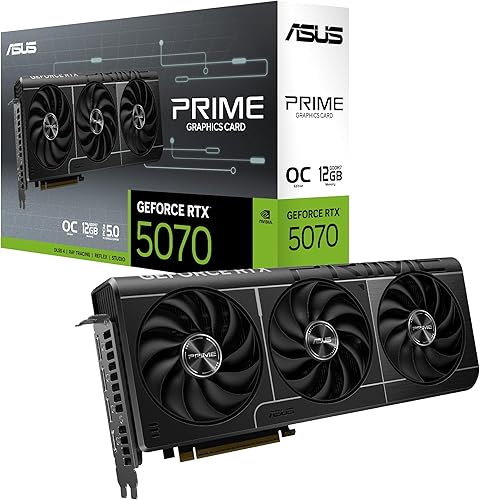
The RTX 5070 is faster than the 5060 Ti but has 12GB of VRAM. Choose it if speed matters more than running the largest models.
It has 340+ reviews, a 4.8-star rating and 200+ purchases last month.
Pros
- Fast
- Highly rated
- Good for gaming too
Cons
- Less VRAM than 5060 Ti 16GB
- Higher price
5. ASUS Dual Radeon RX 9060 XT 16GB — AMD alternative

AMD cards can run Stable Diffusion with supported tools, and the RX 9060 XT offers 16GB of VRAM at a good price. Setup is typically more involved than on NVIDIA.
It has 440+ reviews, a 4.7-star rating and 400+ purchases last month.
Pros
- 16GB VRAM
- Good value
- Great for gaming
Cons
- Less AI software support
- More setup steps
How to Choose a GPU for Stable Diffusion
Buy as much VRAM as you can afford, prefer NVIDIA for easy setup, and make sure your PSU can handle the card.
VRAM is the top priority
As a rough guide, 8GB can run older SD 1.5 models but struggles with SDXL and add-ons. 12GB is workable for SDXL. 16GB gives room for SDXL, ControlNet, LoRAs, upscaling and many newer models.
Why NVIDIA is easier
Most popular tools, guides and extensions are built around NVIDIA CUDA. AMD and Intel cards can work, but often need different install steps or have limited feature support.
Speed vs memory
A faster card makes each image quicker, but running out of VRAM can stop a workflow entirely. If you must choose, more VRAM usually matters more for AI images.
System RAM and storage
Use at least 32GB of system RAM and an NVMe SSD with plenty of space; model files can be several gigabytes each.
Power supply
Check the card’s recommended PSU wattage and connectors. Mid-range cards often need about 550 to 650W; high-end cards more.
Software to start with
Popular free interfaces include ComfyUI and other open-source front ends. Download models only from reputable sources and respect each model’s license.
VRAM Guide for AI Image Generation
| VRAM | What you can do | Example cards |
|---|---|---|
| 8GB | Basic SD 1.5; limited SDXL | Many entry gaming cards |
| 12GB | SDXL with care, some add-ons | RTX 3060 12GB, RTX 5070 |
| 16GB | SDXL, ControlNet, LoRAs, upscaling | RTX 5060 Ti 16GB, RTX 5070 Ti, RX 9060 XT 16GB |
| 24GB+ | Largest models, video and training | High-end cards (premium prices) |
Rough guidance; requirements vary by model, resolution and tool settings.
Quick Setup Checklist
- Install the latest GPU driver.
- Install a Stable Diffusion interface such as ComfyUI.
- Download models from reputable sources and check licenses.
- Start at 1024 x 1024 for SDXL and adjust batch size to fit VRAM.
- Monitor VRAM use and close other GPU-heavy apps.
Related guides
Frequently Asked Questions
How much VRAM do I need for Stable Diffusion?
12GB is workable; 16GB is recommended for SDXL and newer models.
Is the RTX 5060 Ti 16GB good for Stable Diffusion?
Yes. It is one of the best value cards because of its 16GB VRAM.
Can AMD GPUs run Stable Diffusion?
Yes, with supported tools, but setup and compatibility are usually better on NVIDIA.
Is 8GB enough?
For basic SD 1.5 work, sometimes; for SDXL and add-ons, it is limiting.
Is the RTX 3060 12GB still good?
Yes, as a budget option, though newer cards are faster.
Do I need a powerful CPU for Stable Diffusion?
No. The GPU does most of the work; a modern mid-range CPU is fine.
Final Verdict
The RTX 5060 Ti 16GB is the best graphics card for Stable Diffusion for most people because it offers 16GB of VRAM at a mid-range price. Choose the RTX 5070 Ti 16GB for faster generation, and the RTX 3060 12GB if you are on a tight budget.
As an Amazon Associate, Guide Of Adviser earns from qualifying purchases. Product details and prices can change, so please check Amazon before you buy.