
Hand tremor, stiffness and slower fine movements can make a regular mouse frustrating. The pointer jumps when your hand shakes, small buttons are easy to miss, and gripping a flat mouse for long periods can cause pain.
The good news is that the right mouse, combined with a few settings, can make the computer much easier to use. We picked mice that buyers are choosing right now, with “bought in past month” sales on Amazon in November 2026 and ratings of 4.4 stars or higher. Trackballs lead the list because the device stays still on the desk, so a tremor in your arm does not move the pointer.
Quick answer: The Logitech Ergo M575S trackball is the best mouse for most people with Parkinson’s: it never moves on the desk, you control the pointer with your thumb, and it is affordable. The Logitech MX Ergo S is the premium pick thanks to its adjustable tilt and a precision-mode button that slows the pointer on demand.
Our Top 3 Picks for best mouse for parkinson’s disease
🔥 Black Friday Deals Live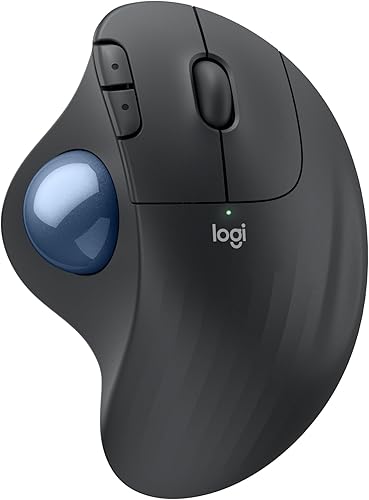
Logitech Ergo M575S Wireless Trackball
Stationary thumb trackball, quiet clicks, over 8,000 bought last month.
- ✓ Does not move on the desk
- ✓ Hand rests, no tight grip
- ✓ Affordable

Logitech MX Ergo S Advanced Wireless Trackball
Precision-mode button and 0–20° tilt for comfort and fine control.
- ✓ Precision mode for small targets
- ✓ Adjustable tilt
- ✓ Rechargeable
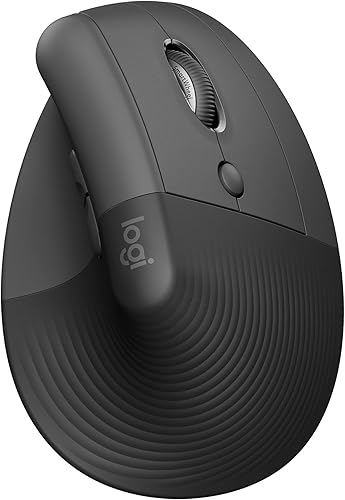
Logitech Lift Vertical Ergonomic Mouse
Handshake grip reduces wrist strain for stiffness and rigidity.
- ✓ Relaxed handshake grip
- ✓ Quiet buttons
- ✓ Comfortable for long use
As an Amazon Associate, we earn from qualifying purchases. Prices and deals change often, so check Amazon for the latest price.
How we picked these products
- Checked Amazon US in November 2026 and kept only products with strong “bought in past month” sales.
- Compared ratings and review counts, and dropped listings with too little feedback.
- Matched every product to the exact need in this guide, not just the category.
- Read the top-ranking guides for this topic and added the details they miss or get wrong.
We do not hands-on test every product. Our picks are based on specs, sales, verified buyer feedback and manufacturer information. Last updated: November 2026.
Quick Comparison
| Product | Best for | Key features | Price |
|---|---|---|---|
| Logitech Ergo M575S Wireless Trackball | Best overall mouse for Parkinson’s | Thumb-operated trackball · stays in place · Bluetooth or USB receiver · up to 24-month battery | Check price |
| Logitech MX Ergo S Advanced Wireless Trackball | Best premium trackball | Thumb trackball · precision-mode button · 0° or 20° tilt · USB-C rechargeable · quiet clicks | Check price |
| ProtoArc EM02 Wireless Trackball (0°/15° Adjustable) | Best budget trackball | Thumb trackball · 0°/15° tilt · rechargeable · multi-device | Check price |
| Logitech Lift Vertical Ergonomic Mouse | Best vertical mouse for stiffness | 57° vertical angle · small to medium hands · quiet clicks · Bluetooth or receiver | Check price |
| Logitech MX Vertical Wireless Mouse | Best vertical mouse for larger hands | 57° angle · larger size · rechargeable · adjustable pointer speed | Check price |
| Anker 2.4G Wireless Vertical Ergonomic Mouse | Best budget vertical mouse | Vertical design · 3 DPI levels (800/1200/1600) · AAA batteries | Check price |
| Logitech Lift Vertical Ergonomic Mouse, Left-Handed | Best left-handed option | Left-hand 57° vertical design · quiet clicks | Check price |
1. Logitech Ergo M575S Wireless Trackball — Best overall mouse for Parkinson’s
Because the M575S stays still, shaking in your arm or hand does not move the cursor. You roll the ball with your thumb, which needs only small movements, and your hand rests on a sculpted shell instead of gripping. Pointer speed can be lowered in Logitech Options+.
More than 8,000 bought last month with 4.5 stars. Many buyers with tremor or arthritis say it made using the computer much easier; it takes a few days to get used to thumb control.
Pros
- Does not move on the desk
- Hand rests, no tight grip
- Affordable
- Long battery life
Cons
- Thumb control has a learning curve
- Right-handed only
2. Logitech MX Ergo S Advanced Wireless Trackball — Best premium trackball
The MX Ergo S adds two features that help a lot with tremor: a button that switches into a slow, precise pointer mode for small targets, and a magnetic hinge that tilts the mouse 20° to relax the forearm.
About 2,000 bought last month with 4.4 stars. Owners praise comfort for long sessions; it is more expensive than the M575S.
Pros
- Precision mode for small targets
- Adjustable tilt
- Rechargeable
- Premium feel
Cons
- Expensive
- Heavier to carry
3. ProtoArc EM02 Wireless Trackball (0°/15° Adjustable) — Best budget trackball

A lower-cost alternative with an adjustable angle, similar to Logitech’s premium design. Good for trying a trackball without spending much.
About 500 bought last month with 4.4 stars.
Pros
- Low price
- Adjustable angle
- Rechargeable
Cons
- Ball not as smooth as Logitech
- Software is basic
4. Logitech Lift Vertical Ergonomic Mouse — Best vertical mouse for stiffness
For people whose main problem is stiffness or wrist pain rather than tremor, a vertical mouse keeps the hand in a relaxed handshake position. Lift suits small and medium hands and has soft, quiet buttons.
More than 8,000 bought last month with over 14,000 reviews.
Pros
- Relaxed handshake grip
- Quiet buttons
- Comfortable for long use
Cons
- Moves with the hand, so less helpful for strong tremor
5. Logitech MX Vertical Wireless Mouse — Best vertical mouse for larger hands

The MX Vertical is bigger than Lift and fits medium to large hands. A button on top changes pointer speed quickly, which helps when precision is needed.
About 6,000 bought last month with 4.4 stars.
Pros
- Fits larger hands
- Speed button
- Rechargeable
Cons
- Pricier
- Not ideal for strong tremor
6. Anker 2.4G Wireless Vertical Ergonomic Mouse — Best budget vertical mouse

A very low-cost way to try a vertical mouse. Set it to the lowest DPI for slower, steadier movement.
About 5,000 bought last month with over 53,000 reviews.
Pros
- Very cheap
- Simple DPI button
- Huge review base
Cons
- Basic build
- Not for tremor control
7. Logitech Lift Vertical Ergonomic Mouse, Left-Handed — Best left-handed option
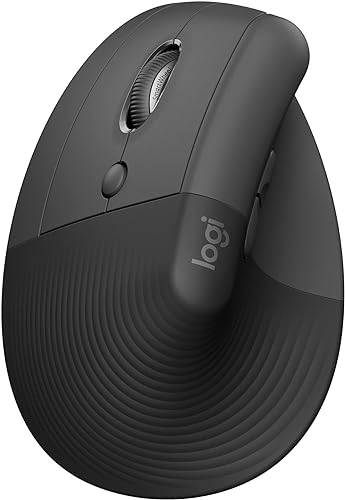
Parkinson’s often affects one side more than the other. If your dominant hand has more tremor, switching to the other hand can help, and this is one of the few quality left-handed ergonomic mice.
About 1,000 bought last month with 4.4 stars.
Pros
- True left-handed design
- Same comfort as Lift
Cons
- Left-hand only
How to Choose a Mouse for Tremor or Stiffness
The goal is to separate pointer movement from arm and hand tremor, and to reduce grip effort.
Trackball vs vertical mouse
A trackball stays still, so tremor in the arm does not move the pointer. A vertical mouse helps with stiffness and wrist pain, but because you move the whole mouse, it does less for tremor.
Lower the pointer speed
Slower pointer speed (lower DPI) makes small tremors move the cursor less. Most Logitech mice let you set this in Logi Options+; Windows and macOS also have pointer speed settings.
Turn off pointer acceleration
In Windows, unchecking “Enhance pointer precision” makes movement more predictable. On a Mac, reduce tracking speed in Settings.
Accessibility features
Windows ClickLock, Mouse Keys, larger pointer sizes and Sticky Keys can all help. macOS has similar options under Accessibility. Some people also use tremor-filtering software.
Get advice
An occupational therapist can suggest the best device and setup for your symptoms.
Which Mouse for Which Symptom?
| Main difficulty | Best type | Our pick |
|---|---|---|
| Hand or arm tremor | Thumb trackball | Logitech Ergo M575S |
| Tremor plus small targets | Trackball with precision mode | Logitech MX Ergo S |
| Wrist stiffness or pain | Vertical mouse | Logitech Lift |
| Larger hands, stiffness | Large vertical mouse | Logitech MX Vertical |
| Dominant hand affected more | Left-handed vertical | Logitech Lift Left |
| Tight budget | Budget trackball | ProtoArc EM02 |
Settings Worth Changing
- Lower pointer speed or DPI.
- Turn off pointer acceleration (“Enhance pointer precision” in Windows).
- Increase pointer size and use a high-contrast cursor.
- Slow down double-click speed.
- Try ClickLock for dragging without holding the button.
This guide is for general information. Talk with your doctor or an occupational therapist about tools that suit your symptoms.
Related guides
Frequently Asked Questions
What type of mouse is best for hand tremors?
A thumb or finger trackball is usually best, because the device stays still on the desk and tremor in the arm does not move the pointer.
Do vertical mice help with Parkinson’s?
They can help with stiffness and wrist discomfort, but they are less helpful for tremor because you still move the whole mouse.
How can I stop accidental clicks?
Use a mouse with firm or quiet buttons, slow down double-click speed in your settings, and consider Windows ClickLock to avoid holding the button while dragging.
Are there alternatives to a mouse?
Some people find a touchscreen, a large trackpad, voice control (Windows Voice Access, Mac Voice Control) or keyboard shortcuts easier.
Final Verdict
For most people with Parkinson’s tremor, start with the Logitech Ergo M575S trackball. Choose the MX Ergo S if you want a precision-mode button and adjustable tilt, or the ProtoArc EM02 to try a trackball on a budget.
If stiffness or wrist pain is the bigger issue, a vertical mouse such as the Logitech Lift is a comfortable alternative. Adjust pointer speed and accessibility settings for the best results.
As an Amazon Associate, Guide Of Adviser earns from qualifying purchases. Product details and prices can change, so please check Amazon before you buy.